PowerPoint presentations can make great videos - if you know how to do it. Luckily, there are plenty of programs both free and for pay that you can use to do this. Learn more about these programs today!
PowerPoint is a great tool for presentations and talks. But, did you know that you can also use PowerPoint for videos as well? But, you may ask how do you go about doing that? Here’s a step-by-step tutorial to help you turn your slideshow presentations into videos.
The first thing that you need to do is create a slideshow presentation . Add pictures and a minimal amount of text. Since you want to convert this into a video, you don’t want it to be text heavy. Don’t worry about recording your audio now since you will be able to do it later.
Video Scout Instructions
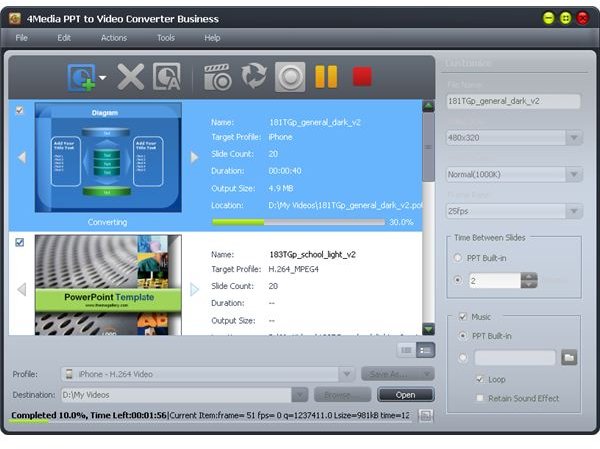
Once your presentation is done, you can now change your video into video format (.WMV, .AVI or .MPG ). You will have to either buy a program or download a free program. For around $100, the 4 Media PPT to Video Converter is an excellent choice.
The free programs can be a little more complicated, but you can easily follow their step-by-step instructions as well. For example, E.M. Free PowerPoint Video Converter and PowerDVD Lite are both really good programs, and they are completely free to use.
While individual steps vary by program, here are some general instructions on how to convert videos.
The first thing that you need to do is download and install your video program. Then open up PowerPoint and your presentation. Go back to your video conversion program, and select “Convert to AVI” in the File menu. Now, follow the below instructions.
· Click Next to go to the next screen.
· Change the output video file name and video format if you need to.
· Click the Next button.
Creating the Video
Now, you can change the settings for your slideshow presentation. You can automate your slideshow so that it changes after a specified period of time. Here, you can change the preset resolution of the slideshow and the frame rate for the output file. Once you’re done with this page, you can click next to go to the Audio Recording page options. If you don’t want record sound, you can uncheck the Sound Recording box. If you want to record sound, you can do it now.
Now, you can click Next to convert the PowerPoint presentation. Click Next again, and this will show the next slide. Once the conversion is done, you’ll see a final page. You can now close the program. You’ll now be able to see your converted PowerPoint presentation.
Tips and Suggestions
Always remember to save your work as you go. Video programs are notorious for crashing, causing you to lose all of your work. Try out a few video editing programs before you decide on one, especially if you plan on purchasing a PowerPoint conversion program. Many of these programs come with free trial downloads. Try converting a few PowerPoint presentations, and see if you like the results.
Look especially for how the track matches up to the video and how fast the text or graphics fly in. When the video editing program converts PowerPoint presentations, it compresses them, which can create some strange effects.
References
MP4 Converter, https://www.mp4converter.net/ppt-to-video-converter.html
eTinySoft, https://www.effectmatrix.com/PowerPoint-Video-Converter/Free-PowerPoint-Video-Converter.htm
Ishan. “Five Free PPT to Video Converters”, https://www.ilovefreesoftware.com/13/featured/free-ppt-to-video-converters.html


