If Your Computer… Especially a Laptop… Shuts Down In an Instant

Article by PapaJohn (5,292 pts ) , published Jun 29, 2009

If your computer has been running fine but suddenly shuts down in an instant, as if somebody turned off the power switch, there’s a good chance that happened. The CPU may have overheated and an automatic thermal switch turned it off.

When a CPU runs at full throttle for a long period… maybe just a few minutes… heat builds up. Rendering a video file is one of the tasks that uses as much CPU power as it can get, so it can finish making the new movie file as quickly as possible. That’s fine if the cooling system for the computer is also able to run at maximum efficiency and is capable of sucking away the heat generated. Luckily, if the heat build-up gets too high, there’s a circuit breaker that instantly shuts down the computer to protect it from damage.

If this happened to you, it's time to learn about the "Affinity" setting

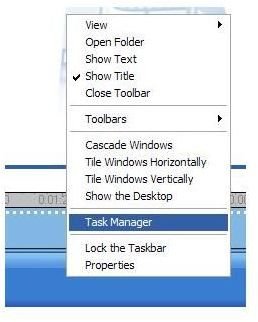
It happens to me often. I first learned about such heat buildup and the CPU affinity setting at Barnes & Noble. Sitting in a big cushy chair, starting a video saving or rendering with Movie Maker, and putting the laptop on the seat so it was nestled as I stand on the mocha line… to return to find the rendering didn’t finish, system shut down, and the seat cushion feeling hot. After a few times I realized the cushy chair reduced whatever air flow the laptop needed to keep it from overheating.  Fig. 1Open your Task Manager [Figure 1]  by right clicking anyplace on the task bar, the long bar with the start button and icons on it, usually at the bottom of your screen. It’s the same on XP and Vista.task manager image 2

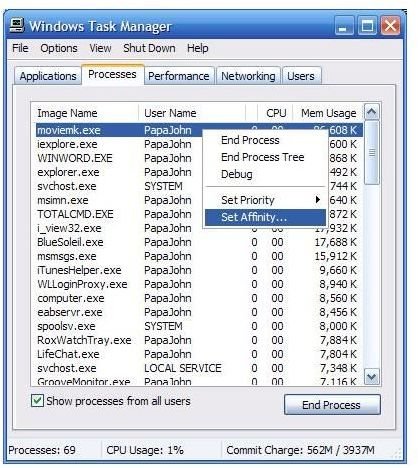
The Affinity setting works on one process at a time. Find the process that is using most of the CPU energy. It could be Movie Maker, the Expression Encoder 2, or another video editing or conversion app that needs lots of CPU cycles to create a new video file [Figure 2]. Right mouse click on the line item and select ‘Set Affinity’. 

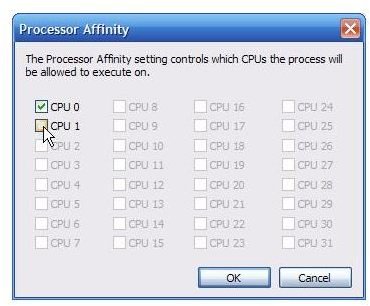
If your system has 2 or more CPU’s, they’ll be listed individually. Processor Affinity Image 3Simply uncheck one and press the OK button to stop the process from using it. You can do it while the rendering is happening.  It’ll result in the computer using only half the computer power and generate half the heat. Don’t worry about making a mistake and unchecking them both, as the system won’t let you.
As dust builds up around the cooling fan, and a computer gets older and tired, the heat generation stays up there but the cooling efficiency goes down. As you become busier with video work and do more renderings, you might find yourself turning off one of the CPU’s on a regular basis. At system startup, the CPU will return to the fully on setting.

If your system is overheating and has only one CPU, it could be time to clean the dust from the fans or aid them by having an external fan blowing on it as it renders a movie.

On a positive note, I find my renderings don’t need much more time to finish when using only one of the CPU’s. A side benefit of using just one of the CPU’s is that the other is available to let me easily do other things as the rendering goes… internet surfing, email, IM, writing articles for Bright Hub, etc.

10 Comments

Oct 25, 2009 12:42 PM
Response to Comments....
Thanks to those who made other suggestions... such as Nilus for the 'priority' setting. And to those saying thanks.

Sorry Amy and others who were looking for more info and didn't get a response... I now get automatic notifications of new posts so things won't be unresponded to for such long periods. Hope you found the help you need at newsgroups, forums or at my website.

Only computers with multiple CPU cores will have the affinity option... it's normal not to have it. For those who ask what else it might be, here's one.

Some video/movie related tasks are not considered by Windows to be activities. For example, if you are saving a Movie Maker project to a movie file (DV-AVI or WMV), and your know it'll take a while so you let it render by itself during dinner, you might come back to find the computer shut down.

The power options (in the Control Panel) tell it when to kick in the screen saver, and then turn off the hard drive. If the drive stops you think the computer is down... I guess it pretty much is.

You can change the settings to stop the computer from turning off due to inactivity... or you can give it something else while it's saving the movie, something it considers as activity. Playing music in Windows Media Player is one it recognizes... dinner music could help your movie rendering finish.
Oct 25, 2009 9:12 AM
Ratheesh Kn
RE: If Your Computer… Especially a Laptop… Shuts Down In an Instant
Can any one suggest me why my lap is automatically shutting down. Its a Acer Aspire 4730z.
Aug 25, 2009 7:31 PM
Amy
Problem with windows movie maker
Excuse me but I have a problem with windows movie maker that is not meantioned above can you help me?.

You see the problem is my laptop did go off but now I can`t get back on to windows movie maker it comes up with....

"another user is running windows movie maker on this computer. Please close the other session of windows movie maker before starting again".

Please help me im only 14!.
Aug 13, 2009 6:59 PM
Greg
Thanks!
My PC processed video files just fine when I bought it 2 years ago, but recently I have been having the problem you describe....the affinity trick (though it flies in the face of logic a tad!) worked a treat, and as you say there is no appreciable delay in the work being completed....you have my thanks.
Aug 13, 2009 1:01 PM
Nilus
Priority
You will only get the affinity option if you have more than one cpu-core. I fail to see however how this would even help? since very few computers actually use more than one core for a single application.
Something that you can use though which I myself use to lower heat/power consumption is to lower an applications “priority”, as default is it set to “normal” and changing it to “below normal” or “low” can help a lot : )
Important: do not use the “real time” option since it can/will make the system instable.
Aug 2, 2009 2:03 PM
Nazim
Thank you.
Thank you. Excellent piece of advise. Appreciated.
Jul 24, 2009 5:38 PM
Henrique Ko
Computer lacks affinity choice in task manager
Just like Jessica, in none of my tasks have any of the Affinity options. What should I do?
Jul 14, 2009 12:41 AM
sakthi
pc shutting while rendering in ae
really i was frustrated for the past one week...because my pc shuts while i render aftereffects file..i couldnot find the supposed problems ..i think it would be processor or mother board or ram etc..one thing i was sure that when the processing power is over it happens...

and thanks what u gave suggestion above would help me..please tell me is there could be other causes for my problem

my system spe
amd phenom quad coe
asus m2nvm hdmi nvidia chipset
8 gb ram(4x 2 gb(one ram in this has different frequency ..3 were 400 and one is 333 MHz*****
Nvidia graphics card 1gb
nvidia

please help me if there could be any problems with this..thanks with regards

sakthi
dgl,TN,India
Jul 7, 2009 6:44 AM
tkt
suddenly shuts down
i have a windows 7 32-bit . after i turn it 1 hour it turn off . i check the cpu and every thing. i dont find anything . plz any one help me
Jun 28, 2009 11:03 PM
Jessica
Computer lacks affinity choice in task manager
I attempted to follow these steps as my computer is shuttind down when streaming, but when I went to the task manager and click on iexplore, I do not get an Affinity option. What else can I do?