Four Photo Editing Programs - Review & Comparison of Paint Shop Pro, Photoshop Elements, Paint.NET and GIMP
Four Photo Editing Programs
The assignment sounded easy enough - use four different photo editing programs and write about them. I started with a set of photos and Corel’s Paint Shop Pro Photo X2, Adobe’s Photoshop Elements 6, and the free Paint.NET 3.31 and GIMP 2.4.5.
Paint.Net (4 out of 5)
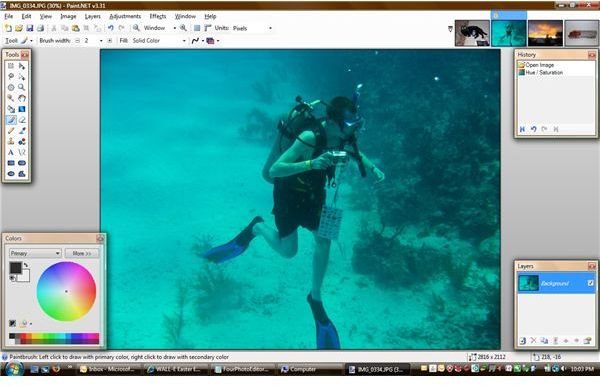
Paint.NET has an incredibly easy-to-use interface with an adequate toolbar, a good set of paint tools, and a very large selection of image manipulation options. While it does not offer the ability to automatically adjust hue, saturation or contrast, one menu option leads to a web page with literally hundreds of free plug-in modules (214 by my count). There is a full set of artistic, blur, distortion, and other effects, including red eye removal. This program has many virtues: It’s small enough that it loads fast, it offers a good selection of photo manipulation options, and did I mention that it is free?
Paint Shop Pro (5 out of 5)
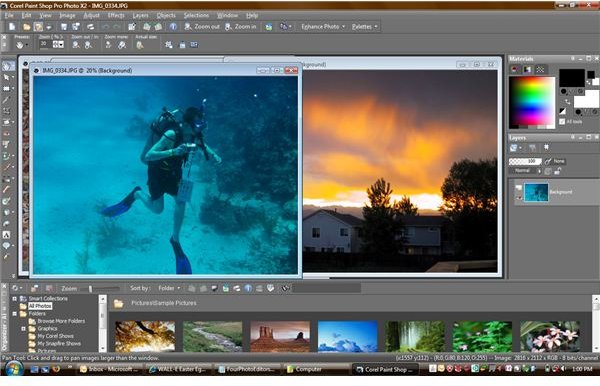
Paint Shop Pro was an early shareware application, and it has grown in capabilities with every release. Now owned by Corel, the latest X2 release (version 12) has almost as many features as that Holy Grail of image processing programs, Photoshop. Paint Shop Pro’s user interface is very intuitive and it may be prettier than the other programs (this is a matter of taste, of course). The automatic photo enhancement generally does a better job than I could do by hand, and there seems to be more automatic tweaks than other programs.
On the positive side, Paint Shop Pro is certainly a full-featured program, especially given the $80 MSRP. The latest version even offers a fairly easy way to make HDR (high dynamic range) photos. With complexity comes size, and as a result the time to load this application is longer than I mind waiting. Since it mapped itself to my JPG file extension, clicking on any JPG image in Explorer results in that long load time before I can view the image, so I’ll be changing that file association back to the Windows viewer.
GIMP (3 out of 5)
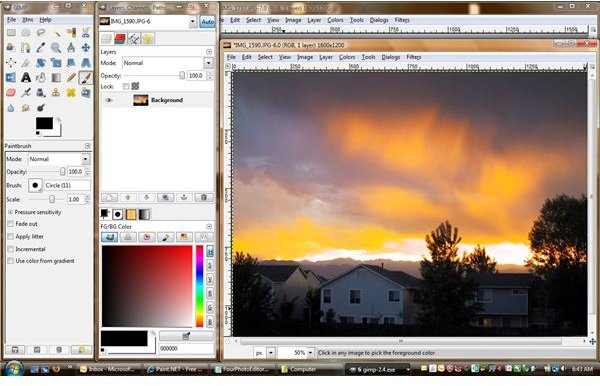
This open-source program has long been a staple of the Linux world, but a Windows version has been available for almost as long. Its user interface isn’t as intuitive as I would like but it is more powerful than Paint.NET. GIMP is unique in the world of graphic manipulation programs because it doesn’t really have a main window with everything else inside. When you start GIMP, you get two windows full of tools. Each image opens in its own window, which makes management a nightmare when you have more than a few images open. Both the tools window and the image window have menus, making the interface even more confusing.
GIMP has several options for automatic photo processing, adjusting the white balance, contrast, brightness, and HSV (but no red-eye removal that I could find). However, the automatic results never looked that good, leaving me to attempt to adjust the images by hand. The adjustment dialogs show the effects of any adjustment before applying it to the image, but I still wasn’t able to fix images to my satisfaction.
On the positive side, GIMP is very powerful, and like Paint.NET it has a plethora of plug-ins available (some of which might offer automatic enhancement). It also has a thriving user community and excellent documentation. On the negative side, it just isn’t easy to use. I suspect that it may be configurable to eliminate several of my issues but I was unable to do so. Sadly, the GIMP crashed to a blue screen several times on two different computers.
Photoshop Elements (4 out of 5)
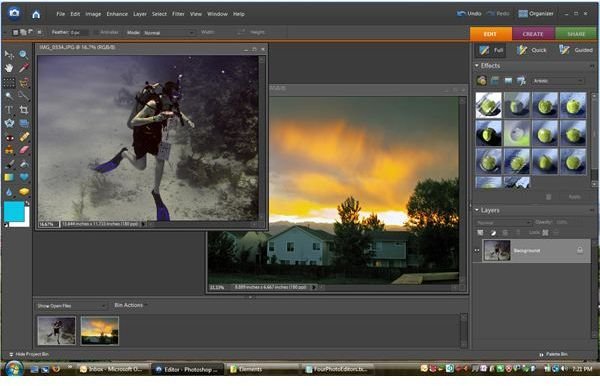
I’m not sure if I like Photoshop Elements or not. It has only a fraction of the power of Photoshop, but then again it’s a fraction of the price. Like Paint Shop Pro, it does far more than editing. Photoshop Elements has a full set of automatic photo adjustments, including Remove Color Cast, which did an excellent job of removing the blue in my underwater photo. One surprising omission is that of screen captures - I’m used to Paint Shop Pro’s full-featured capture, but could not find anything comparable in Photoshop’s menus.
Photoshop Elements should appeal to the average digital photographer, as the interface is certainly clean and intuitive. It does have a few annoyances, such as nagging you to let it organize your photos. I’d rather not do that, as my photo storage system is somewhat complicated. Photoshop Elements has enough options to appeal to a wide segment of users, but its price ($99 MSRP) is higher than Paint Shop Pro’s and it isn’t as powerful.
Which Photo Editing Program Is Best For You?
It really is a case of “it depends”. I use Paint.Net for basic image editing, but prefer the larger feature set of Paint Shop Pro for serious work. My daughter prefers the GIMP for basic editing, and my wife likes the interface of Photoshop Elements. Both Paint Shop Pro and Photoshop Elements offer limited-time trials, making it easy to decide which one fits your needs best.
Screen Shots