With AKVIS Chameleon, you can take pieces of several digital photographs and combine them together to form one final image. This tool also allows you to extract an object from one photo and insert it seamlessly into another. Read on to find out more about the plugin’s capabilities.
Overview of AKVIS Chameleon V.6.0
Although it is possible to create photo collages with the use of layers and other tools found in most major photo editing applications, the process can be tedious and the final result will often look choppy and disorganized. AKVIS Chameleon is a plugin that is compatible with Paint Shop Pro , Photoshop Elements , and a number of other image editors that claims to simplify and improve this process.
Chameleon is available for both the Mac and Windows platforms. In this review, we’ll be using the Windows version of the plugin with Paint Shop Pro as the host photo editor.
Installation and Setup (5 out of 5)
No problems were encountered during the installation process of Chameleon. The plugin does come packaged with a built-in self installation utility, so all you have to do is click and run. It is possible that you may have to perform a few additional steps, depending on your host photo editor. Paint Shop Pro users who are having trouble with this may want to take a look at this article on using third-party plugins .
Ease of Use (5 out of 5)
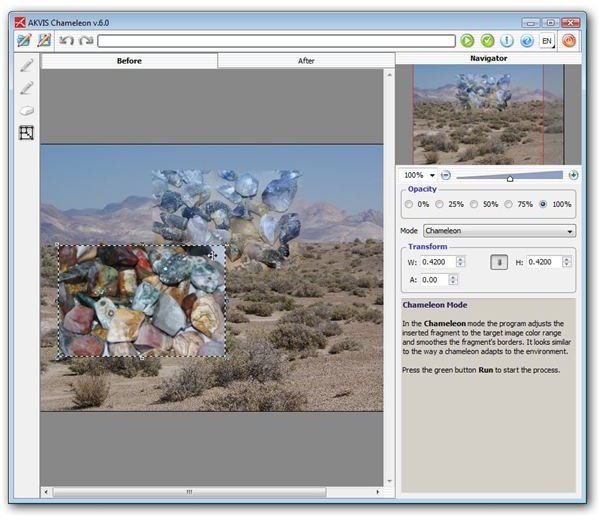
The Chameleon plugin has two separate components. The first piece allows you to grab a selected digital photo (or a defined selection in one) as a fragment. After doing this, you would select the photo or image that you want to use as the background of your final project and use the Make Collage component of Chameleon. From this point, you can make all sorts of modifications to adjust the position, size, and blending of the initial selection into the background image.
(Click on any image for a larger view)
I was very impressed with how quickly and easily it was to perform these tasks within the Chameleon interface. While it is certainly possible to achieve similar results without the use of the plugin, it would take a lot of effort and time as well as a great deal of skill and knowledge concerning the tools in the host editor. Chameleon greatly simplifies the technique, making the entire process more artistic and fun rather than technical and frustrating.
Features (5 out of 5)
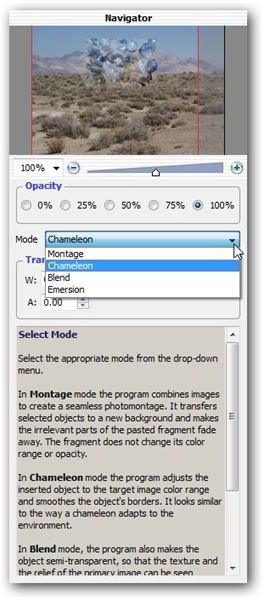
Chameleon has four main modes – Montage, Chameleon, Blend, and Emersion. With these options, you have complete control over how the photo fragments will appear when placed on the background image. (Note that you can use another digital photograph as your background, or you can create an entirely new image on which to overlay your various photo selections.)
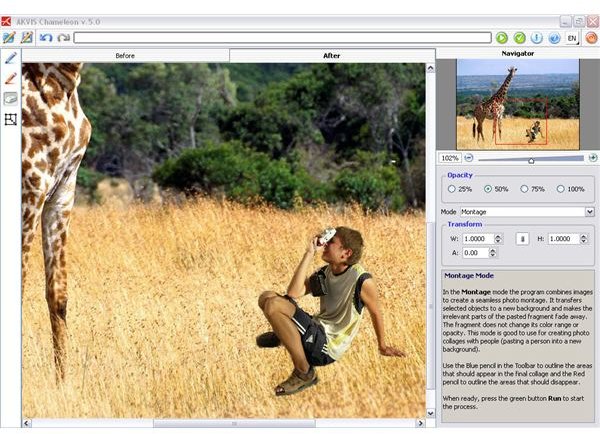
One thing that I love about this product is it does much more than simply create collages and montages. You can also use it to extract an object, such as a person or building, from one photo and insert it seamlessly into another photograph. The blending tools in the application make the original background fade completely away so that the resulting image looks completely natural without having to spend hours working to achieve that perfect look.
Price to Value (5 out of 5)
The Home License for the Chameleon plugin is priced at $75. Commercial users can obtain a Business License for $230. Each of these licenses does permit installation and registration of the software on two separate machines.
It should be noted that these prices are for the downloaded versions of the product. If you’d like a DVD shipped to you, there is an additional $19.95 charge.
Overall (5 out of 5)
Chameleon tops my list as one of the most useful and fun plugins available on today’s market. The price is very reasonable considering the power of the application. Furthermore, even though the software is easy enough to use that beginners can get started right way, more advanced users will still find that the variety of options found in the utility make many existing tools seem almost obsolete.
This product is definitely worth a try, and you can check it out for free by downloading a fully functional trial version from the AKVIS web site.


