Audacity Review: Not the Best Open-Source Audio Recording Tool for Podcasters, But Good
Editor’s Note: This article was originally published Sep 2007 and recently updated for archival purposes.
Why Use Audacity?
Audacity is the Swiss army knife of audio editing from Dominic Mazzoni and the open source community. I am reviewing version 1.3.3, but like any active community project, you can expect frequent updates. I found Audacity to be a passable audio recording solution, but it really comes up short when you use it for podcasting.
How to Use Audacity to Create a Podcast
It was simple enough to record a podcast. I hit Record and was able to slice and dice the result, splice in music, and add multiple tracks. As an audio recorder it did well, so long as you are familiar with other audio recording software.
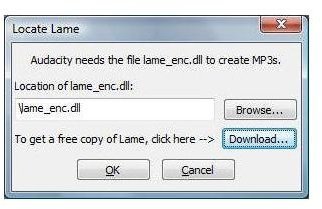
When came time to save my audio as an MP3, I had to venture deeper into the geek jungle. Audacity will prompt you for the location of lame_enc.dll. Why? Because Audacity cannot legally distribute MP3 encoding software unless they license it from Thomson Consumer Electronics–which would be difficult to do given that Audacity is free. Instead, Audacity helps you navigate to a website in Argentina to download a DLL where the MP3 encoding patent doesn’t hold up.
Now I’m left with questions on the legality of downloading an MP3 encoder that circumvents the patent. Is this legal? I honestly have no idea. Depending on your point of view, either software patents are out of control, or open source has some flaws, or maybe both. Either way, I’m not left with a great experience in creating my MP3 for my podcast.
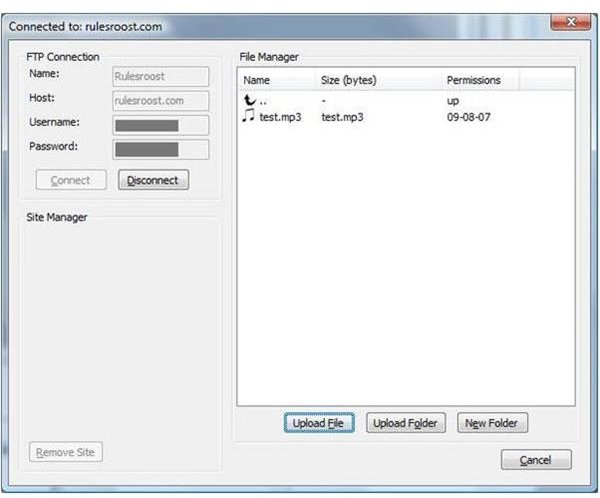
After I worked through the MP3 issues and was satisfied with my final recording, it was time to publish it. With Audacity, you get a built-in FTP client that works well.
But simply uploading an MP3 to a website does not a podcast make. Audacity doesn’t help you create the syndication needed to publish and annotate your podcast. Most podcasting software does this step for you and supports iTunes tags and RSS.
Telephony Support (3 out of 5)
There are a lot of features that have questionable value but are at least fun to play with. For example, there is a DTMF Tone Generator (those are the sounds you get when you press a button on your telephone). I suppose if you want to set something up to vote for your favorite American Idol over and over, this might come in handy. Use caution, though: I tried to register for overcrowded college courses using a DTMF generator a few years back and, due to some wrong tones, found myself registered for the same French course five times over.
Performance (5 out of 5)
Audacity had excellent performance even on very large files. When you pull in an MP3, it converts it to an editable raw file and breaks it into the left and right stereo tracks. The process is quick and easy to use. Overall the application is frugal with your memory and uses all of your processor as necessary, and performance was always pleasant.
Help & Support (1 out of 5)
Unless you are well versed in audio recording from a Pro Tools perspective, you will likely run across terms and features that don’t immediately make sense. Unfortunately, Audacity has no built-in help so it’s off to the web to find help.
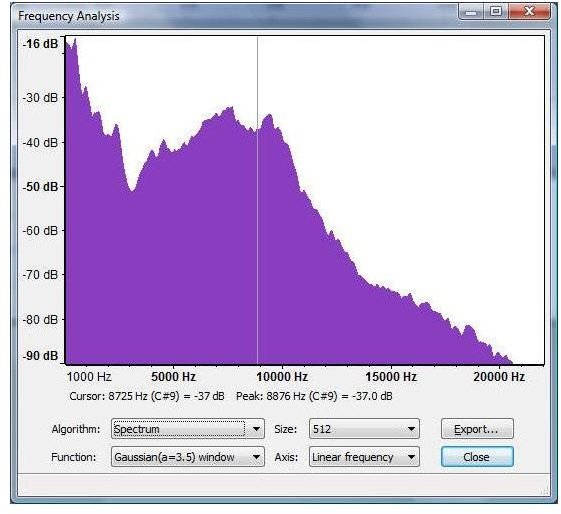
In my case, I was trying to understand how to read the frequency analysis. From the menu, if you select Analyze -> “Plot Spectrum…” you get a great-looking chart with lots of knobs to turn. I knew the basics of looking at this chart to see where I needed to apply compression (take out the extreme high and low frequencies), but I didn’t know which settings to choose.
From the Audacity web page, I clicked the link for the wiki, which appeared to be down (audacityteam.org/wiki). I was able to see the web page using Google’s cache; hopefully the outage is just temporary. The adventure continues.
From the wiki, I wasn’t able to really understand the types of Windows in the spectrum, so I headed off to Wikipedia, where I found a very complete article on the science and math of Window functions (wikipedia.org/wiki/Window_function). I bookmarked this for later.
I suppose my criticism of Audacity is that if they are going to include such a powerful feature, they should at least link it to some online help or give a really brief overview of what the feature is used for. As a geek toy, it was fun to go learn about how to apply Window functions to spectral analysis, but it didn’t further my podcast.
Audacity’s Features (3 out of 5)
Audacity comes loaded with effects. The expected compressor, amplify, echo, equalization, and so on are present.
Using some of the effects (like Fade In, Fade Out, and tempo change) can be awkward from the effects menu. I would much prefer to adjust those things right from the main window while looking at the recording. Another audio program, Propaganda, does a really excellent job of this.
There are also some effects that have questionable value. The Wahwah effect doesn’t seem to add anything to voice. I recorded a short lick on the guitar to see how it did and it wasn’t much better.
User Interface (2 out of 5)
Audacity can effectively use your whole screen. The toolbars can be undocked and all of the settings are saved between sessions.
Each button has a tooltip, but a short description on the status bar would be tremendously useful. For example, if I hover over the hourglass-looking button, I can see that it is the Envelope tool, but with no description anywhere in sight, I either have to know how to use an an envelope tool or I’m off to the web to figure out what it does.
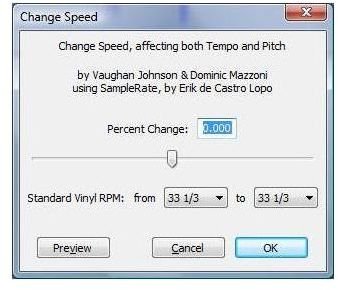
One of the artifacts of a community project is the way a user interface can present itself. Have a look at the Change Speed effect:
From top to bottom, this user interface has problems.
“Change Speed” is repeated twice: once in the title bar and once in the dialog box.
- Above everything else, the authors are listed. It’s hard to understand the thinking here. Why not save that for the About box, or at least put it beneath the functionality?
- The Vinyl RPM settings are just gratuitous and hurt the signal-to-noise ratio of useful features to fluff.
- The OK and Cancel buttons are reversed. The OK should be on the left.
To be fair, you could easily work with this feature even with the user interface problems, but when the whole application is rife with these types of issues, you just have a lesser experience.
Suggested Features
Obviously, the ability to publish podcasts that are tagged and have syndication would be a great feature. A consistent user interface and meaningful help that is easy to find would also make Audacity more appealing.
Conclusion
It’s hard to not like Audacity, but it’s also hard to give it a good score. While the effects are fun and the features generous, I cannot ignore the lack of publishing capabilities and the lack of decent help.
However, even after giving the software a below average review, I have an appreciation for Audacity and I’ll probably keep it on my system and follow the project as it progresses. It’s really a good geek toy and I had fun with it. There are a lot of features to learn and many topics to study.