Simple Guide to Copying WinMo Contacts to SIM

Adapted by:  • Edited by: Simon Hill
Updated Jul 8, 2011
• Related Guides: Sim Card | Windows Mobile

Windows Mobile devices save contacts directly to the user's phone, which is fine for typical use; however, power users or anyone changing phones may need to take their contacts easily from one device to another. Fortunately it is a simple matter to copy contact info to your device's SIM card.

What is a SIM Card?

What is a SIM Card?
click to enlarge
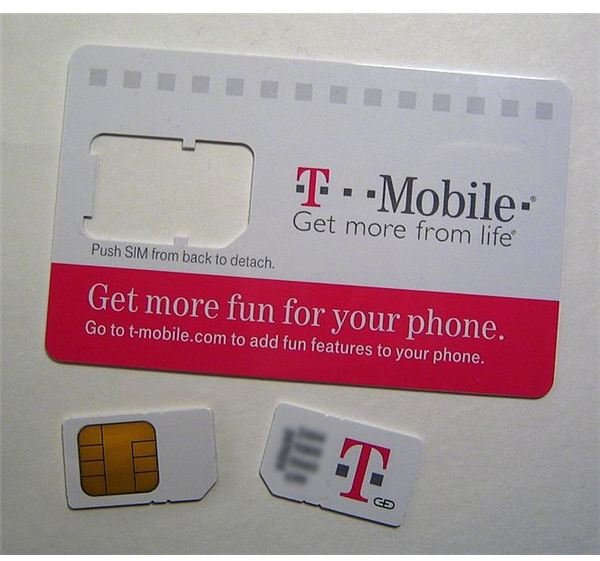
If you're new to the world of cellular use or have moved from a CDMA Network (such as Verizon/Sprint/etc.) you may have never used a SIM card. To keep it simple the SIM card is the small rectangular card that goes into your phone and allows your GSM service provider (AT&T/T-Mobile/etc.) to recognize your phone via the SIM. While the SIM card is necessary to make calls it can also store your important contact information and be moved easily from device to device.

On the right is a SIM card in its original packaging, the small part that can be removed is the SIM Card.

How to Save New Contacts to a SIM Card

Again if you're new to using a SIM card you may believe that it's difficult to save a contact to your SIM card. In fact it's one of the easiest steps you can take via your Windows Mobile device. Below I've included a quick step-by-step guide for saving contacts to your device's SIM card:

  • Click on the Start Button on your device.
  • Click on Contacts.
  • Click The New Button to create a new contact.
  • You'll be presented with two choices Outlook Contact or SIM Contact obviously you'll want to click on the latter.
  • Enter in the information on the contact screen after you have clicked SIM Contact.
  • Press the OK key and your New Contact is saved directly to your Windows Mobile device.

It's really that simple to save new SIM contacts to your Windows Mobile device. I continue to stress the new aspect of the saved SIM contact because the steps listed above are used when adding a new point of contact to your device, specifically adding it directly to your SIM card. While the contacts will be accessible via any phone your SIM card is installed on, they are not installed at this point directly to your current device.

How to Save Existing Contacts to a SIM Card

Existing contacts can also be copied to your device's SIM card, this is a great option for "backing up" your contacts and for moving them to a new or secondary device. Here's the very simple steps you can take to accomplish this goal.

  • Navigate to the contact you want to save to your SIM card.
  • Click the Menu Key.
  • Click Save To SIM.

That's it, an easy to remember process that could save you from inadvertently losing contacts in the future if your device is broken or you decide to change to a new device.

References


Comments

Showing all 16 comments
 
Moe Jul 25, 2010 11:00 AM
Copy google contacts/outlook to an sim card
I have a sch a777 from at&t and I need to copy my contacts to that sim card in that phone from my google/outlook contacts how do i do that.
dansa.yang Jul 20, 2010 5:40 AM
Backup sms
I am using the GodswMobile SMS Transfer,with which I can fastly backup and restore my SMS messages between mobile phone and desktop computer.It's very easy.
wingssu Jun 23, 2010 3:31 AM
transfer sms
my device is HTC Touch Pro 2 which runs windows mobile 6.x;I searched on the internet and found a software called "GodswMobile Windows Mobile SMS Transfer",It contains a computer app to Backup and restore SMS.it is fast to backup ,restore and easy to use!
Melinda Apr 19, 2010 10:09 PM
Windows Mobile Contact
Simply use a third party app call "GodswMobile Contacts Transfer" to transfer contacts from phone to sim card and also transfer from old mobile phone to new one.
Jack Apr 13, 2010 7:42 AM
RE: How-To-Guide: Copy Contacts To Your Sim Card Via Windows Mobile Read more:
hi
It will shows like this copy to SIM,But that option is not working on My mobile(windows Mob 6.1 Version)plz help me ....
Raj Feb 21, 2010 8:18 AM
No save to sim option in WM 6
Hi, I get only two options when I try to save a contact...Outlook Contact or Windows Live Contact...no sim options. Appreciate any help.
Sara CiCi Lautner Slbw Jan 14, 2010 7:47 AM
RE: Simple Guide to Copying WinMo Contacts to SIM
I have Sony Ericsson X1 and and I can't copy existing contacts from device to a SIM that way... :S
Jair Garcia Jan 5, 2010 2:41 PM
Edit simcard´s contacts from pc, sincro...
I have a HTC TyTN II, how can do to edit my simcard´s contacts from pc? Please Help me!! I tried with centre Microsoft Windows Mobile Device Center, but nothing.
Debbie Jan 4, 2010 2:49 PM
Tmobile to ATT
I don't want to lose my contacts and most of my friends that switched have..what do I do? Tmobile will not help if they know I'm going to ATT...help
Debbie Jan 4, 2010 2:46 PM
When Sim card is full
What to do if you get the message sim card is full?
James Allen Johnson Dec 15, 2009 1:44 PM
Response To Marvin
Marvin,

Where does this article say ANYWHERE that this is a great method for copying hundreds of contacts? Yes it would be idiotic to move 300 contacts in this manner, but you completely 100% missed the point of the article. Although it would work fine for new users who start saving contacts from the beginning.
marvin Dec 15, 2009 8:05 AM
Dumb Method!
Kind of an idiotic method if you have 300 contacts don't you think?
Jeryl Nov 2, 2009 10:07 PM
Contacts on SIM cards
Hi,
I'm using an ACER DX900 on WM6.1
I've some old contacts in my SIM cards, managed to get some of them copied to the new phone. I noticed that when i receive calls, only those transfered to my new phone appears with names, while those that remain on SIM card does not. Is there a way to make sure ALL my contacts including those on the SIM can be seen? Thanks!
Way Sep 21, 2009 12:44 AM
MULTIPLE CONTACTS to a Sim Card
really nd help as my phone is getting up my nerve with all the problems! Above mentioned saving existing contacts to the SIM card. For my case there are quite a number of contacts that i really need to transfer to the SIM. pls help! i cant figure a way to saving multiple contacts to SIM card!
James Allen Johnson Sep 18, 2009 12:48 PM
Transferring Contacts - Cecilia Response
Cecilia, We would need more information to assist you. For example are you going from a Windows Mobile to Windows Mobile device. Microsoft does offer an online backup you could use. Are you going from Symbian to WinMo? You can't simple just move that information from one device to another. However there are app options available. Typically backup apps.
cecilia lapierre Sep 18, 2009 12:04 PM
downloading contacts from verizon to att
i would like information on transferring contact information from verizon to my new att phone.
 
blog comments powered by Disqus
Email to a friend