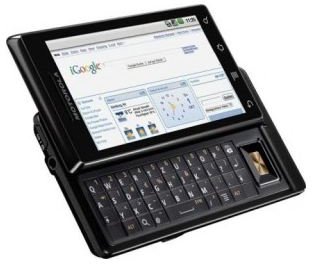
The Motorola Droid inherently has tethering capabilities though the feature is not implemented. Are you interested in knowing how to enable your Motorola Droid tether? Read on to learn more about how to tether the Motorola Droid.
How to Tether the Motorola Droid?
Connectivity is King in today’s digital age. No matter where you are, access to information is the primary goal of most gadgets on the market today. The smartphone is at the top of this gadgets list and therefore is expected to have omnipotent connectivity options. Though smartphones have revolutionized the way we work and have fun, at times we require alternate devices to perform certain tasks. Since smartphones already come with some kind of network connectivity options it makes sense to utilize and extend this connectivity to other devices, therefore tethering. Tethering involves using your smartphone’s data connection to access the Internet via a pc or a notebook. The Motorla Droid is one of the recent smartphones that is tethering capable, though not enabled. This article will show you how to tether your Motorola Droid and enjoy Internet connectivity on a computer or any other device thorough Wi-Fi tethering.
Motorola Droid Tether with Root Access
As the name sounds, this is a relatively complex method and could leave your phone vulnerable on the security front. All Android based phones sold with retailers do not provide the user with “Root access” for the above mentioned reason, however if you are willing to take a leap of faith you can tinker with your phone and acquire root access. The process of “rooting” as it’s commonly called involves a series of steps that can be located at the Android forums and are not included this article.
Here is a video tutorial on the process of gaining Root access to your Motorola Droid , remember to verify the process is for your version of Android as the process differs, or the update package differs, for different versions.

Once you have gained root access to your phone download and install the Android Wi-Fi tether app , as you would any other app. Please note that depending on the version of Android you are running different versions of the app have to be installed. Android 1.5 cupcake users can download the app directly to the phone from Android market or from the Android Wi-Fi tether app website, if you’re running Android version 1.1 install version 0.97.1 of the Android Wi-Fi tether app.
Once you have the install completed you can enable the Motorola Droid tether option easily by tapping on the green Wi-Fi signal icon that pops up after you launch the app. Now you have your own Wi-Fi hotspot to which your notebook or Wi-Fi enabled computer can connect and access the Internet.
Motorola Droid tether without Root access
June Fabrics has the PdaNEt Android app that will allow you to tether your Motorola Droid phone without any device hacking and it is easy to accomplish for any user. As mentioned in the previous paragraph tethering your Motorola Droid by gaining root access is a risky proposition and is not suitable for all users. If you are looking for an easier and less risky way of tethering your Motorola Droid then we’ve got a solution for you.
• Download and install the PdaNet application for Windows or Mac on your computer.
• Connect your phone to your computer via the USB cable.
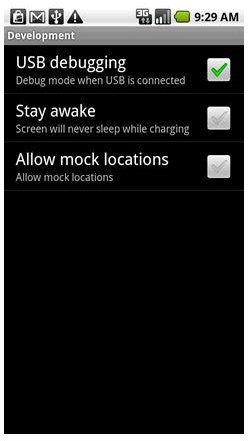
• Enable USB debugging mode on your Motorola Droid phone.
• Launch the PdaNet app on your Motorola Droid and tap to turn on the PdaNet connection (remember that you need to be connected via USB to your computer to enable this).
• The PdaNet application will request you to allow automatic installation of the USB driver for your phone, click to agree and continue with the installation.
• Now on the computer, click connect on the PdaNet application and you should be ready to browse the internet via your Motorola Droid’s data connection.
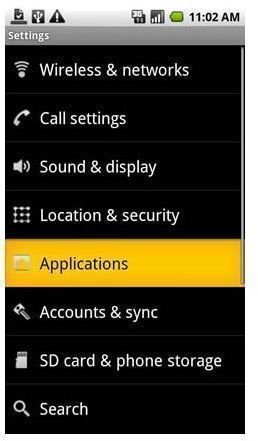
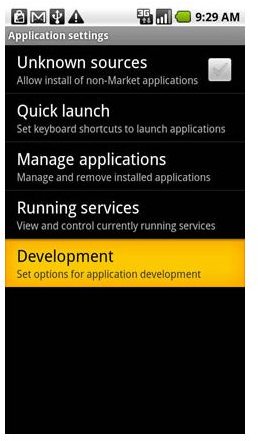
This video should give a more hands-on overview about the process of how to tether your Motorola Droid with PdaNet and how to go about connecting your computer to the Internet.


