Air Mouse turns your iPhone or iPod Touch into a virtual mouse that features all the controls of a regular keyboard in a compact and fun to use application.
Overview
Thousands of applications have been submitted to iTunes claiming to have that innovative feature that will change the whole view of how a phone or mp3 player is used. Air Mouse however, sticks to the basics and tries to improve on the use of the touch screen by making it a virtual “mouse”. Although the application is not free, the company RPA Tech provides the software needed to use on the computer at no extra charge. Other applications have been made to also accomplish this task, so developers have to stay at the top of the game to beat their competition. Read more to see if this app is worth the space on your iPhone/iPod Touch.
Since the price of applications are known to fluctuate, the price might range from $2.99 to $5.99.
Setup (5 out of 5)
Setup is very simple with only two components. Downloading the application is simple enough and with a small footprint of 0.7mb, you won’t notice a thing. In the description of the applications, it provides a link to a website that has the software for multiple systems. The download was quick and it immediately detected my connection with my iPod. In less than a couple minutes, I was able to have the application up and running. If you need any help setting up, they have support here .
Design (5 out of 5)
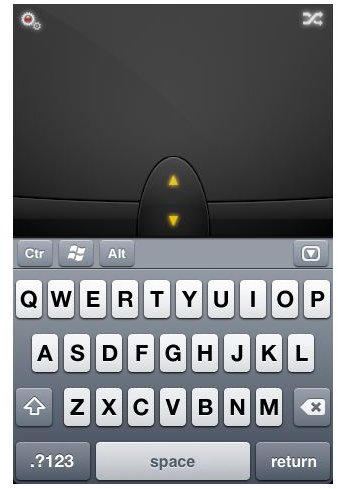
Air Mouse Pro utilizes the touch screen in both displays, landscape and portrait. In portrait, the application allows you to type using the built in full featured keyboard, while still offering ample space for the mouse pad and left and right click buttons. It also includes a scroll bar between the left and right click keys. On the other hand, landscape is used without a keyboard to make moving around and clicking easier on the longer screen. I feel that the screen sizes are reasonable for both modes and the keyboard does not get in the way when using portrait mode. Also, none of the buttons are hard to reach since most users are already accustomed to the small iPhone keyboard.
The Air Mouse software that the developers provided also is simple and to the point. The clean design has only four tabs with easy to understand directions that allow you to change how fast your mouse moves and other basic features such as hotkeys.
Images
Functionality (5 out of 5)
Like while using a regular mouse, you don’t want to be moving around missing the target you are aiming for. The default speed of the mouse is great for accurate browsing, but may seem slow for some. Also, this application uses a unique way of scrolling. While in portrait mode you can either use the scroll button by swiping up on it or by using two fingers and swiping at the same time in the direction you want to go. Landscape mode only utilizes the latter due to the wide screen.
Also included is a settings buttons which allows you to easily to switch between different computers and change ports and IP’s.
The left and right click buttons are very spacious on the landscape mode since there aren’t any other buttons to mistakingly hit. While using portrait, you can sometimes hit the buttons below which can be very annoying as you don’t want to be looking at your iPhone while you are surfing the web. This can be easily forgiven however, with the two viewing modes that you can easily switch between with simple accelerometer usage.
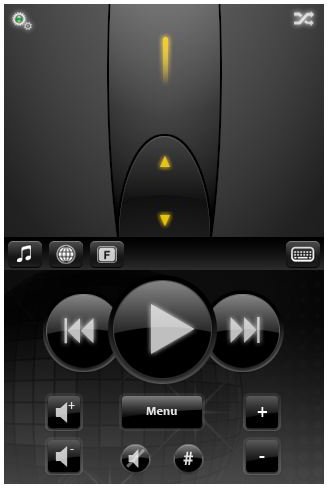
The keyboard on the portrait mode is the same size as the keyboard used in all other services. Above the keyboard are 4 buttons; control, the windows button, alt, and a button that will bring down a drop down menu. The drop down menu replaces the keyboard with either the music tab, the browsing tab, or the extra buttons tab. In the music tab, you can control your music with the fast forward/rewind and play buttons along with buttons that change the volume. This can be used for the music services that Air Mouse can sync with. In the browsing tab, you can use the buttons to go back and forward or to the home page, as well as refresh, cancel, favorite, and zoom. On the last tab, there are the keys that can’t fit on the keyboard such as the arrow and function keys. This is all organized nicely with this drop down menu, and you can switch between them with ease.
The software used by the computer can also switch between different computers as well as set hotkeys. You can also set shortcuts that can be used by pressing the button combinations that you can choose from. Another cool feature is the media that this software can use. You can also set hotkeys for the various music control buttons for VLC, Media Center, WMP, and iTunes. You can also set the scrolling and moving speeds to whatever settings you like using the scrolling bars.
Conclusion
Air Mouse is an excellent application that does what it does perfectly and then some. It doesn’t leave out a single feature that a user would practically use, and does so with a fast and sleek design. Instead of using it as a mouse, you can also use it to control your music wherever you have wifi around your house. It can be a great remote without buying another application or system! The developers like to put this application on sale, so grab it while you can. Even if you don’t have the chance, the bang for your buck is still great. I highly suggest you check it out here.


