The iPhone Budget app is a full-featured budget management application which offers various settings and options with the aim of helping you keep track of your spending and helping you keep to a budget.
Managing a Budget on the Go
I’ve tried various mobile budget management applications even when I didn’t have an iPhone. Unfortunately after installing those budget management applications on my mobile phones, it usually just takes me a day or two of use before I give up and by the third day I stop. Perhaps because of my lack of budget management discipline and patience. Or perhaps the mobile budget applications that I used to have on my mobile phones were not enticing enough to keep me using them. Fortunately, with my new iPhone, some app developers named Deskescape have come up with a pretty good, feature-rich and yet easy to use and manage, budget application app. And it’s simply called Budget.
Budget’s Features
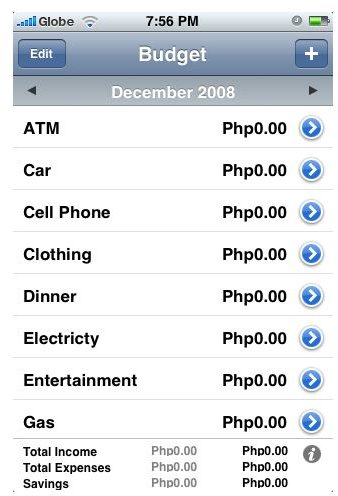
Reading through the list of features laid out by Deskescape for its Budget app for the iPhone, I couldn’t help but notice the difference between a free iPhone app and a paid one. For $1.99 Budget gives you a slew of features that you won’t generally find in a budget management app. These features (listed by Deskescape) include:
- Simple transaction and budget entry - as soon as you fire up the app, you will be presented with pre-defined items in which you can enter your budget by simply tapping the total column opposite the budget item name. You can set your monthly budget for a specific item by simply tapping on the budget icon located below your iPhone’s screen. You can also opt to tap on the advanced budget icon for more advanced budget settings.
- Share transactions between iPhones - by tapping on the Share Transactions icon, the application will generate a report for a particular transaction and send it to someone you specify via email.
- CSV Data Export - lets you export your budget transaction into a CSV file for viewing later as an Excel file.
- Data BackUp and Restore - your usual B and R transaction for safeguarding your budget plans.
- Password Protection - if you’re afraid that your wife might discover your unnecessary expenses, password protect your Budget account.
- Recurring Expenses/Incomes - a pretty useful function especially if you are creating your monthly budget plan. You can set budget items to recur every month for up to 3 months. After which you have to re-enter them.
- Expenses vs budget graphing - more useful if you’re fond of viewing your monthly expenses and income using visual graphs.
- Highlighting of over budget expenses - this feature could help you in keeping track of your expenditures beyond your budgeted amount.
- Reminders for overdue expenses - another useful feature especially for those who keep on forgetting to settle their monthly obligations and dues.
- Yearly expense comparison - for those who keep track of their yearly budget vs expenditures, this feature is definitely useful.
- Category sorting and customization - using the drag-drop method, you can arrange the budget items in whatever way you want.
Our Verdict
It’s not very often that we encounter such a feature-rich budget management application on any mobile device. Hence, iPhone users like us, are very fortunate to have this app available for download at the App Store. If we can spend 99 cents for some games which really have no productivity value, then I don’t see a reason why we should not buy this app and install it on our iPhones. You might argue that there are free budgeting-related apps available, but the Budget app really hits us with every detail of our budgeting management strategy. Yes, I definitely recommend this application.
You may also be interested in reading about some iPhone expense tracker apps .
References
- iTunes App Store, http://itunes.apple.com/us/app/budget/id283281224?mt=8


