PRO Zoom Camera 5x adds a whole new level of functionality to your Google Android smartphone. The program provides images editing, 5 different white balance types, 8 filters and even a timer delay. Keep reading for our full PRO Zoom Camera review.
PRO Zoom Camera 5X is a great way to control your phone’s camera. Users can white balance photos before they take their shots, use 8 different filters and even implement a timer delay. Much like the developer’s PRO Paint Camera application, this program offers a very simple and intuitive design that makes it easy to launch the application’s various functions, including clipart files and on screen zoom functions.
Keep reading to learn more about PRO Zoom Camera 5X, including several screenshots from the program.
Overall Use (4 out of 5)
The first screen found on the program allowed me to white balance the camera. White balancing is used to cut out undertones and overtones that can occur when taking pictures in different lights. In fact this technology is used by news broadcasters and film makers to cut out unwanted color shading. The program offers five options, the first is your standard “Auto” output, followed by: Incandescent, Fluorescent, Daylight and Cloudy.
After the white balance option is chosen users can then choose effects. These include “None, Mono, Sepia, Negative, Solarize, Aqua, Blackboard, Whiteboard and Posterize.” I liked the Sepia option which gave the traditional brown tones and the Whiteboard which made it simple to add clipart at a later time.
The effects screen is very simple to use with large buttons that are all finger friendly and well laid out on the screen.
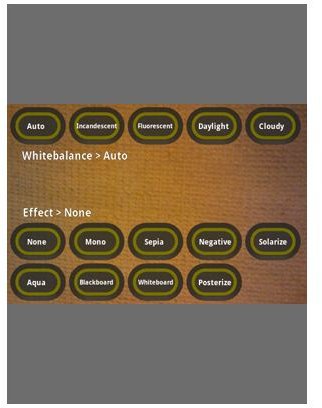
The programs features were also all very easy to access from the picture taking screen. For example the bottom of the screen features a touch friendly zoom option and an autofocus button that can be used with a quick press of a finger or a swipe of your screen. Users can also access the filters screen shown above with a single press of the screen.
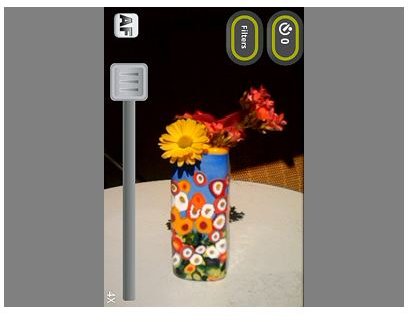
You’ll also notice the top left option that allows users to set a “timer delay” for self portraits, just click on the option and set the timer then get ready for the picture to be taken.
Users can also choose to add up to 30 different clipart images which are perfect for creating mothers day photo cards, birthday cards and other cards of the users choosing. The clip art is fun, but a little campy, then again mobile photo cards are campy by their very nature.

Once you’ve created your images you can send them via the preview screen with an integrated GMAIL option that makes taking pictures, editing them and ultimately sending them a very simple process.
The program also allowed me to save photos with my volume key which isn’t offered on the HTC Hero and several other Android devices at this time, this made it much more simple to take photos.
Finally, I enjoyed the auto save function which eliminates the slow save times which has always been one of biggest pet peeves with my HTC Hero.
Conclusion
For the best results I suggest purchasing this application from the Android Market at the very respectable price of $2.99 (Limited Time Only), while also picking up PRO Paint Camera from the same manufacturer. With these two programs you can take pictures with various effects, add in your own text and pencil marks, throw together clip art and send your auto focuses and self timed pictures to anyone you choose.
Overall this is a very worthwhile application to have on your Google Android based smartphone and considering you can have two applications for under $10 with a bunch of functionality I would definitely consider this application a must have for photo lovers.
References
Android Market, https://market.android.com/details?id=com.popularcrowd.piczoompro


