Have you ever wanted to emulate the “whiteboard” found in office meetings with all of the colored markers and eraser capabilities that they offer. Now you can have your very own mobile version of those eraser boards right on your Google Android phone.
Henry Huang has created a virtual whiteboard, which unlike note taking applications doesn’t require use of your slide out keyboard or virtual keyboard, instead users simply choose a colored marker and doodle their notes right onto their device. The program is excellent for working out math problems, jotting down quick notes and just having some fun as you doodle pictures of your boss or teach as they bore you with their latest lecture.
Keep reading to learn more about Henry Huang’s Whiteboard application, including several screenshots that show it’s simplicity.
Overall Use (3 out of 5)
I know plenty of users who hate typing on their mobile devices with small keyboards that tend to lend themselves to “fat fingering” keys, yet they still need to take notes on a regular basis. If those notes are for personal use and don’t need to look professional or if you need to quickly draw up a diagram for later use Henry Huang’s Whiteboard is a great option.
The Whiteboard application offers a very simple interface that couldn’t possibly be any easier to use. I started by choosing the marker color I wanted to use, there are currently 4 colors: Black, Blue, Green and Red which can be clicked on from the left side of the program. I was then able to drag my finger across the screen to mark up my display with words, diagrams and doodles in the color I chose.
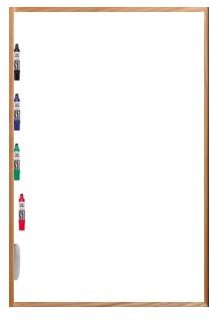
You’ll also notice a “white” object at the bottom of the screen, this is the eraser which can be chosen to erase any part of the board you’ve drawn across. It’s basically the same type of functionality found on MS Paint in a much more simplistic manner. Users can choose the on-screen eraser or use the volume down key to undo a marking and volume up redo a move.
There are also several other functions including screen sounds and “always on” screen functions which can be found by accessing the programs on-board preferences section.
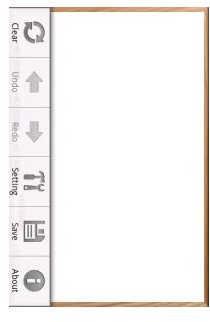
Finally, users can choose to save their files as JPEG or PNG files as they see fit. I like the small size, yet crisp pictures provided by PNG files so I chose this option which then saved the files by choosing the “save” option from the menu screen shown above.
Conclusion (3 out of 5)
I really liked the simple functionality that this program offered, it’s a great way to doodle down a quick note or diagram or for working out a math problem as if you were using a piece of paper. Conversely I would have loved to see more options, perhaps some effects such as bolding or even crop and paste abilities.
While more options would have been nice I found that the program did exactly what it promised, it created a whiteboard on my HTC device and for $.99 it’s well worth the download.


