The Voice Recorder application for Google Android allows users to not only record their important notes, but also to title them and search for them by title or date. Keep reading to learn about this useful reminder keeper app.
Overall Use (4 out of 5)
In true Google Android app fashion, even a simple application such as a voice recorder offers a sleek interface, nice large touch screen friendly icons and intuitive use and search functions. Voice Recorder features that same trademark black background found on many of today’s Android apps and it does so with simple and understated visuals that make the application enjoyable to use.
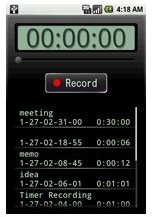
On the main recording screen, users simply hit the large Record button, begin speaking and the app then records their sounds until they tell it to stop. All the while, the app’s large numbered counter tells users how long they’ve been recording their messages. This is a great option if you need to keep your messages short so you can email them to another person. The app then shows the last five messages with titles, if applicable, the date those messages were recorded and the time contained in each message.
Options
Recordings are saved directly to the user’s MicroSD card. This means your system’s internal memory won’t be bogged down and your recording times will still be maintained for hours on end if necessary.
The application doesn’t just record messages as I mentioned above; it can send messages as well. You just need to sign up for a free Gmail account then choose to send the message and it will send it as an attachment via your Gmail account. It’s also simple to configure; you just need to enter in your Gmail login information and you’re ready to go.
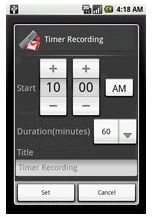
Another unique option is the ability to set when you want a recording to begin. For example, let’s say I want a recording to start at 10am. I simply enter in 10am, add a title for the recording if I choose to use a title, and enter the duration of the recording, for example, 60 minutes. When I hit “Set,” the program will begin recording at that time based on my phone’s own internal clock. I can also hit “Cancel” to stop that operation. I personally fail to see the use for this part of the Voice Recorder application, but I’m sure you can find some way to use this option.
Search Feature
Finally, you can find your past recordings fairly easily with Voice Recorder by searching by the title or the date of the recording. The title option is your basic search function while the time option uses your touch screen with large buttons to set the month, day and year of the recording. Both options are suited for searching, although the title search makes the most sense to me since I can just type “birthday” and find all recordings with that word in the title. With the date option, I have to remember the actual date of the recording.
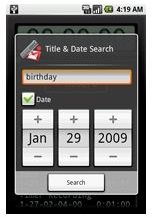
Seriously, how often do you find a search function on a mobile recorder ? Not very often. Definitely a nice addition.
Conclusion
Voice Recorder for Google Android is not only a free application via the Android Market, it’s a very competent, easy to look at and intuitive application that I would recommend to any user looking for a more robust recording option for their mobile. Definitely a worthwhile app.
Once I realized this app was made by the same developers who brought us MyCloset I had to give it a try. Now I’m glad I did because it worked so well I can hardly believe it’s free.
Download it at the Android Market and let us know what you think!
References
- Android Market: Voice Recorder, https://market.android.com/details?id=com.tokasiki.android.voicerecorder&hl=en
- Screenshots provided by writer.


