Say goodbye to tele-callers and hello to sanity with the Simtak Call Filter. This application lets you filter and block undesirable numbers and gives you a sense of phone privacy, which is hard to find these days.
Introduction
The Simtak Call Filter lets you block all those pesky little unwanted calls that can play havoc with your sanity. So next time you are taking a Siesta or watching a movie, ensure that your are not disturbed by a tele-caller. You can filter unwarranted calls by either sending a busy signal or forwarding the caller to voicemail. Those who fancy drastic measures can activate the “pick up and hang up” which ensures that the caller doesn’t even get to leave a voice message. Another option is to make a profile that allows only your friends and family to contact you.
Overall Usage (5 out of 5)
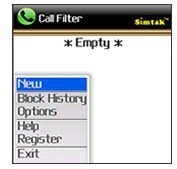
After installing the application, I had to give it full permissions so that it can work its magic without any hitches.
I opened the application and navigated to the “Options” selection. There I came across two choices; “don’t show blocked calls in the call logs” and “show blocked calls dialog after blocking”. I deselected the first option and then selected the second choice.
Next, I went to the Call Filter tab and chose to create a new profile. In this section I added a couple of numbers from work and my own landline number and named the profile “Proscrination”, selected the “Send to Voicemail “ option and added “Weekdays” in the “Time Period” option. I then requested my roommate to call me from my landline number and the application worked like a charm!
Then I changed the “Send to Voicemail “ option to “Pick up and hang up” option and again the program worked exactly as advertised.
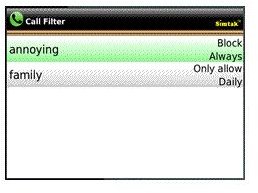
Since I am not the kind of girl to boycott family and friends (even if I am tempted at times), I created a new profile called “Loved Ones”, selected “Only allow” in the option type and typed my best friend’s number. When she called I was able to receive her call, however I was able to block other calls at the same time.
Verdict (5 out of 5)
The Simtak Call Filter v2.0.05 does what it says and work flawlessly, bloccking all the calls I didn’t want to take at any given time. Apart from blocking calls, the application also impresses with its interface and other thoughtful little features including Profile support and full integration with the Blackberry Address Book and Call Log.
Personally I feel $5.99 is a small price to pay for some peace and quite and hence I recommend this application!


