Customizing your BlackBerry with software and utilities is a great way to get the most out of your BlackBerry smartphone. There is more than one way to install BlackBerry applications and here we will discuss the options.
BlackBerry Desktop Manager
One of the more popular methods for installing BlackBerry apps is to use the BlackBerry Desktop Manager. BlackBerry Desktop Manager is a useful tool for installing BlackBerry applications and managing your BlackBerry smartphone files and OS. The following are the instructions for adding software to BlackBerry phones from Desktop Manager (these steps assume you already have Desktop Manager installed on your computer).
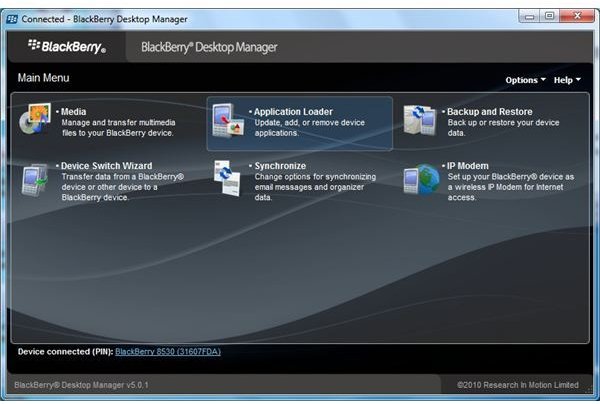
- With your computer on, connect your BlackBerry device with the USB cable and start BlackBerry Desktop Manager.
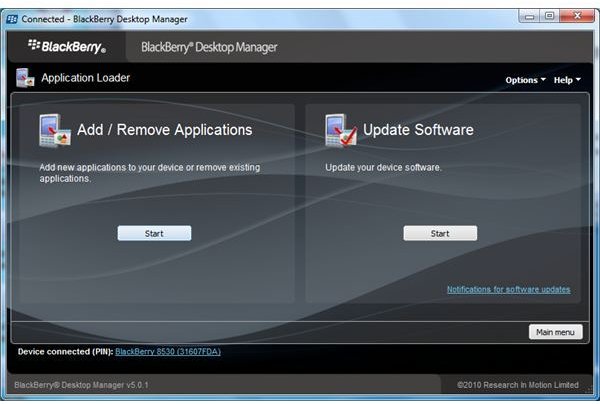
- From BlackBerry Desktop Manager, click on “Application Loader” and then click “Start” under the Add / Remove Applications box.
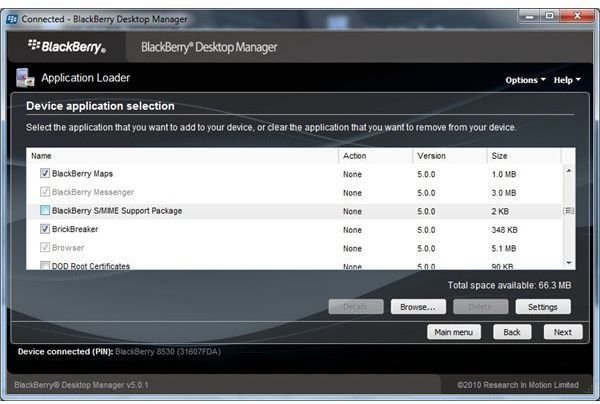
- Click on “browse” and look for the software you wish to install on your BlackBerry. You can also browse the available applications for software that you would like to install.
- Place a check in the box, next to the application you wish to install, and then click “next”.
- If the software does not ask you if you would like to reboot your BlackBerry then you can manually reboot it. This can be done by removing the battery for 10 seconds and replacing or you can simultaneously press the “alt”, “function”, and “delete key”.
- Congratulations! You have now installed software to your BlackBerry smartphone.
Blackberry Desktop Manager images.
BlackBerry App World
BlackBerry App World comes pre-installed on most BlackBerry devices and is a popular source for BlackBerry apps . There are literally thousands of applications on BlackBerry App World for download ranging in price from free to hundreds of dollars. You can search for BlackBerry applications by name or browse by category to find the application you are looking for. To install applications from App World, start by launching the application on your BlackBerry.
- Locate the BlackBerry App World icon in the menu. The icon looks like the BlackBerry symbol or key. Launch BlackBerry App World.
- The first window that comes up will be a scrolling list of the most popular applications. You can scroll through this or choose from the options on the bottom.
- The options on the bottom are for searching by category, top paid apps, and top free apps.
- After locating the application you wish to install select it. You will be given a page with information about the app as well as available reviews, other information, and a link to download. Select the download link.
- The app will download and install automatically. Once completed it may ask if you wish to provide it permissions etc. It may also ask you to reboot now or later. The sooner the better for a reboot as this is usually required for BlackBerry apps to work properly.
- Once the application is installed you can find it in the downloads folder.
Deleting or Removing software.
Occasionally a program that was installed does not work the way we want it to and it becomes necessary to remove an application. This can be done in a few steps and is relatively easy to complete.
You can use BlackBerry Desktop Manager to remove apps from your BlackBerry. The process for removal is almost the same as installation with one exception. Instead of placing a check in the box next to the application name, you are going to remove the check. Follow the rest of the process and you have successfully deleted the application.
Removing software can also be done from the BlackBerry smartphone itself. To do this go to the menu and select the “options” icon. In the menu select “applications”. Give the device a few seconds to build a list of applications. Once this list has been built locate the app you wish to remove. Highlight the application and press the BlackBerry key on the phone. You will be given some options to edit permissions, delete, etc. Chose Delete and follow any other instructions provided. You have now deleted a BlackBerry app from the device itself.
Congratulations! You have successfully learned two methods for installing BlackBerry apps and two methods for removing / deleting applications. These instructions for adding / deleting software on BlackBerry phones comes from the more popular methods. Have fun with installing applications on your BlackBerry.


