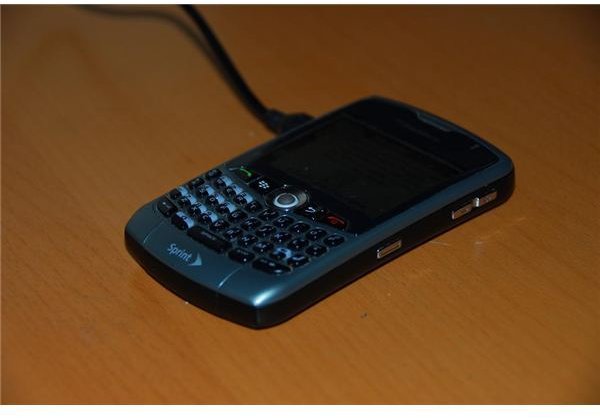
If you have ever wanted to use your BlackBerry device as a portable modem, a process known as tethering, review this guide on how to complete the process. RIM’s additions to the BlackBerry Desktop Manager program have made the process as simple as possible.
An Introduction to BlackBerry Tethering
BlackBerry tethering is simply a term used to describe using your BlackBerry device as a wireless modem for your computer. The BlackBerry uses it’s data connection to relay information to and from your computer and the Internet. While you can technically use your BlackBerry to connect any computer to the Internet, tethering is done mostly with laptops, since it is only natural that a portable computer have a portable Internet connection. This may all sound a little like a Wi-Fi connection, and in a way it is, but the difference is that your BlackBerry uses your wireless carrier’s network signal which is much easier to find than a Wi-Fi hotspot.
For a long time the tethering process was a pain to complete, and it was often much better to pay for an application that would let you use your BlackBerry as a modem. However, with the release of BlackBerry Desktop Manager version 5.0.1, RIM has taken all of the work out of tethering your BlackBerry.
Contact Your Wireless Carrier
Before you tether your BlackBerry and jump on the Internet, you need to make sure that you are allowed to. Some wireless carriers require you to pay a fee in order to use the tethering feature. Most carriers that charge, like Verizon and Sprint, require that you pay an additional fee on top of a data plan. While this may seem like an unfair charge, since you are only making a phone call with your BlackBerry, look at it from their point a view for a moment. When your computer is connected to the Internet you will be using much more bandwidth than if you were just browsing on the small mobile browser. In the end, your other option is to buy a wireless card, which comes with it’s own expensive plan, so the little extra money isn’t all that bad.
Just call them up and have them add the tethering option to your account, or ask if you need a tethering option. Some carriers refer to this as a “Phone-as-modem” plan or add-on.
Install BlackBerry Desktop Manager 5.0.1
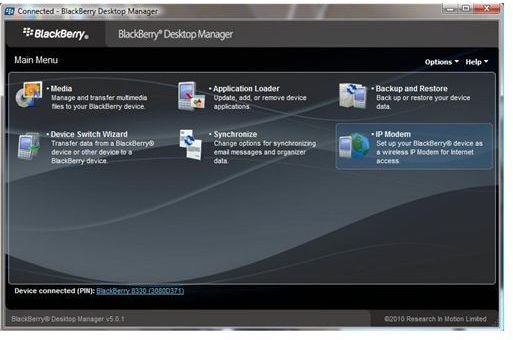
If you don’t have BlackBerry Desktop Manager installed, or if you have an older version installed, you need to download and install version 5.0.1 . While you can tether with any version after 4.1, version 5.0.1 automates all of the set-up for you. The setup file is a little large, so it may take a few minutes to download it, but after that, the installation process is straightforward.
If you have never used the Desktop Manager before, take a few minutes and learn how it works . You will also want to backup your information, which you should do every week or so, to protect your information.
Connect in Seconds
1. Connect your BlackBerry to the computer.
2. Open the BlackBerry Desktop Manager.
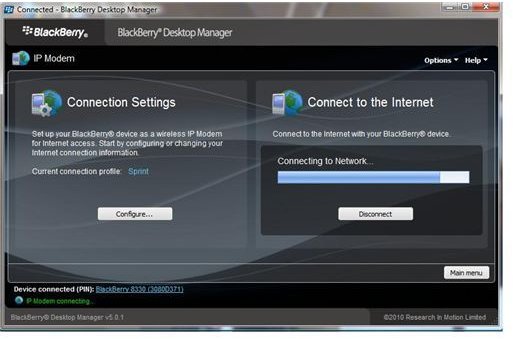
3. Click on the “IP Modem” button.
4. Click on “Configure” on the left side of the screen, underneath “Connection Settings.”
5. Choose your wireless carrier form the drop down list, then click “OK.” This should default to your correct provider, but do this step to check, just in case.
6. Click the “Connect” button on the right side of the screen. Then press “Continue” when prompted.
That’s all it takes to get your computer connected to the Internet using your BlackBerry device.


