Are you bored with the background on your BlackBerry? This how-to-guide shows you how to easily change your background with several simple steps.
Introduction
Considering the flexibility that BlackBerries give us, we can almost do as much customization as we like. If we want to change the wallpaper, it is very easy and you have two options:
- Wallpaper is changed by the installed theme
- Wallpaper is changed regardless of the current theme
Changing the Wallpaper with the Installed Theme
In this option, we don’t really need to do anything. When we install the theme, it automatically sets its wallpaper. To download themes, there are lots of websites available. All you need to do is google the keywords “blackberry theme”. There are free and commercial themes out there depending on the websites you use.
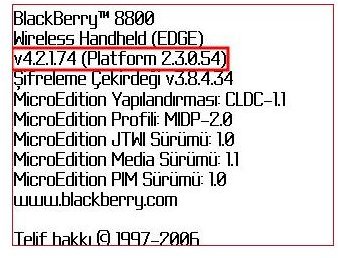
Before going with this option, make sure that the theme supports your BlackBerry model and your operating system. To check the installed OS, go to Options in the main menu, then About. There you see at the top your BlackBerry model and operating system version. For example, one of my friend’s About section reads as:
BlackBerry ® 8800
Smartphone (EDGE)
v 4.5.0.108 (Platform 2.7.0.89)
The numbers after the ‘v’ are your operating system. In this example, it is OS 4.5 with revision 108. In the screenshot, the operating system is 4.2.
Changing the Wallpaper Regardless Of Current Theme
Before getting excited and trying to change your wallpaper, find out your screen resolution first. The following list will assist you (all resolutions are in pixels):
Storm: 360x480
Bold: 480x320
8800/8700/8300 Series: 320x240
8100/7100 Series: 240x260
8200 Series: 240x320
Then resize your pictures to the resolution that your handset supports and copy the pictures into the Pictures folder under Media. You can do that by either connecting your handset to the computer or by downloading images from the Internet.
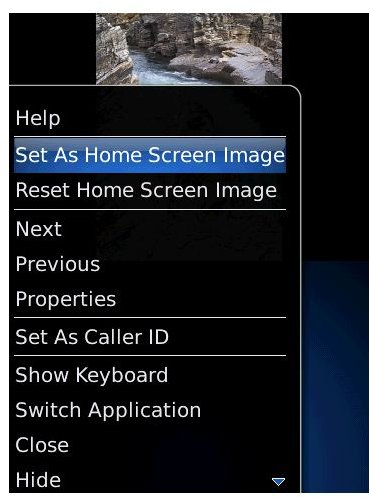
When you are done with the Pictures, go to the Media icon in your main menu, then go to the Pictures folder. Inside you will see the thumbnail previews of the images that you have placed in your device. Select one by rolling your trackball (or the wheel depending on your device) and then click the menu key. In the opened menu, select the “Set as Home Screen Image”option and that’s it! When you go back to the menu you will see your image as the wallpaper.
There are many sites on the Internet where you can download free and commercial wallpapers as well as themes. I suggest you give them a look, you may find something that will fit nicely with your personality. Or else, copy your favorite images on to your handset and change them whenever you want.
Screenshot courtesy of Technipages .


