When setting up a webpage form, it is important to determine the order of inputs ahead of time so that the flow of input is consistent with the desired order. Should you put an input in the wrong place, though (or the order of the input placements is off) a simple property change will fix it easily.
Background Information
Those forms you use to fill out details of your payments when buying stuff online have to come from somewhere. So do the ones you use to sign up for an account on the site, as well as for when you log in to your account. In fact, these forms are built into the HTML code that determines the layout of the page itself, including the bits on where the various form inputs are displayed.
But what if you mess up during the process of laying out the structure of your form and you need to rearrange the sequence in which the text inputs are activated during keyboard input entry and navigation?
Controlling the Tab Order
So here’s how to control tab sequence in an HTML form. If you’re in any way familiar with computer programming you may have noticed that some software development tools are capable of allowing the design of the user interface to be constructed in a visualized manner (think Visual Basic or similar). Certain types of inputs can be set to determine their place in the input flow (like the TabIndex property in our Visual Basic example). HTML pages also have a tabindex property for the same exact purpose. The following illustration from Microsoft Expression Web shows how the tabindex property is set on a webpage form object:
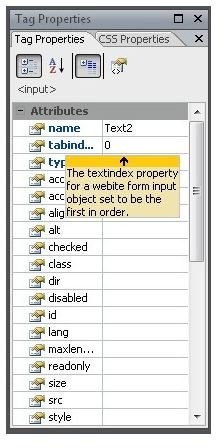
Notice that the starting index starts at one number less than one (read: zero). That’s because it’s common practice in designing and interpreting computer interfaces and results processing to set the position of the starting value of an input ordering position or other numerically-counted interpretation at one less than the actual value. In other words, 0 is equivalent to 1, 1 is equivalent to 2, and… well, I’m sure you get the idea. This is in no way enforced by Expression Web, but it’s good practice to have an order which increments by one for each item in the list – and this is the method used by the pro’s so it’s as good as anything.
How NOT to Control Tab Order
To demonstrate the process of how to control tab sequence in an HTML form, I have prepared a small example using Microsoft Expression Web to demonstrate the use of the tabindex property. If you’re using another program (like Dreamweaver, for example) the process should be similar, but do at least check to be safe.
Let’s say you had three text inputs on a form in progress and you set the form in progress to jump between the input boxes in this order (using the traditional “one-less” approach):
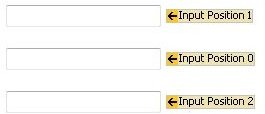
As you can see, the whole thing is completely out of place. The center is marked as the first, the top is second, etc. What you should have instead is a tab order that moves from top to bottom. I’ve seen at least one real-world input form that fails to use the more obvious approach to form input, such as this clunker from American Express .
Fixing the Layout
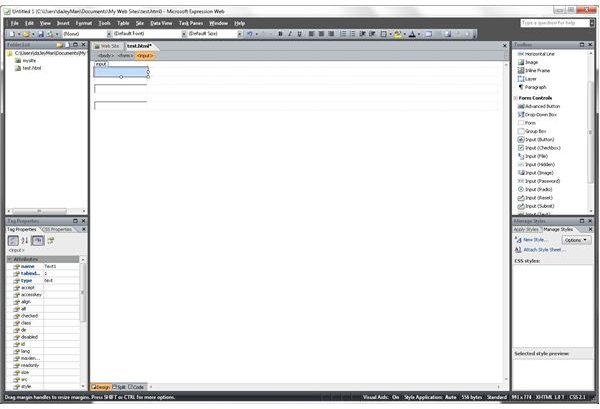
Fixing the tab order is a rather simple affair. To start, click the top-most text input to select it as shown:
Next, set the tabindex property to the first value in the order as shown:
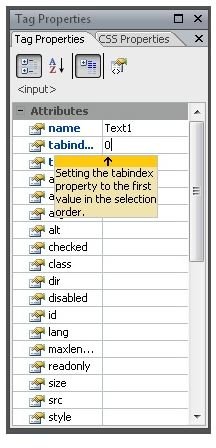
Then repeat for each one of the input spaces using 1 for the second from the top, and 2 for the third. When finished, the tab order should be set to flow like this:
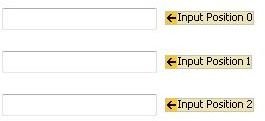
Note that when setting the tab order in Expression Web, the tabindex property is not changed for inputs with the same tabindex value, so the tabindex property must be set manually for each input to a unique value in order to avoid problems.


