Content syndication - i.e. adding related articles and photos from all over the Net is one of the easiest ways to make your site content rich. You can search for related articles manually, or use tools, such as Zemanta, that do the job for you.
Content Syndication with Zemanta - Find Related Content Easily
While doing this manually (i.e. browsing the Net for suitable articles and images) gives you more control over what you put on your blog, this task is so time-consuming that it is impractical to do. Actually, when there are great tools for that, why should you even think about doing it manually?
Zemanta is one such tool you can use to add links to related articles and photos on your blog. Zemanta has access to thousands of content sources and unless your blog is in a very narrow niche, the tool can give you really useful suggestions for related articles and suitable photos.
Zemanta is a relatively new tool but it has already become very popular. This is due to its great functionality and to the fact that it can be used in many environments. Zemanta is offered in the form of a Firefox extension, an Internet Explorer Extension, a Bookmarklet for Chrome, Safari and other browsers. Also, if you want to use the server-side version (the functionality of which is the same as the client-side), you can get Zemanta for Live Writer, Wordpress , Joomla , Drupal, and MovableType.
Zemanta Can Suggest Related Articles and Photos from the Web or from Your Site/Flickr Account
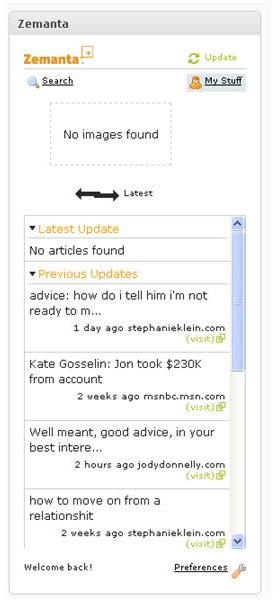
After you get Zemanta, you need to configure it a bit. For instance, you can specify the list of sites where you want to get articles and photos from. These photos and articles are arranged in a handy list (there is even preview for photos) and you just need to click on the ones you like. For instance, here is how Zemanta looks in WordPress:
One of the best features of Zemanta is that you can configure it to include articles and photos from your site as well. This is especially nice for large sites with tons of content, where the possible related articles are too many to pick manually. You just need to click the Preferences link, enter your blog URL/Flickr account and the stuff from there will be included in the lists. Later, when you click My Stuff, you will see a list only of your articles and/or photos.
In addition to the basic functionality of finding related articles and photos, Zemanta offers some more features, for instance the so called ReBlog feature. The ReBlog feature allows other bloggers to use portions of your post (stating you as the source and including a backlink) and this could help get more traffic to your site.
Also, when you join the Zemanta network, your content will become available for syndication to other bloggers to include in related articles lists. This could be of great benefit because if a high-traffic blog picks an article or two, just imagine how much traffic you will get for free! Zemanta might not be perfect but it offers a lot and it makes sense to try it because it is a decent content syndication tool.


