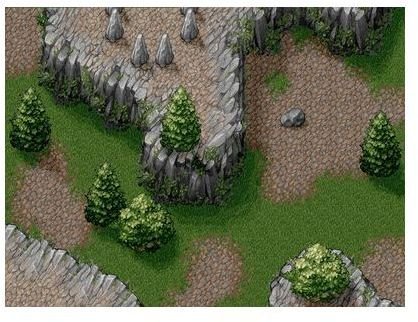
Along with discussing the advantages to using tiled backgrounds, this tutorial will show you how to add them.
In part 9 of the series we added the ability to define a level structure using a series of timed function calls. This works well for placing enemies on the screen, but is not so useful for drawing the background level. In this article we will add the ability to render a predefined tiled background.
Tiled backgrounds are made up of a handful of smaller repeated tiles arranged, in this case, in a grid. This approach has a number of advantages, but the biggest is that it reduces the memory requirements of the game. Using one single prerendered background image could conceivably take up several megabytes of memory per level. Of course using a prerendered background would give you the highest level of detail, but all the detail in the world doesn’t matter if the player clicks off the page because they are sick of waiting for the game to load. By contrast a tiled background will take up a fraction of the memory used by a prerendered background, and a good artist can still make some nice looking tiled backgrounds.
The first step in making a tiled background are the tiles themselves. I found a nice set of free tiled wilderness graphics from https://lostgarden.com/labels/free%20game%20graphics.html . The site also has another of other tiled resources sets which you may find interesting.
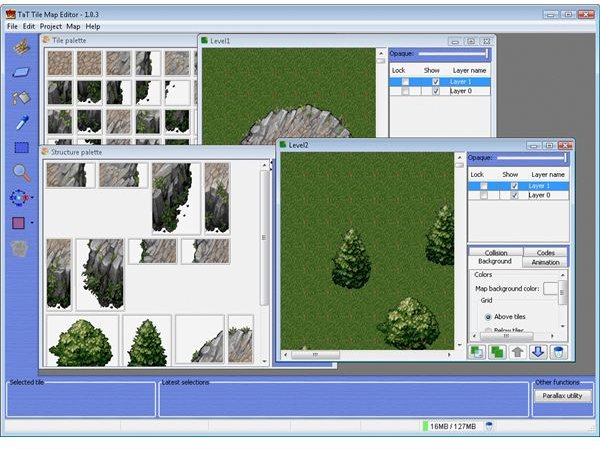
The next step is finding a level editor that will allows us to draw the levels through a graphical interface. Of course you could write your own (that’s another article series in itself), but luckily someone has already done the hard work for us. The TaT tile map editor from https://kotisivu.dnainternet.net/ttilli/tilemapeditor/download.htm will do the job nicely. It has a few nice features like layers and XML exporting that we will make use of.
And of course we need to add some code to render the tiled background within the game. First we need some way to hold the tiles background data. The TiledBackgroundDefinition class takes care of that for us. Lets look at the Actionscript code for that class now.
Faster Game Loading
package
{
public class TiledBackgroundDefinition
{
public var tiles:Array = null;
public var tileScrollRate:Number = 0;
public var tileWidth:int = 0;
public var tileHeight:int = 0;
}
}
The tiles property is a multidimensional array that will contain references to the GraphicsResources that will be used to draw the background. When populated the tiles array will contain a dimension for the layers, then the rows and then finally the columns. For example tiles[1][4][5] would point to the GraphicsResource for the sixth column (tiles[1][4][5]) of the fifth row (tiles[1][4][5]) of the second layer (tiles**[1]**[4][5]) – remember that arrays have zero based indexers. The tileWidth and tileHeight properties define the size in pixels of the tiles that make up the level. And tileScrollRate defines the speed at which the tiled level scrolls underneath the player to give the illusion of movement.
Now that we have a way to define a tiled background we need a place to store the definitions. The LevelDefinitions class will be used to store these definitions. Lets take a look at the new Actionscript code for the LevelDefinitions class now.
LevelDefinitions.as
package
{
import flash.geom.*;
import flash.utils.*;
public class LevelDefinitions
{
protected static var instance:LevelDefinitions = null;
protected var levelDefinitions:Dictionary = new Dictionary();
public var levelTileMaps:Dictionary = new Dictionary();
static public function get Instance():LevelDefinitions
{
if ( instance == null )
instance = new LevelDefinitions();
return instance;
}
public function LevelDefinitions()
{
}
public function addLevelDefinition(levelID:int, element:LevelDefinitionElement):void
{
if (levelDefinitions[levelID] == null)
levelDefinitions[levelID] = new Array();
(levelDefinitions[levelID] as Array).push(element);
levelDefinitions[levelID].sort(LevelDefinitionElement.sort);
}
public function getNextLevelDefinitionElements(levelID:int, lastTime:Number):Array
{
var returnArray:Array = new Array();
var nextTime:Number = -1;
if (levelDefinitions[levelID] != null)
{
for each (var levelDefElement:LevelDefinitionElement in levelDefinitions[levelID])
{
if (levelDefElement.time > lastTime && nextTime == -1)
{
returnArray.push(levelDefElement);
nextTime = levelDefElement.time;
}
else if (levelDefElement.time == nextTime)
{
returnArray.push(levelDefElement);
}
else if (levelDefElement.time > nextTime && nextTime != -1)
break;
}
}
return returnArray.length == 0?null:returnArray;
}
public function getNextLevelID(levelID:int):int
{
if (levelDefinitions[levelID + 1] == null) return 0;
return levelID + 1;
}
public function startup():void
{
GameObjectManager.Instance.addCollidingPair( CollisionIdentifiers.PLAYER, CollisionIdentifiers.ENEMY);
GameObjectManager.Instance.addCollidingPair( CollisionIdentifiers.ENEMY, CollisionIdentifiers.PLAYERWEAPON);
GameObjectManager.Instance.addCollidingPair( CollisionIdentifiers.PLAYER, CollisionIdentifiers.ENEMYWEAPON);
defineLevel1();
defineLevel2();
}
public function shutdown():void
{
}
protected function defineLevel1():void
{
var level1Tiles:TiledBackgroundDefinition = new TiledBackgroundDefinition();
levelTileMaps[1] = level1Tiles;
level1Tiles.tileScrollRate = 25;
level1Tiles.tileHeight = 40;
level1Tiles.tileWidth = 40;
level1Tiles.tiles =
[
[
[ResourceManager.GreenGraphicsID1, ResourceManager.GreenGraphicsID1, ResourceManager.GreenGraphicsID1, ResourceManager.GreenGraphicsID1, ResourceManager.GreenGraphicsID1, ResourceManager.GreenGraphicsID1, ResourceManager.GreenGraphicsID1, ResourceManager.GreenGraphicsID1, ResourceManager.GreenGraphicsID1, ResourceManager.GreenGraphicsID1, ResourceManager.GreenGraphicsID1, ResourceManager.GreenGraphicsID1, ResourceManager.GreenGraphicsID1, ResourceManager.GreenGraphicsID1, ResourceManager.GreenGraphicsID1]
…
,[ResourceManager.GreenGraphicsID1, ResourceManager.GreenGraphicsID1, ResourceManager.GreenGraphicsID1, ResourceManager.GreenGraphicsID1, ResourceManager.GreenGraphicsID1, ResourceManager.GreenGraphicsID1, ResourceManager.GreenGraphicsID1, ResourceManager.GreenGraphicsID1, ResourceManager.GreenGraphicsID1, ResourceManager.GreenGraphicsID1, ResourceManager.GreenGraphicsID1, ResourceManager.GreenGraphicsID1, ResourceManager.GreenGraphicsID1, ResourceManager.GreenGraphicsID1, ResourceManager.GreenGraphicsID1]
]
,[
[null, null, null, null, null, null, null, null, null, null, null, null, null, null, null]
…
,[null, ResourceManager.GreenGraphicsID62, ResourceManager.GreenGraphicsID63, ResourceManager.GreenGraphicsID64, null, ResourceManager.GreenGraphicsID48, ResourceManager.GreenGraphicsID49, null, null, null, null, null, null, null, null]
]
];
LevelDefinitions.Instance.addLevelDefinition(
1,
new LevelDefinitionElement(
4,
function():void
{
for each (var xPos:int in [150, 350])
{
(Enemy.pool.ItemFromPool as Enemy).startupBasicEnemy(
ResourceManager.SmallBluePlaneGraphics,
new Point(xPos, -ResourceManager. SmallBluePlaneGraphics.bitmap.height),
55);
}
}
));
…
}
protected function defineLevel2():void
{
…
}
}
}
We have added one new property, levelTileMaps, which is a Dictionary used to map TiledBackgroundDefinitions to LevelID’s (much like the levelDefinitions property we added in part 9).
In addition we have also added two new functions: defineLevel1 and defineLevel2. These functions exist as a way of separating out the code used to define separate levels, which as you can see gets quite verbose with the new tiled background definitions. Inside these functions we create one TiledBackgroundDefinition object, initialise its properties and then assign it to the levelTileMaps property.
When you create a level with TaT you get two files that are important for each level: the tileset.xml (which defines the individual tiles that make up a level) file and the YourLevelName.xml file (which defines how the tiles have been laid out to make a level). It’s the data from the YourLevelName.xml file that we put inside the tiles array.
You may be wondering how we went from the XML file created by the TaT editor to a multidimensional array. The short answer is that I cheated and wrote another application that takes the XML from TaT and converts it into the Actionscript code that creates the array you see here. The reason why I didn’t just parse the XML inside the application directly is much the same reason as why I choose not to define the level structure in XML: because parsing XML and converting string references to object references is a tedious process, and in this case writing an application to convert the XML to Actionscript was easier. While I won’t go into the code for the conversion application (it was a very quick and dirty program) you can download it from the Sourceforge SVN repository at https://flexfighters.svn.sourceforge.net/viewvc/flexfighters/TatResourceParser/ .
The second XML file created by the TaT editor defines the individual tiles that make up a level. Using the same application I mentioned above we have converted that XML data into the matching Actionscript code that embeds the images and then creates the matching GraphicsResource objects in the ResourceManager class. This new code is vert repetitious, so I will only show a fraction of the new resource definitions here.
ResourceManager.as (sample of new code)
[Embed(source="../media/Green26.png")]
public static var GreenID65:Class;
public static var GreenGraphicsID65:GraphicsResource = new GraphicsResource(new GreenID65());
[Embed(source="../media/Green5.png")]
public static var GreenID11:Class;
public static var GreenGraphicsID11:GraphicsResource = new GraphicsResource(new GreenID11(), 1, 1, new Rectangle(0, 0, 40, 40));
public static var GreenGraphicsID12:GraphicsResource = new GraphicsResource(new GreenID11(), 1, 1, new Rectangle(40, 0, 40, 40));
public static var GreenGraphicsID17:GraphicsResource = new GraphicsResource(new GreenID11(), 1, 1, new Rectangle(0, 40, 40, 40));
public static var GreenGraphicsID18:GraphicsResource = new GraphicsResource(new GreenID11(), 1, 1, new Rectangle(40, 40, 40, 40));
This code is the same as other resource definitions, with the exception of a new parameter passed to the ResourceManager in some cases. This is to accommodate what TaT refers to as “structures” - pictures that have been added to the level that are larger than the tile size. So for example a tile may be 40x40 pixels, but a tree image might be 40x80 pixels. In this case the tree image would be referenced as two separate images by the tile definition, one tile being the top of the tree and the second being the bottom. By allowing the GraphicsResource to reference the same area we can easily reference the same tile areas.
Now that we have a way to define and store the tiled background definitions it’s time to create a class that can read that data and actually draw the level to the screen. For that we create the TiledBackground class. Lets look at that Actionscript code now.
TiledBackground.as
package
{
import flash.display.*;
import flash.geom.*;
import mx.collections.*;
import mx.core.*;
public class TiledBackground extends BaseObject
{
public var scrolling:Boolean = true;
protected var yOffset:Number = 0;
protected var definition:TiledBackgroundDefinition = null;
static public var pool:ResourcePool = new ResourcePool(NewTiledBackground);
static public function NewTiledBackground():TiledBackground
{
return new TiledBackground();
}
public function TiledBackground()
{
super();
}
public function startupTiledBackground(definition:TiledBackgroundDefinition):void
{
super.startupBaseObject(ZOrders.BACKGROUNDZORDER);
this.definition = definition;
this.yOffset = 0;
this.scrolling = true;
}
override public function shutdown():void
{
super.shutdown();
}
override public function enterFrame(dt:Number):void
{
if (scrolling)
{
var mapHeight:int = definition.tiles[0].length * definition.tileHeight;
var mapOverlap:int = mapHeight - Application.application.height;
yOffset += definition.tileScrollRate * dt;
if (yOffset > mapOverlap)
{
scrolling = false;
yOffset = mapOverlap;
}
}
}
override public function copyToBackBuffer(db:BitmapData):void
{
var startRow:int = yOffset / definition.tileHeight;
var startRowNumber:Number = yOffset / definition.tileHeight;
var startRowHeight:int = definition.tileHeight * (startRowNumber - startRow);
var drawnHeight:int = 0;
var drawnWidth:int = 0;
var layer:int = 0;
var row:int = startRow;
var col:int = 0;
// loop through each layer
for (layer = 0; layer < definition.tiles.length; ++layer)
{
// loop through each row
var count:int = 0;
for (row = (definition.tiles[layer] as Array).length - 1 - startRow; row >= 0 ; –row)
{
// loop through each column of the current row
for (col = 0; col < (definition.tiles[layer][row] as Array).length; ++col)
{
var graphics:GraphicsResource = definition.tiles[layer][row][col] as GraphicsResource;
var top:int = Application.application.height - drawnHeight - definition.tileHeight + startRowHeight;
if (graphics != null)
{
db.copyPixels(
graphics.bitmap,
graphics.drawRect,
new Point(
col * definition.tileWidth,
top),
graphics.bitmapAlpha,
new Point(
graphics.drawRect.x,
graphics.drawRect.y),
true);
}
drawnWidth += definition.tileWidth;
if (drawnWidth >= Application.application.width)
break;
}
drawnWidth = 0;
drawnHeight += definition.tileHeight;
if (drawnHeight >= Application.application.height + definition.tileHeight)
break;
}
drawnHeight = 0;
}
}
}
}
We have 3 properties to note here. The scrolling property is true while the level is scrolling, and false once the level has scrolled completely to the end. The yOffset property is used to store how far the level has scrolled. The definition property holds a reference to one of the tiled background definitions we created in the Level class.
The two functions that do the bulk of the work are the enterFrame and copyToBackBuffer functions. During the enterFrame function the TiledBackground scrolls down using the tileScrollRate property of the TiledBackgroundDefinition class to define the scrolling speed. Once it detects that it has reached the end of the level it sets scrolling to false and stops updating the yOffset property. The copyToBackBuffer function does the work of determining where to draw the tiles. It first loops through the layers, then the rows and then finally the columns to draw each tile individually in the correct position on the screen.
The creation of the TiledBackground class also required splitting up the old GameObject class. Originally the GameObject assumed that each element in the game could be represented by one GraphicsResource. Until TiledBackground that was a valid assumption, however the TiledBackground needs to access many hundreds of individual GraphicsResources to draw itself on the screen. To accommodate this we have created a new class called BaseObject which contains all the common properties of game elements, excluding the GraphicsResource. TiledBackground and GameObject both now extend BaseObject, while all other game element classes like Player and Enemy remain unaffected.
It’s the Level class that ultimately puts all this work together and creates a TiledBackground with the appropriate definition. Lets look at the new Actionscript for the Level class now.
Level.as
package
{
import flash.events.*;
import flash.geom.*;
import flash.media.*;
import flash.net.*;
import flash.utils.*;
import mx.core.*;
public class Level
{
protected static var instance:Level = null;
protected static const TimeBetweenLevelElements:Number = 2;
protected static const TimeBetweenClouds:Number = 2.5;
protected static const TimeToLevelEnd:Number = 2;
protected var nextDefinitions:Array = null;
protected var levelID:int = 0;
protected var totalTime:Number = 0;
protected var timeToNextCloud:Number = 0;
protected var timeToLevelEnd:Number = 0;
protected var backgroundMusic:SoundChannel = null;
public var levelEnd:Boolean = false;
static public function get Instance():Level
{
if ( instance == null )
instance = new Level();
return instance;
}
public function Level()
{
}
public function startup(levelID:int):void
{
new Player().startupPlayer();
timeToLevelEnd = TimeToLevelEnd;
levelEnd = false;
backgroundMusic = ResourceManager.Track1FX.play(0, int.MAX_VALUE);
this.totalTime = 0;
this.levelID = levelID;
nextDefinitions = LevelDefinitions.Instance.getNextLevelDefinitionElements(levelID, 0);
var tileDefinition:TiledBackgroundDefinition = LevelDefinitions.Instance.levelTileMaps[levelID] as TiledBackgroundDefinition;
if (tileDefinition != null)
(TiledBackground.pool.ItemFromPool as TiledBackground).startupTiledBackground(tileDefinition);
}
public function shutdown():void
{
backgroundMusic.stop();
backgroundMusic = null;
}
public function enterFrame(dt:Number):void
{
totalTime += dt;
if (nextDefinitions == null)
{
if (Enemy.pool.NumberOfActiveObjects == 0)
levelEnd = true;
}
else
{
var nextLevelDefTime:Number = (nextDefinitions[0] as LevelDefinitionElement).time;
if (totalTime >= nextLevelDefTime)
{
for each (var levelDefElement:LevelDefinitionElement in nextDefinitions)
levelDefElement.func();
nextDefinitions = LevelDefinitions.Instance.getNextLevelDefinitionElements(levelID, nextLevelDefTime);
}
}
// add cloud
timeToNextCloud -= dt;
if (timeToNextCloud <= dt)
{
timeToNextCloud = TimeBetweenClouds;
var cloudBackgroundLevelElement:BackgroundLevelElement = BackgroundLevelElement.pool.ItemFromPool as BackgroundLevelElement;
cloudBackgroundLevelElement.startupBackgroundLevelElement(
ResourceManager.CloudGraphics,
new Point(Math.random() * Application.application.width, -ResourceManager.CloudGraphics.bitmap.height),
ZOrders.CLOUDSBELOWZORDER,
75);
}
if (levelEnd)
{
timeToLevelEnd -= dt;
var scale:Number = timeToLevelEnd / TimeToLevelEnd;
if (scale < 0) scale = 0;
var transform:SoundTransform = backgroundMusic.soundTransform;
transform.volume = scale;
backgroundMusic.soundTransform = transform;
}
if (timeToLevelEnd <= 0)
Application.application.currentState = “LevelEnd”;
}
}
}
As you can see we have stripped out all the old code that was responsible for randomly creating the BackgroundLevelElement and have added 3 lines of code to now create a new TiledBackground class.
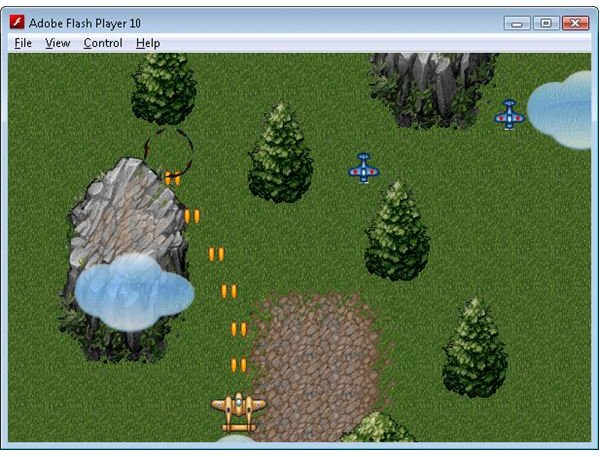
By adding the ability to render a tiled background we have a way of creating nice looking levels that don’t take up too much memory. And thanks to some freely available map editing tools and background tile sets it is quite easy to generate these levels even if you don’t have a lot of artistic ability.
Go back to Flash Game Development with Flex and ActionScript
Related Files
Images
This post is part of the series: Game programming with Flex
Learn how to create a Flash game using Flex with this step by step series.
- Flash Game Development with Flex and Actionscript - Getting Started
- States & Double Buffer Rendering in Flex 4.0
- Flex & Actionscript Tutorial: Adding Game Actions
- Creating an Interactive Animated Background With Flex and Actionscript
- Adding Weapons to Your Game: Flex & Actionscript Tutorial
- Collision Detection With Actionscript
- Adding Bitmap Animations With Flex and Actionscript
- Adding Music and Sound FX With Flex and Actionscript
- Defining Levels: Game Design With Flex and Actionscript
- Actionscript Tutorial: Add a Scrolling Tiled Background


