In part 5 we added some enemies and gave the player the ability to fire it weapons. In part 6 we will add collision detection to allow the player to actually shoot the enemies.
Collision detection is the ability to detect when two objects have collided, and then react appropriately. In part 5 we gave the player the ability to fire weapons at the oncoming enemies. The only problem was that these bullets just passed right through the enemies. In part 6 we will add the necessary code to implement collection detection, which will allow us to shoot the enemies down.
Collision detection is one of those seemingly simple concepts that can be incredibly difficult to implement. You will find entire books devoted to the topic of testing for intersections between 2D and 3D shapes. Fortunately for us our collision detection will be quite simple. Each object on the screen will have a rectangular area in which collisions will be detected (the “collision area”). For simplicity this area will be the same as the size of the underlying graphic that is used to display the sprite on the screen. Once these rectangles overlap we will detect a collision.
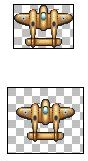
In order to get the best results these graphics should cropped as closely to the image that is to be displayed as possible. Below is an example of two images that could be used in the game. Both will display exactly the same way because the space around the plane is transparent. However the top image is more optimized for the collision detection system though because it is closely cropped to the actual image of the plane. The bottom image would appear to collide with other objects before it should because the collision detection system doesn’t take any notice of the transparent border, and assumes that the entire area of the image will be used as the collision area.
So lets take a look at the changes that are needed in the GameObject class to implement collision detection.
When Objects Collide
package
{
import flash.display.*;
import flash.events.*;
import flash.geom.*;
/*
The base class for all objects in the game.
*/
public class GameObject
{
// object position
public var position:Point = new Point(0, 0);
// higher zOrder objects are rendered on top of lower ones
public var zOrder:int = 0;
// the bitmap data to display
public var graphics:GraphicsResource = null;
// true if the object is active in the game
public var inuse:Boolean = false;
public var collisionArea:Rectangle;
public var collisionName:String = CollisionIdentifiers.NONE;
public function get CollisionArea():Rectangle
{
return new Rectangle(position.x, position.y, collisionArea.width, collisionArea.height);
}
public function GameObject()
{
}
public function startupGameObject(graphics:GraphicsResource, position:Point, z:int = 0):void
{
if (!inuse)
{
this.graphics = graphics;
this.zOrder = z;
this.position = position.clone();
this.inuse = true;
GameObjectManager.Instance.addGameObject(this);
setupCollision();
}
}
public function shutdown():void
{
if (inuse)
{
graphics = null;
inuse = false;
GameObjectManager.Instance.removeGameObject(this);
}
}
public function copyToBackBuffer(db:BitmapData):void
{
db.copyPixels(graphics.bitmap, graphics.bitmap.rect, position, graphics.bitmapAlpha, new Point(0, 0), true);
}
public function enterFrame(dt:Number):void
{
}
public function click(event:MouseEvent):void
{
}
public function mouseDown(event:MouseEvent):void
{
}
public function mouseUp(event:MouseEvent):void
{
}
public function mouseMove(event:MouseEvent):void
{
}
protected function setupCollision():void
{
collisionArea = graphics.bitmap.rect;
}
public function collision(other:GameObject):void
{
}
}
}
We have added two new properties: collisionArea, and collisionName. The collisionArea property represents a rectangle that defines the collision area described above. The collisionName property is a name assigned to a GameObject that defines what type of object it is, at least as far as the collision system will be concerned. For example a weapon fired by the player will have a collisionName of “PlayerWeapon”, while an enemy might have a collision name of “Enemy”. By default we set it to “None” through the CollisionIdentifiers.NONE property.
In addition we also have three new functions: collision, CollisionArea and setupCollision. The collision function is another empty function that is expected to be overridden by an extending class. It will be called by GameObjectManager when a collision has been detected. The setupCollision function is used to save the size of the graphic for use with the collision detection system. CollisionArea returns the collisionArea rectangle at the GameObjects current position on the screen.
You may be wondering why we bother having the collisionArea property at all considering it is exactly the same as graphics.bitmap.rect. This is because later on (in part 7) we will be adding animation to the game. The animation class will override the setupCollision function with its own specialised logic. For now though the collision area will be the same as the graphic rectangle.
CollisionIdentifiers.as
package
{
public class CollisionIdentifiers
{
public static const NONE:String = “None”;
public static const PLAYER:String = “Player”;
public static const PLAYERWEAPON:String = “PlayerWeapon”;
public static const ENEMYWEAPON:String = “EnemyWeapon”;
public static const ENEMY:String = “Enemy”;
public static const POWERUP:String = “Powerup”;
}
}
Like the ZOrders class, the CollisionIdentifiers class is used to hold a number of predefined static properties; in this case collision names. Again the purpose of this is to facilitate self documentation. CollisionIdentifiers.PLAYER is self explanatory, whereas the string “Player” doesn’t have the same inherent meaning.
Lets now look at the changes made to the GameObjectManager class.
GameObjectManager.as
package
{
import flash.display.*;
import flash.events.*;
import flash.utils.*;
import mx.collections.*;
import mx.core.*;
public class GameObjectManager
{
// double buffer
public var backBuffer:BitmapData;
// colour to use to clear backbuffer with
public var clearColor:uint = 0xFF0043AB;
// static instance
protected static var instance:GameObjectManager = null;
// the last frame time
protected var lastFrame:Date;
// a collection of the GameObjects
protected var gameObjects:ArrayCollection = new ArrayCollection();
// a collection where new GameObjects are placed, to avoid adding items
// to gameObjects while in the gameObjects collection while it is in a loop
protected var newGameObjects:ArrayCollection = new ArrayCollection();
// a collection where removed GameObjects are placed, to avoid removing items
// to gameObjects while in the gameObjects collection while it is in a loop
protected var removedGameObjects:ArrayCollection = new ArrayCollection();
protected var collisionMap:Dictionary = new Dictionary();
static public function get Instance():GameObjectManager
{
if ( instance == null )
instance = new GameObjectManager();
return instance;
}
public function GameObjectManager()
{
if ( instance != null )
throw new Error( “Only one Singleton instance should be instantiated” );
backBuffer = new BitmapData(Application.application.width, Application.application.height, false);
}
public function startup():void
{
lastFrame = new Date();
}
public function shutdown():void
{
shutdownAll();
}
public function enterFrame():void
{
// Calculate the time since the last frame
var thisFrame:Date = new Date();
var seconds:Number = (thisFrame.getTime() - lastFrame.getTime())/1000.0;
lastFrame = thisFrame;
removeDeletedGameObjects();
insertNewGameObjects();
Level.Instance.enterFrame(seconds);
checkCollisions();
// now allow objects to update themselves
for each (var gameObject:GameObject in gameObjects)
{
if (gameObject.inuse)
gameObject.enterFrame(seconds);
}
drawObjects();
}
public function click(event:MouseEvent):void
{
for each (var gameObject:GameObject in gameObjects)
{
if (gameObject.inuse) gameObject.click(event);
}
}
public function mouseDown(event:MouseEvent):void
{
for each (var gameObject:GameObject in gameObjects)
{
if (gameObject.inuse) gameObject.mouseDown(event);
}
}
public function mouseUp(event:MouseEvent):void
{
for each (var gameObject:GameObject in gameObjects)
{
if (gameObject.inuse) gameObject.mouseUp(event);
}
}
public function mouseMove(event:MouseEvent):void
{
for each (var gameObject:GameObject in gameObjects)
{
if (gameObject.inuse) gameObject.mouseMove(event);
}
}
protected function drawObjects():void
{
backBuffer.fillRect(backBuffer.rect, clearColor);
// draw the objects
for each (var gameObject:GameObject in gameObjects)
{
if (gameObject.inuse)
gameObject.copyToBackBuffer(backBuffer);
}
}
public function addGameObject(gameObject:GameObject):void
{
newGameObjects.addItem(gameObject);
}
public function removeGameObject(gameObject:GameObject):void
{
removedGameObjects.addItem(gameObject);
}
protected function shutdownAll():void
{
// don’t dispose objects twice
for each (var gameObject:GameObject in gameObjects)
{
var found:Boolean = false;
for each (var removedObject:GameObject in removedGameObjects)
{
if (removedObject == gameObject)
{
found = true;
break;
}
}
if (!found)
gameObject.shutdown();
}
}
protected function insertNewGameObjects():void
{
for each (var gameObject:GameObject in newGameObjects)
{
for (var i:int = 0; i < gameObjects.length; ++i)
{
if (gameObjects.getItemAt(i).zOrder > gameObject.zOrder ||
gameObjects.getItemAt(i).zOrder == -1)
break;
}
gameObjects.addItemAt(gameObject, i);
}
newGameObjects.removeAll();
}
protected function removeDeletedGameObjects():void
{
// insert the object accordng to it’s z position
for each (var removedObject:GameObject in removedGameObjects)
{
var i:int = 0;
for (i = 0; i < gameObjects.length; ++i)
{
if (gameObjects.getItemAt(i) == removedObject)
{
gameObjects.removeItemAt(i);
break;
}
}
}
removedGameObjects.removeAll();
}
public function addCollidingPair(collider1:String, collider2:String):void
{
if (collisionMap[collider1] == null)
collisionMap[collider1] = new Array();
if (collisionMap[collider2] == null)
collisionMap[collider2] = new Array();
collisionMap[collider1].push(collider2);
collisionMap[collider2].push(collider1);
}
protected function checkCollisions():void
{
for (var i:int = 0; i < gameObjects.length; ++i)
{
var gameObjectI:GameObject = gameObjects.getItemAt(i) as GameObject;
for (var j:int = i + 1; j < gameObjects.length; ++j)
{
var gameObjectJ:GameObject = gameObjects.getItemAt(j) as GameObject;
// early out for non-colliders
var collisionNameNotNothing:Boolean = gameObjectI.collisionName != CollisionIdentifiers.NONE;
// objects can still exist in the gameObjects collection after being disposed, so check
var bothInUse:Boolean = gameObjectI.inuse && gameObjectJ.inuse;
// make sure we have an entry in the collisionMap
var collisionMapEntryExists:Boolean = collisionMap[gameObjectI.collisionName] != null;
// make sure the two objects are set to collide
var testForCollision:Boolean = collisionMapEntryExists && collisionMap[gameObjectI.collisionName]. indexOf(gameObjectJ.collisionName) != -1
if ( collisionNameNotNothing &&
bothInUse &&
collisionMapEntryExists &&
testForCollision)
{
if (gameObjectI.CollisionArea. intersects(gameObjectJ.CollisionArea))
{
gameObjectI.collision(gameObjectJ);
gameObjectJ.collision(gameObjectI);
}
}
}
}
}
}
}
We have added one property to GameObjectManager: collisionMap. This is a dictionary where the key is the collision name of a GameObject, and the value is an array of the collision names of all the other GameObjects that it will collide with. Once populated it will look something like this:
Key: “Player” Value: {“Enemy”, “EnemyWeapon”, “Powerup”}
Key: “Enemy” Value: {“Player”, “PlayerWeapon”}
Key: “PlayerWeapon” Value: {“Enemy”}
Key: “Powerup” Value: {“Player”}
and so on.
The addCollidingPair function is used to populate the collisionMap dictionary. We will call this from in the main.mxml file in the creationComplete function.
The checkCollision function is where the collisions are actually detected and the corresponding GameObjects notified. It looks complicated, but is quite simple.
It starts by looping through the gameObjects collection (which contains all the active GameObjects) twice, and is structured in such as way as to compare each GameObject to every other GameObject once. It then does a number of checks:
- Is the collisionName of either GameObject “None”? Both GameObjects need a collisionName that is not “None” to participate in a collision.
- Are both of the GameObjects inuse (i.e. are they active in the game). This should always be the case, but it doesn’t hurt to check.
- Are the collisionNames of the GameObjects registered as being colliders in the collisionMap? The purpose of the collisionMap is to determine which GameObject will collide.
If these few checks are true then we use the intersects function of a rectangle to see if the GameObjects are actually colliding. If they are then they are notified through their collision function.
As I mentioned earlier in the article collision detection is a subject that has entire books devoted to it. There are many clever ways to optimize a collision detection system which we have ignored. What we have here is a simple, brute force method of checking for collisions. It may not be a shining example of an opimized collision detection system, but it works because we will only have maybe two dozen GameObjects on the screen at any one point.
In order for any collisions to be detected at all we need to make a few calls to the addCollidingPair function. These will be made in the creationComplete function of our Application object. Lets look at those changes now.
main.mxml
<mx:Application
xmlns:mx=“https://www.adobe.com/2006/mxml"
layout=“absolute”
width=“600”
height=“400”
frameRate=“100”
creationComplete=“creationComplete()”
enterFrame=“enterFrame(event)”
click=“click(event)”
mouseDown=“mouseDown(event)”
mouseUp=“mouseUp(event)”
mouseMove=“mouseMove(event)”
currentState=“MainMenu”>
<mx:State
name=“Game”
enterState=“enterGame(event)”
exitState=“exitGame(event)">
</mx:State>
<mx:State name=“MainMenu”>
<mx:AddChild relativeTo="{myCanvas}” position=“lastChild”>
<mx:Button x=“525” y=“368” label=“Start” id=“btnStart” click=“startGameClicked(event)”/>
</mx:AddChild>
</mx:State>
</mx:states>
<mx:Canvas x=“0” y=“0” width=“100%” height=“100%” id=“myCanvas”/>
<![CDATA[
protected var inGame:Boolean = false;
public function creationComplete():void
{
GameObjectManager.Instance. addCollidingPair(CollisionIdentifiers.PLAYER, CollisionIdentifiers.ENEMY);
GameObjectManager.Instance. addCollidingPair(CollisionIdentifiers.ENEMY, CollisionIdentifiers.PLAYERWEAPON);
GameObjectManager.Instance. addCollidingPair(CollisionIdentifiers.PLAYER, CollisionIdentifiers.ENEMYWEAPON);
}
public function enterFrame(event:Event):void
{
if (inGame)
{
GameObjectManager.Instance.enterFrame();
myCanvas.graphics.clear();
myCanvas.graphics. beginBitmapFill(GameObjectManager.Instance.backBuffer, null, false, false);
myCanvas.graphics.drawRect(0, 0, this.width, this.height);
myCanvas.graphics.endFill();
}
}
private function click(event:MouseEvent):void
{
GameObjectManager.Instance.click(event);
}
private function mouseDown(event:MouseEvent):void
{
GameObjectManager.Instance.mouseDown(event);
}
private function mouseUp(event:MouseEvent):void
{
GameObjectManager.Instance.mouseUp(event);
}
private function mouseMove(event:MouseEvent):void
{
GameObjectManager.Instance.mouseMove(event);
}
protected function startGameClicked(event:Event):void
{
currentState = “Game”
}
protected function enterGame(event:Event):void
{
Mouse.hide();
GameObjectManager.Instance.startup();
Level.Instance.startup();
inGame = true;
}
protected function exitGame(event:Event):void
{
Mouse.show();
Level.Instance.shutdown();
GameObjectManager.Instance.shutdown();
inGame = false;
}
]]>
</mx:Script>
</mx:Application>
As you can see specifying that two GameObjects will collide with each other only requires one call to the GameObjectManager addCollidingPair function. Here we have specified that the player will collide with an enemy, the enemies will collide with the players weapons, and that the player will collide with the enemies weapons.
So now that we have collisions being detected we need to update the code for the Player, Weapon and Enemy classes to set their collisionName and to react when a detection has been found. Lets look at the Player class now.
Player.as
package
{
import flash.events.*;
import flash.geom.*;
import mx.core.*;
public class Player extends GameObject
{
protected static const TimeBetweenShots:Number = 0.25;
protected var shooting:Boolean = false;
protected var timeToNextShot:Number = 0;
public function Player()
{
}
public function startupPlayer():void
{
startupGameObject(ResourceManager.BrownPlaneGraphics, new Point(Application.application.width / 2, Application.application.height / 2), ZOrders.PlayerZOrder);
shooting = false;
timeToNextShot = 0;
this.collisionName = CollisionIdentifiers.PLAYER;
}
override public function shutdown():void
{
super.shutdown();
}
override public function enterFrame(dt:Number):void
{
super.enterFrame(dt);
timeToNextShot -= dt;
if (timeToNextShot <= 0 && shooting)
{
timeToNextShot = TimeBetweenShots;
var weapon:Weapon = Weapon.pool.ItemFromPool as Weapon;
weapon.startupBasicWeapon(
ResourceManager.TwoBulletsGraphics,
new Point(
position.x + graphics.bitmap.width / 2 - ResourceManager.TwoBulletsGraphics.bitmap.width / 2,
position.y - graphics.bitmap.height + ResourceManager.TwoBulletsGraphics.bitmap.height * 2),
150,
true);
}
}
override public function mouseMove(event:MouseEvent):void
{
// move player to mouse position
position.x = event.stageX;
position.y = event.stageY;
// keep player on the screen
if (position.x < 0)
position.x = 0;
if (position.x > Application.application.width - graphics.bitmap.width)
position.x = Application.application.width - graphics.bitmap.width;
if (position.y < 0)
position.y = 0;
if (position.y > Application.application.height - graphics.bitmap.height )
position.y = Application.application.height - graphics.bitmap.height ;
}
override public function mouseDown(event:MouseEvent):void
{
shooting = true;
}
override public function mouseUp(event:MouseEvent):void
{
shooting = false;
}
override public function collision(other:GameObject):void
{
Level.Instance.levelEnd = true;
this.shutdown();
}
}
}
As you can see there are two modifications to the Player class to accommodate the new collision detection system. The first is during the startup function where we set the collisionName. The second is the addition of the collision function, which will be called by the GameObjectManager when a collision has been found. Here we notify the Level that the level should end by setting the levelEnd to true (because the player has been killed), and we call shutdown to remove the Player from the game.
The changes to the Enemy and Weapon classes are exactly the same except for modifying the Levels levelEnd property in the collision function. For the sake of brevity I won’t show the Enemy or Weapons classes - you can download the source at the end of the article and check out the changes for yourself.
The final change we have to make is to the Level class. Lets look at that now.
Level.as
package
{
import flash.events.*;
import flash.geom.*;
import flash.media.*;
import flash.net.*;
import flash.utils.*;
import mx.collections.ArrayCollection;
import mx.core.*;
public class Level
{
protected static var instance:Level = null;
protected static const TimeBetweenLevelElements:Number = 2;
protected static const TimeBetweenEnemies:Number = 3;
protected static const TimeBetweenClouds:Number = 2.5;
protected static const TimeToLevelEnd:Number = 2;
protected var timeToNextLevelElement:Number = 0;
protected var levelElementGraphics:ArrayCollection = new ArrayCollection();
protected var timeToNextEnemy:Number = 0;
protected var enemyElementGraphics:ArrayCollection = new ArrayCollection();
protected var timeToNextCloud:Number = 0;
protected var timeToLevelEnd:Number = 0;
public var levelEnd:Boolean = false;
static public function get Instance():Level
{
if ( instance == null )
instance = new Level();
return instance;
}
public function Level(caller:Function = null )
{
if ( Level.instance != null )
throw new Error( “Only one Singleton instance should be instantiated” );
levelElementGraphics. addItem(ResourceManager.SmallIslandGraphics);
levelElementGraphics. addItem(ResourceManager.BigIslandGraphics);
levelElementGraphics. addItem(ResourceManager.VolcanoIslandGraphics);
enemyElementGraphics. addItem(ResourceManager.SmallBluePlaneGraphics);
enemyElementGraphics. addItem(ResourceManager.SmallGreenPlaneGraphics);
enemyElementGraphics. addItem(ResourceManager.SmallWhitePlaneGraphics);
}
public function startup():void
{
timeToNextLevelElement = 0;
new Player().startupPlayer();
timeToLevelEnd = TimeToLevelEnd;
levelEnd = false;
}
public function shutdown():void
{
}
public function enterFrame(dt:Number):void
{
// add a background element
timeToNextLevelElement -= dt;
if (timeToNextLevelElement <= 0)
{
timeToNextLevelElement = TimeBetweenLevelElements;
var graphics:GraphicsResource = levelElementGraphics.getItemAt(MathUtils.randomInteger(0, levelElementGraphics.length)) as GraphicsResource;
var backgroundLevelElement:BackgroundLevelElement = BackgroundLevelElement.pool.ItemFromPool as BackgroundLevelElement;
backgroundLevelElement.startupBackgroundLevelElement(
graphics,
new Point(Math.random() * Application.application.width, -graphics.bitmap.height),
ZOrders.BackgoundZOrder,
50);
}
// add an emeny
timeToNextEnemy -= dt;
if (timeToNextEnemy <= 0)
{
timeToNextEnemy = TimeBetweenEnemies;
var enemygraphics:GraphicsResource = enemyElementGraphics.getItemAt(MathUtils.randomInteger(0, enemyElementGraphics.length)) as GraphicsResource;
var enemy:Enemy = Enemy.pool.ItemFromPool as Enemy;
enemy.startupBasicEnemy(
enemygraphics,
new Point(Math.random() * Application.application.width, -enemygraphics.bitmap.height),
55);
}
// add cloud
timeToNextCloud -= dt;
if (timeToNextCloud <= dt)
{
timeToNextCloud = TimeBetweenClouds;
var cloudBackgroundLevelElement:BackgroundLevelElement = BackgroundLevelElement.pool.ItemFromPool as BackgroundLevelElement;
cloudBackgroundLevelElement. startupBackgroundLevelElement(
ResourceManager.CloudGraphics,
new Point(Math.random() * Application.application.width, -ResourceManager.CloudGraphics.bitmap.height),
ZOrders.CloudsBelowZOrder,
75);
}
if (levelEnd)
timeToLevelEnd -= dt;
if (timeToLevelEnd <= 0)
Application.application.currentState = “MainMenu”;
}
}
}
The changes to the Level class simply allow it to be notified when the Player dies through the levelEnd property. When set to true a count down beings in enterFrame using the timeToLevelEnd property, and when timeToLevelEnd reaches 0 the state is changed back to MainMenu which drops us back to the main menu screen.
Collision detection is essential in any action game. In this article we have implemented a simple, but effective, collision detection system which allows the player to now interact with other elements in the game, like being able to shoot the enemies. Unfortunately at the moment actually destroying an enemy is quite unsatisfying because they just disappear. In part 7 of the series we will add some animations to the game, and with that some nice explosions.
Back to Flash Game Development with Flex and ActionScript
Related Files
This post is part of the series: Game programming with Flex
Learn how to create a Flash game using Flex with this step by step series.
- Flash Game Development with Flex and Actionscript - Getting Started
- States & Double Buffer Rendering in Flex 4.0
- Flex & Actionscript Tutorial: Adding Game Actions
- Creating an Interactive Animated Background With Flex and Actionscript
- Adding Weapons to Your Game: Flex & Actionscript Tutorial
- Collision Detection With Actionscript
- Adding Bitmap Animations With Flex and Actionscript
- Adding Music and Sound FX With Flex and Actionscript
- Defining Levels: Game Design With Flex and Actionscript
- Actionscript Tutorial: Add a Scrolling Tiled Background


