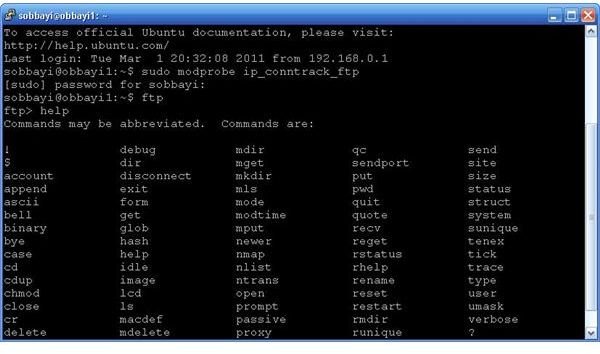
There are plenty of FTP GUI applications you can use to copy files across networks. In the absence of these you may need to use a FTP command line tool therefore making it necessary to have a FTP commands list handy. This guide is one such list.
Introduction
To get to know what the common FTP commands list contains, it is best to know what FTP is. FTP, known as File Transfer Protocol in full is a standard service that is used to copy files from one computer to another over a network in either the Internet or an Intranet. The FTP service is facilitated by the use of client and server applications to handle the requests. Some of these applications have calls to the FTP commands built-in while others like the command line tools require you to type them in manually. Here is an article on the some of the workings in FTP and a comparison of FTP programs .
FTP Syntax
You can use FTP from the command line using the following command:
FTP
The usage is as follows:
FTP [options] [-s:filename] [-w:windowsize] [host]
where
-s:filename Specifies a text file containing FTP commands; the commands will automatically run after FTP starts.
-w:buffersize Overrides the default transfer buffer size of 4096.
host Specifies the host name or IP address of the remote host to connect to.
The options above are all optional.
Other Common FTP Commands
append - This tells the server that If the file specified in the pathname exists at the server site, then the data shall be appended to that file;
ascii - Default transfer data type intended primarily for the transfer of text files
bell - Cause a bell to ring after each command.
binary - Transfer data type best for the transfer of files other than text files
bye - End the FTP client session and quite the program
cd - Used to browse remote directories
close - Close the active connection
delete - delete the specified file on the remote host
debug - Toggle debug mode on and off
dir - List a remote directory’s files and subdirectories.
disconnect - Disconnect from the remote host, but not the FTP program.
get - Cop a file from the server to your local computer
glob - Toggle the use of wildcard characters in local path-names.
hash - Toggle printing a hash (#) for each 2K data block transferred.
help - Used to print a list of available commands
lcd - Used to browse local directories
literal - Send arguments, as-is, to the remote FTP host.
ls - List items in the directory
mdelete - Delete files on remote host.
mdir - Display a list of a remote directory’s files and sub-directories.
mget - Copy multiple remote files to the local computer.
mkdir - Used to create a directory on the server
mls - List a remote directory’s files and folders.
mput - Copy multiple local files to the remote host.
open - Open a connection to the server
prompt – During copying of multiple files, this allows the FTP client to prompt for action after each file has been copied
put - Send a file from the local computer to the remote server
pwd - Returns the name of the current directory on the remote host
quit - End the FTP client session and quite the program
quote - Send arguments, as-is, to the remote FTP host
recv - Copy a remote file to the local PC
remotehelp - Display help for remote commands
rename - Used to rename a specified file to the new name given
rmdir - This is used to remove a directory from the drectory tree
send - Copy a local file to the remote host.
status - Used to check whether you are connected to the server, what other features are turned on and off
trace - Toggle data packet tracing on and off
type - The data representation type used for data transfer and storage.
user - The person or process wishing to access the file transfer service
verbose - Turn on and off echoing activity on screen
This sums up the common FTP commands list
References
ietf.org https://tools.ietf.org/html/rfc959
Microsoft.com https://www.microsoft.com/resources/documentation/windows/xp/all/proddocs/en-us/ntcmds.mspx?mfr=true
Screenshot by author


