
Are you, like many others, looking for the most important plug-ins for a small business WordPress website or blog? Read here for the best options in WordPress plug-ins that can benefit your small business’s marketing capabilities.
Deciding which are the best plug-ins for a small business Wordpress website can be a tedious task. However, with a bit of educational information and a bit of helpful advice you can quickly have a great small business WordPress blog up, running and driving in the traffic.
Many previously successful business owners will attest to the fact that having built their own business website, they also built an accompanying blog with it. Their blog aims are to provide the most helpful information that is, of course, related to their personal business services or product niche. In turn, traffic to the blog can increase traffic to the regular site as well.
Crawl Rate Tracker
Make this easy to install and easier to use WordPress plug-in part of your business blog indefinitely. The most important aspect of this
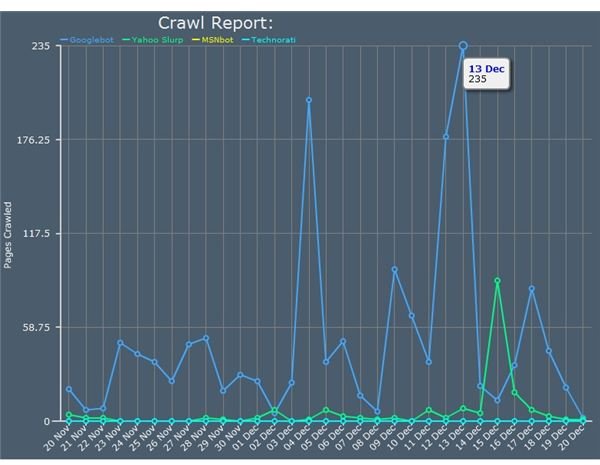
plug-in is that with targeted marketing, and a bit of investigation, you will learn which marketing techniques are working best for you and your site.
The crawl rate tracker will actually show you which search engine crawler has visited your site, which page was crawled, and how many times a specific search engine crawler has visited your site each day. Seeing your site being indexed by web crawlers can be quite exciting if you fully understand that this is the beginning of your websites long relationship with search engines.
WordPress Stats
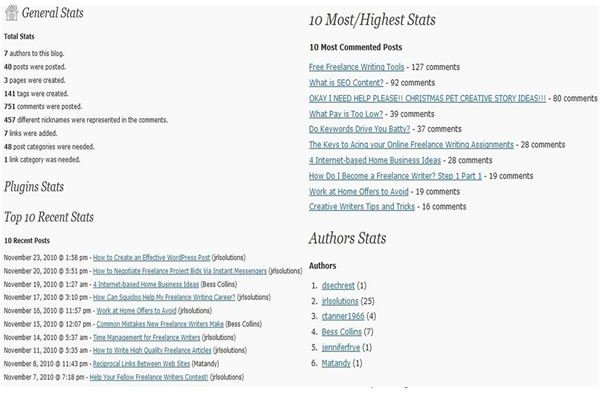
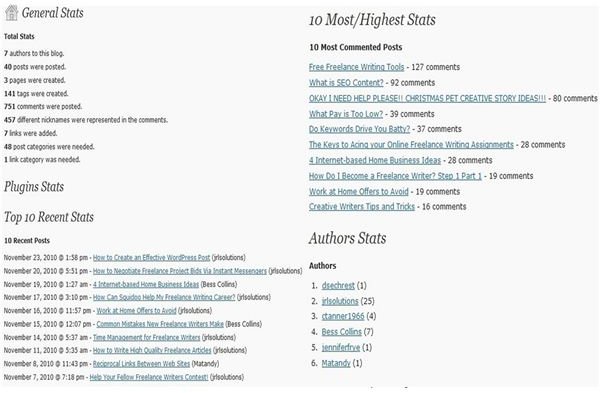
Getting to know your readers or following is another immensely important aspect for having a successful blog that is helpful in boosting your small business. Let WordPress stats tell you a variety of things about the readership on your blog. Know which post have received the most comments, which commenters are regular readers and which authors have contributed the most to your site.
All of these features make WordPress stats one of the most informative plug-ins for a small business WordPress Website.
Feedburner WordPress Plug-In
The Feedburner WordPress plug-in is the absolute best way to stay in tune with who may be following your RSS feeds. The Feedburner WordPress plug-in also provides the user with a short list of summaries for the last few post on your blog.
Although feed burner requires a Gmail e-mail account to monitor the progress of your feed burner, once you are able to investigate the Feedburner dashboard, you have a better idea of how many people subscribe to your RSS feeds, which post are actually bringing in traffic, and which post may have lost you subscribers to your RSS feed.
Social Bookmarking Plug-In
Social bookmarking plug-ins are a must-have for any small business owners these days. Not only do they give the blog owner the

capability of sending their blog post to various social networking sites, but they also give blog readers quick and easy way to share your post with those of their own social networking sites.
As long as you have invested the time in your own social marketing networks, you should see significant traffic from the utilization of this tool alone.
Ezine Article WordPress Plug-In
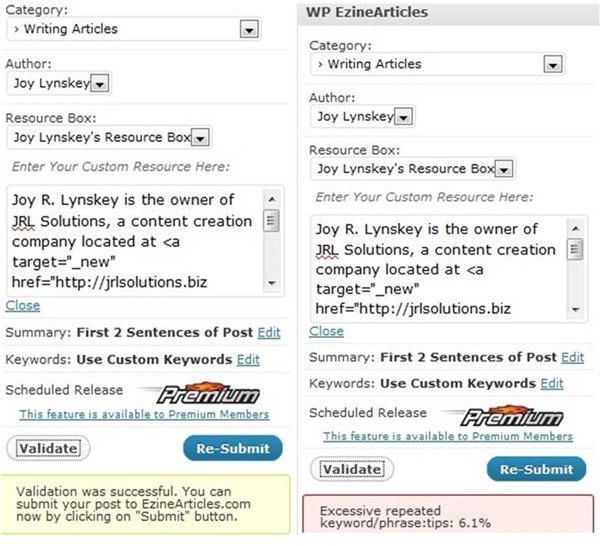
Ezine articles submission guidelines can leave some small business owners a bit frustrated. Although Ezine has some pretty strict guidelines for article submissions, there’s actually a great reason for this. Ezine aims to provide their users with helpful and educational content on the subject matters they search. In order to do so, they have to restrict certain things like self promotional language, keyword stuffing, and irrelevant subject matter.
Because some small business owners may not be the most skilled writers, this can cause them the need to outsource their Ezine article submissions. Although this is a feasible idea for some, for others it may not be within a budget. Luckily, for those small business owners who have passable writing skills, but little experience with Ezine article submissions, the Ezine WordPress plug-in can be the absolute answer to all those frustrating writing guidelines.
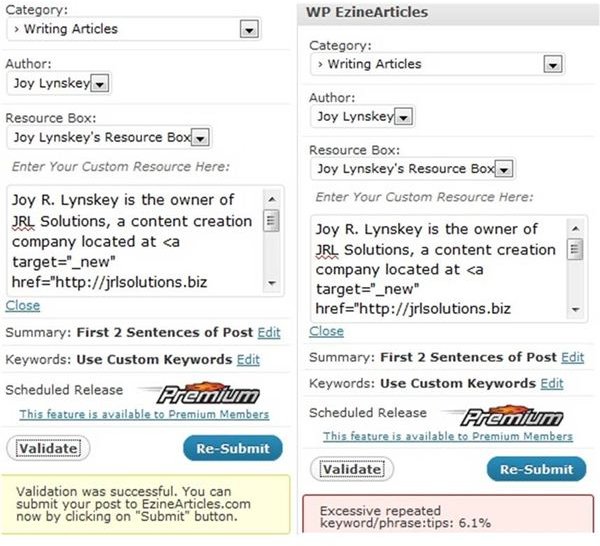
Additionally, one thing that many may not know about Ezine articles, is that they do indeed allow duplicate content submissions. However, to be able to submit duplicate content, the original content must clearly be credited to yourself. With this handy plug-in the user is able to create their post on WordPress, validate it with the Ezine article validation tool, submit it to WordPress, and then submit it to Ezine articles website. Note that in order to use this plug-in, you must already have an Ezine article account with author resource boxes completed correctly.
Be aware that this article validation tool will not correct other common Ezine article mistakes such as:
- Excessive typos or bad grammar
- Incorrect author or resource boxes
- Excessive promotional language
However, the Ezine article WordPress plug-in tool will recognize and restrict the submissions on articles that contain:

- Excessive keywords
It will list the keyword or keywords, and show you the exact keyword density for each.
- Less then required word counts
If your article is not long enough to pass Ezine guideline submissions, the validation tool will let you know the required word count and prevent you from submitting your post to their site until it contains required word count to pass.
- Improper Linking
Ezine articles have strict guidelines about where links can be placed in the article body, if at all. Placing one in the wrong place will quickly show on the validation tools, which will also explain a better way to place it if you hope it to pass.
Using this plug-in on a new Ezine account is also a nearly guaranteed way to achieve platinum status the first time you are eligible for it.
WordPress Plug-Ins in Action
References
All Photos care of Joy Lynskey


