Comodo Antivirus Review - Free Antivirus Software From Comodo Labs
Introduction
Important note: Comodo Antivirus is no longer offered as a standalone product, but is still available as part of Comodo’s free Internet Security suite. Read Bright Hub’s review of Comodo’s new security suite: Comodo Internet Security.
When it comes to antivirus software, many people prefer to spend their money on commercial, off-the-shelf security products. However, with several free-to-use antivirus packages available, there’s no need to have to pay for internet security. Comodo, one of the world’s leading IT security providers, has a range of security products that are free to use with a lifetime usage licence and Comodo’s antivirus software is just one product in their range. But is it any good?
Overview & Features Of Comodo Antivirus
First of all, it should be noted that the current version of the Comodo Antivirus scanning engine is still a beta version, so users should expect the odd bug or irregularity. Comodo is working on an updated version of the engine, and hopes to release it in the not-too-distant future. While the beta status may put people off, it shouldn’t as the engine is solid and robust.
Comodo’s free antivirus comes with a host of features not normally seen in a free product. Features of this anti virus software include:
- Individual computer and network protection – yes, despite it’s being free, Comodo AV can be used in a network environment to protect servers and client PCs, as well as being able to scan across network drives and folders.
- On Access Scanning – Real-time protection against virus infection.
- On Demand Scanning – Check a file, disk or folder for possible infection before use.
- HIPS Protection – Host Intrusion Prevention System enables users to prevent and stop malicious spyware and malware from being installed or executed.
- Removable Device Scanning – Check through all known sources of infection from add-in peripherals such as CDs, DVDs, USB Sticks and even your cell phone.
- Incremental Scanning – Allows faster scans by ignoring files and folders marked as ‘safe.’
- Heuristic Detection – Identifies unknown viruses by analysing behaviour patterns of software code.
- Process Monitoring – Continually scans memory resident applications and processes.
- Email Scanning – Scans both incoming and outgoing email and attachments.
- Worm Blocker - protection against worm programs that attempt to duplicate themselves by sending mass mailings to your contact list.
- Compressed File Scans – Can scan within compressed file formats such as .RAR and .ZIP.
- Daily Updates – Automated daily updates of the virus signature database.
- Quarantine Files – Quarantine suspicious files so they cannot run.
- Safe List – Create a customized safe list of programs and files installed to speed up scans.
- Full Reports – Comprehensive logs and results of all anti-virus scans performed.
- Scan Scheduling – Choose when to update your virus definitions and antivirus scans.
- File Submission – Submit suspicious files to Comodo Labs for analysis.
For a free product, it’s certainly a comprehensive, feature-rich package far in excess of any of its free antivirus rivals. Some paid-for AV software should also sit up and take notice.
Installation
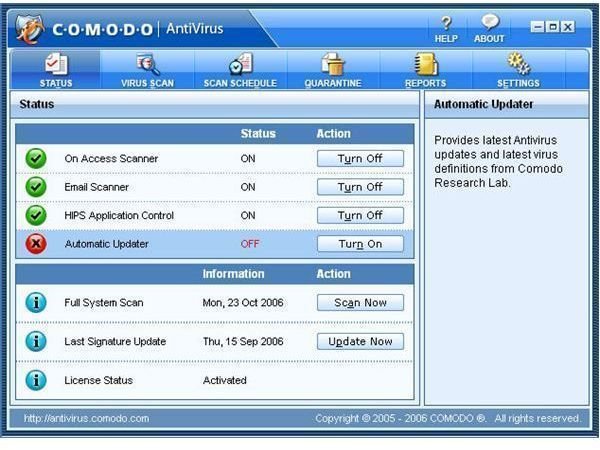
Installation of Comodo Antivirus is relatively painless – there’s no need to register the product and your system will require a reboot to finish the installation process. On first run it automatically builds a custom profile of your files and folders to configure its scanning engine. Comodo’s interface won’t win a style award, but it is clean, uncluttered and easy to navigate. All the key functions of the software are easily accessible.
On Access Performance
One area where Comodo’s antivirus is impressive is its impact on system resources. On my test system, the resource drain was light and there were no hangs or slowdown from the system when opening files or applications.
Scanning speed was excellent and faster than those of other free antivirus programs with a full scan of my test system taking around 40 minutes to complete. It may not be the fastest scanner out there, but by way of comparison, Grisoft’s AVG 8.0 antivirus took almost double that time to complete the same scan. How accurate that time actually is is perhaps open to debate given the product’s beta status. However, there’s no real reason to disagree about its timing and this difference could well be down to the initial profiling of the system by the software.
To benchmark, the test system used comprised of an AMD64 3200+ Processor, 1GB of DDR400 RAM and a 250GB Samsung Spinpoint IDE hard-drive. Installed was Windows XP and Service Pack 2 and 40GB of assorted files.
Real-time Performance
Unfortunately, I felt that Comodo was a little weak in this regard. Testing the On Access Scanner I was able to pull the EICAR test virus onto the system’s hard drive without Comodo protesting about its presence. Indeed, all was silent even after it had been firmly planted into the system. However, upon trying to physically access the file, Comodo sprang to life and alerted me to the suspicious file, somewhat redeeming itself into the bargain.
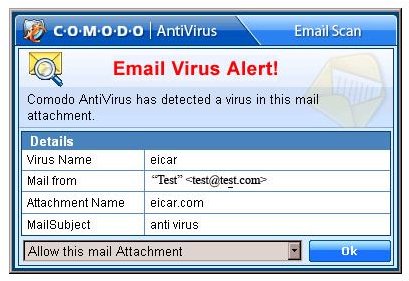
Next, I tried the Email Scanner and emailed a copy of the EICAR file to my email address. Comodo detected this instantly and prompted for a response. It also fared well in the real-world email tests, weeding out many Trojans and other assorted nasties sent via spam emails.
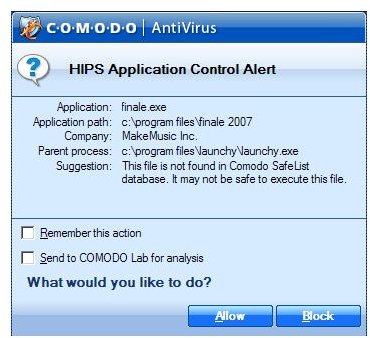
However, the biggest bugbear I had to contend with was the irrepressible and over-zealous HIPS control which bleated constantly whenever I tried to access anything it deemed unsafe – which was quite a lot of things; many of them legitimate processes into the bargain. Even running an installation process for a game CD caused HIPS to throw a wobbler, as did installing the latest Opera browser.
HIPS (Host Intrusion Protection System)
HIPS - for all its good points - is incredibly sensitive until it gets to know your PC and the applications you run. It can, however, be deactivated at the cost of a little security. If you choose to run HIPS, be aware that it can sometimes ‘forget’ you have allowed an application previously and warn you again of its presence. If you can put up with the constant nagging about ‘unsafe’ applications then HIPS is a worthwhile additional layer of security.
Virus Detection
Apart from the EICAR test virus, my test rig wasn’t afflicted with any viruses while running Comodo. This was corroborated by running web-based antivirus scans through Kaspersky. In both cases the test system came up clean.
Problems
I had some issues with Comodo with some POP3 email addresses. The software would occasionally hang while scanning an incoming email, preventing the message–and any subsequent message–from downloading as a result. Short of completely killing Comodo in Windows Task Manager, the only other course of action was to physically log into the mail server and manually delete the message that was causing the issue. This freed up the scanner. In almost all cases, the offender was a spam email, but for anyone who leaves their email running constantly this particular issue could prove troublesome if they don’t notice the issue manifesting itself.
Although a minor irritation, Windows Security Center doesn’t detect Comodo as being installed as a valid antivirus application. This causes the (annoying) Security Center warning icon to appear in the system tray asking you to install a valid antivirus. Thankfully, this can be turned off.
Overall (4 out of 5)
This antivirus offering by Comodo is a good effort by the company and should improve further with the release of version 3. However, while their offering provides a comprehensive suite of set-and-forget antivirus scans with has a good level of detection, it is far from finished. The software’s failure to detect EICAR test viruses until the product has been activated is a concern and one has to wonder what else could have been missed.
The absence of nag screens and banners trying to sell upgrades is a welcome sight, and there is enough overall about Comodo antivirus to merit serious consideration as part of a security setup. However, the fact it is still beta software means I would be reluctant to recommend Comodo Antivirus as a user’s only protection against viruses and malware. Instead users should complement its use with regular online web scans for added security. [Note: it is rarely a good idea to run more than one real-time scanner at a time as doing so can negatively impact system performance.]
If Comodo has addressed the shortcomings of this beta product in the upcoming version 3, then they have the potential to become a major player in the free antivirus software market.
More Reviews!
Would you like to read more reviews? Look around Bright Hub and you’ll find reviews of numerous other anti-virus solutions including Norton AntiVirus, Norton Internet Security, Kaspersky Internet Security, ESET Smart Security, McAfee Total Protection, Blink Professional and ZoneAlarm Internet Security Suite.