How to Bypass Security Certificates In Internet Explorer
Overview
What is a security certificate and why would Internet Explorer report issues with security certificates?
Web certificates, sometimes known as SSL Certificates verify a site you are going to really is the site it claims to be. Certificates can also help encrypt data between your computer and the site you are visiting. In order to verify a site is who it claims to be, the company hosting the site will use certificates to verify the server name and owner information.
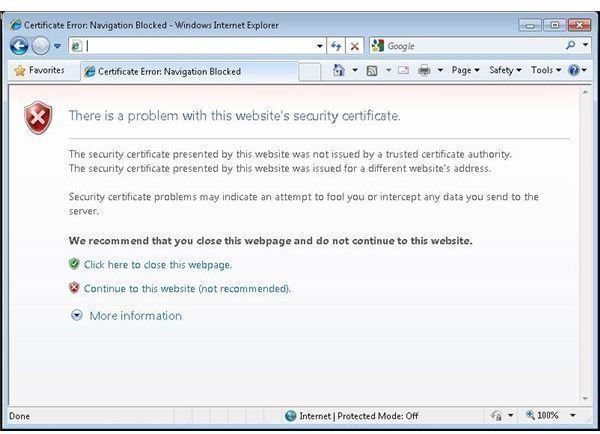
A problem comes in on some systems where the company hosting the site didn’t pay for a 3rd party verification and instead used a so called “self-signed” certificate. Site administrators can easily do this with Windows and Apache systems to save costs and time, but the end result is that end users going to the site will receive an error messages – most likely “There is a problem with this website’s security certificate” when viewed in Internet Explorer 7 or 8 (Figure 1).
In other circumstances you may find the site name and site registered in the certificate don’t match. In this case you’ll receive the same Internet Explorer warning regarding a site certificate mismatch error.
As mentioned above, there are of course legitimate reasons why these issues crop up, so why would Microsoft force Internet Explorer to warn you whenever one of these scenarios popped up? It all boils down to malicious sites. Spammers and other malicious sites may use mismatch techniques to trick you into entering a site that seems legitimate but really isn’t.
Now that you should have a better understanding of what a site certificate is, why they are used and why Internet Explorer gives you a warning, I’ll show you how to bypass these warnings.
How to Bypass an Improper Internet Explorer Security Certificate
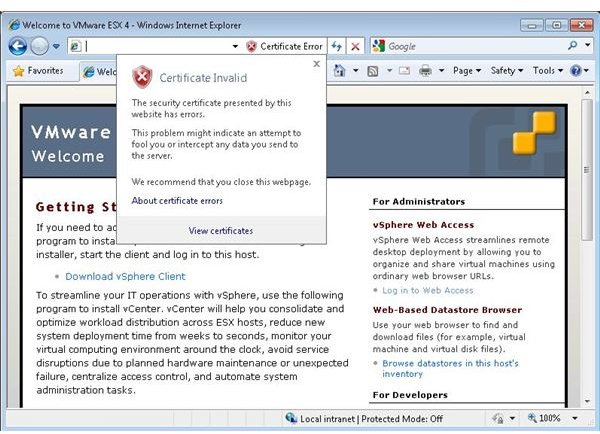
The easiest way to bypass this warning is to simply click on the “Continue to this website” link. This will bring you to the site you were trying to get to, but will color the address bar red and note that there is a certificate error (Figure 2).
There are a few scenarios under which this condition occurs:
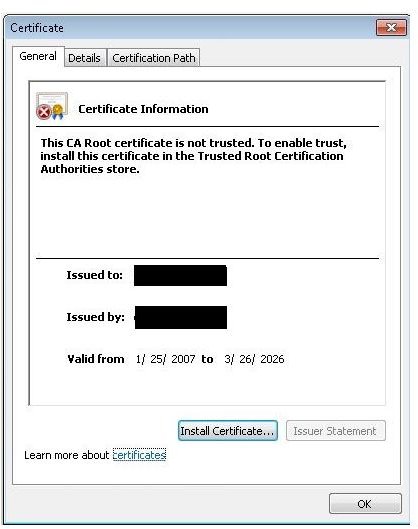
- The certificate has expired. In this case, there isn’t much you can do but wait for the site owner to renew the certificate. You can click on the “Certificate Error” message in the URL bar and choose to open the certificate. Take a look at the “Valid from” field (Figure 3) to check.
- The certificate name doesn’t match the name of the site. Again, you can use the above instructions for viewing the certificate. If the URL and the name in the certificate don’t match, again, this isn’t something you will be able to solve. Just be absolutely sure that this is a site you can trust before proceeding.
- The time and/or date on your computer is wrong. Double click the system clock and make sure the date and time are correct.
Contrary to popular belief, adding the domain into your trusted sites list or installing the certificate won’t help you with a bad certificate. These actions will only help you with a certificate coming from a site using an untrusted certificate authority. Unfortunately, there isn’t much you can do besides ignoring the warning or hoping the site owner fixes the certificate.