Blogger Instructions for Using Blogspot.com

About Blogger
Blogger first made its debut in 1999, making it one of the web’s oldest blogging platforms. In 2003, Google officially acquired Blogger and revamped it as an official Google service. Today, Blogger powers several thousand blogs around the world and is the official host of the Google blog.
Using Blogger - Creating an Account
To get started using Blogger, proceed through the following Blogger instructions.
The first step to getting a Blogger blog is to create a Google account. You can do so by navigating over to this page. Click the orange button that says create a blog. On the next page, fill in your account information. Enter your email address, password, and display name. Fill in the verification word, agree to the terms, and click Continue.
On the next page, fill in a blog title and blog address for your blog. After you have done that, fill in the verification word and click Continue.
The final step in setting up a Blogger blog is to choose a template. Blogger does allow you to use custom templates and themes, but for now, just choose one of the provided themes. Click the Continue button and the Start Blogging button.
Using Blogger - Creating Your First Post
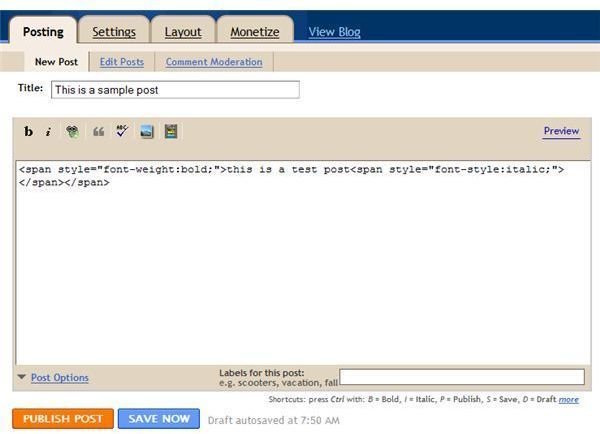
Upon clicking the Start Blogging button, you should be brought directly to the create a post screen. If you are not at this screen, go ahead and click the Posting tab located on the top Blogger toolbar and click the New Post button from the sub menu.
Blogger instructions for creating a post:
- Enter a title for your post in the Title: text area.
- Type your post in the provided body text area.
- You can format text to be bold or italicized by using the provided editing buttons.
- You can add pictures, video, and hyperlinks to your posts by using the provided editing buttons.
- Click the post options link to expand the writing area and view more options such as reader comments and post date.
- Enter labels for your post using the appropriate area located near the bottom right of the New Post window.
- If you want to preview your post before saving or publishing, click the preview link located in the upper right hand corner of the New Post window.
- To save your post as a draft, but not publish it, click the Save Now button.
- To publish your post and make it viewable to blog readers and visitors, click the Publish Post button.
Using Blogger - Adjusting Your Blog Settings
Blogger gives you several adjustment options that you can use for your blogs. Click the Settings tab, located on the top Blogger toolbar. Upon clicking the Settings tab, you should notice several sub links that pop up: Basic, Publishing, Formatting, Comments, Archiving, Site Feed, Email & Mobile, OpenID, and Permissions. Go ahead and navigate through all of these various settings and configure them to your likings.
Using Blogger - Using a Custom Domain Name
One great thing about Blogger is that it offers completely free hosting, with the option of using your own domain name. To use your own domain name, click the Publishing button, located underneath the Settings tab. You should now see the following:
Switch to: Custom Domain (Point your own registered domain name to your blog)
Click this link.
On the next screen, you should see the following:
Already own a domain? Switch to advanced settings
Click this link.
Enter your custom URL, fill out the verification word, and click the Save Settings button.
Adding a Custom Blogger Theme
To add a custom Blogger theme, click the Layout tab and select Edit HTML from the sub menu. You should see a Browse button on this screen. Click it and select your Blogger theme from your computer. Click the Upload button. Scroll down to the bottom of the page and click the Save Template button.
Using Blogger
That’s really all there is to it. The above information should give you a good start to using Blogger. Go ahead and explore the rest of the Blogger options for yourself. If you are looking to monetize your blog, you can find out how to use Adsense with Blogger here.