Using Google Analytics: Getting Started with Google Analytics
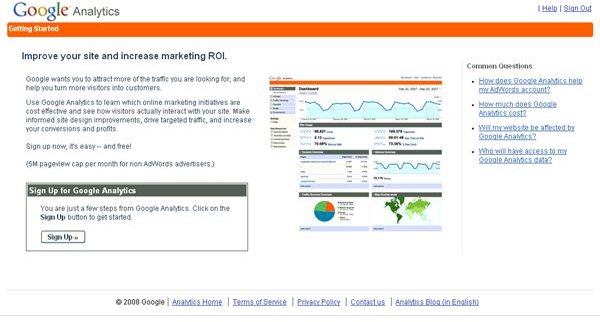
What is Google Analytics?
Google Analytics is a free Web application that allows you to track several different aspects of your Web site traffic from the number of visitors, to the conversion rates of your advertising and more. You can use it with your AdWords account, other Google services and with more than one Web sites. It is more geared toward Internet marketers rather than Web masters though it can be beneficial to both. Several people can have access to the information in your organzation, and you can even export and email the reports that Google Analytics will generate for you. It will help you set, monitor and reach your goals with your Web site much easier than doing nothing at all.
Setting up your Account
**
S****tep One: Visit Google Analytics. If you have an account with Google that you are using for other services, sign into this account. If not, you will be able to create an account by clicking the “Sigh Up Now” link, and entering your email, a password and the captcha.
Step Two: You’ll need to create a Google Analytics account within this Google account. To create this account, all you’ll need to do is enter your Web address,
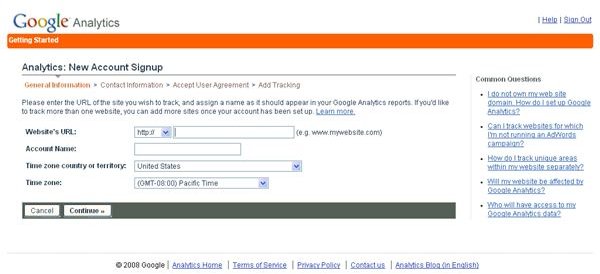
your country and your time zone. The account name will be filled in for you as your Web site’s name because you can add additional Web sites once you finish the account set-up process. Once you get done with this screen, you will be taken to another screen that will ask for your first and last name, phone number and country. Click continue, and you will be prompted to agree to the terms and conditions for using Google Analytics.
Attaching Google Analytics to your Web site
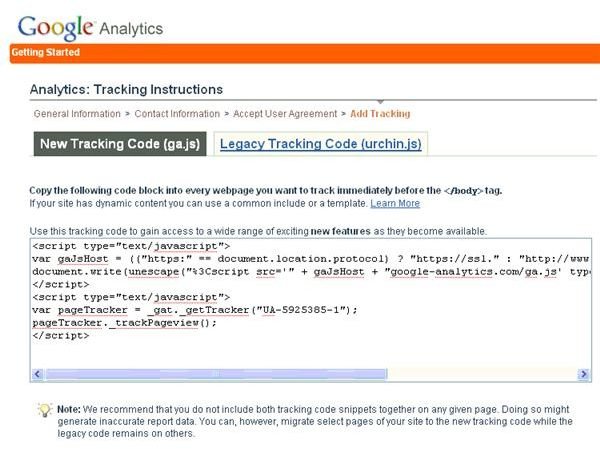
Step Three: After you have agreed to the terms and conditions, you will be given a Tracking Code that you will need to copy and paste into every page on your Web site that you want Google Analytics to track and monitor. You’ll need to paste it before the body tag in the HTML. The tracking code you see in the image is for demonstration purposes only, and yours will be unique to your site. Avoid using both files because it could cause sporadic and inaccurate data.
And, you’re finished! You can go into the Google Analytics Dashboard - an article on customizing the dashboard is coming soon - and take a look around to see what kind of information the program will gather for you. Add more sites, and integrate it with your AdWords account. If you do not have an AdWords account, you will be capped at five million pages views per month.