How to Buy a Laptop with Good Battery Life and Tips to Save Power on Laptops
Buying Tips
The first step is to look for a model with a good battery life. Many manufacturers will make extravagant claims, but these are often based on ‘perfect’ conditions which are difficult to replicate in real-world use. Before choosing a model look for reviews such as those on BrightHub and in computer magazines, as these will often give a much more realistic view of how much battery life you can expect.
A model with solid-state drive may consume considerably less power. This is because these drives don’t have any moving parts: unlike a traditional hard drive, there’s no need for the drives to spin, or for a read/write head to move across the disk. However, at the moment, these drives are more expensive and so you’ll usually only find them in high-end models.
Laptop screens usually work with a light-source shining through the screen. Some modern laptops use a light-emitting diode (LED) to provide this light rather than the traditional fluorescent lamp. These LED models are much less power-hungry.
Models with a silver-zinc battery can run up to 50% longer than the normal lithium-ion batteries. They should also work for longer periods of time before the battery life starts to degrade. However, as with solid-state drives, these models tend to be more expensive so you may have to consider the trade-off in price.
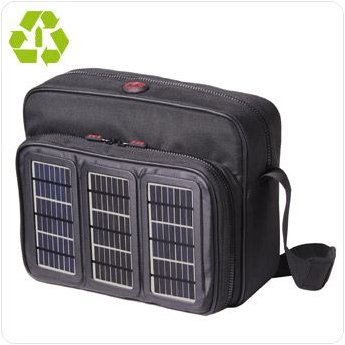
If you want to be really green, it’s worth looking at the Voltaic range of laptop bags and backpacks, which not only carries your laptop, but charges a special battery through solar power! The company claims a day of direct sunlight will be enough to give one full charge to your battery. You can also buy a solar laptop battery charger.
Usage Tips To Save Battery Power
You may well find you can reduce the brightness on your laptop monitor without affecting performance. That’s because most machines are set very brightly in case they need to be displayed in a store (where every screen is competing for attention). If you can reduce brightness you’ll likely save a lot of power.
It’s best to avoid using the CD/DVD drive more than necessary while running from battery power as the spinning of the disc soaks up plenty of juice. Your best bet, within copyright laws, is to copy your content to your hard drive before travelling.
Avoid charging any USB devices through your laptop unless it is running on mains power. In fact it’s best to remove any USB devices which you aren’t actively using as these continue to draw power when ‘idle’.
Turn off your wireless internet function when you don’t need to be online. If you leave it on, it will continue searching for a connection (even in vain) and making your computer work harder.
Related reading
>» Power Up Your Laptop With the Sun - The Voltaic Backpack
>» Laptop PC Buyer’s Guide: Balancing Battery Life
Images
This post is part of the series: Save Power and The Panet - Power Management Reducing Your Carbon Footprint
In a two-part series we examine how you can cut power bills and your carbon footprint by managing your computer’s power settings and by making sure you get the maximum possible use of your laptop battery.