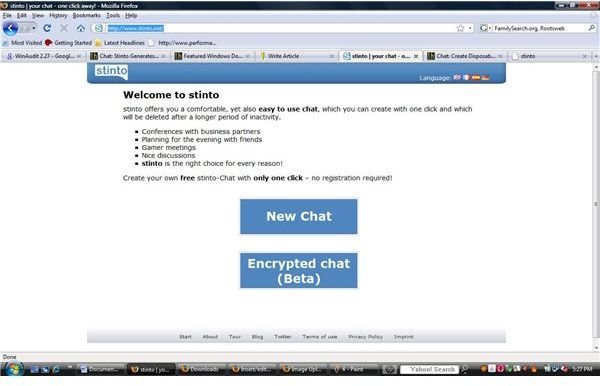
Save money and time by meeting online. You can create your own temporary chat room. After a specific amount of time, the chat room deletes itself. This simple online application offers great features yet is simple to operate.
Disposable Chat
With budget constraints nationwide, alternate methods of communication are being looked at by companies and individuals. Stinto offers an online chat application that is easy to use. Stinto can help cut out traveling to meetings or help study groups setup meetings. Businesses can now chat online and students can now meet online saving travel and time.
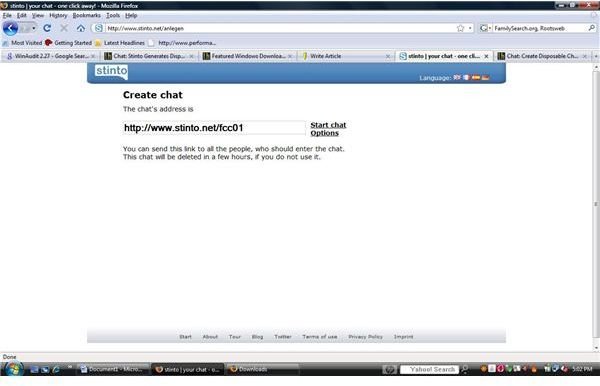
Stinto requires no downloads to your computer or the other participants’ computers. No registration is required. This “On the Fly” chat session works instantaneously. Stinto works instantly to create a chat room that has a unique url for the session.
How to use Stinto
In order to start an online chat session, go to Stinto’s website and click on chat or encrypted chat. Next click on options and enter the name of the chat session and select the number of hours for the chat to exist. Chat sessions are in six hour increments with a minimum of six hours and a maximum of 24 hours. Write down or copy the url to the chat room. Save your options and notify the party of the address of the disposable chat room.
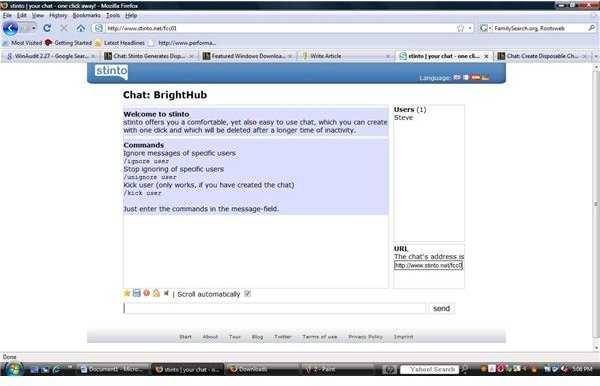
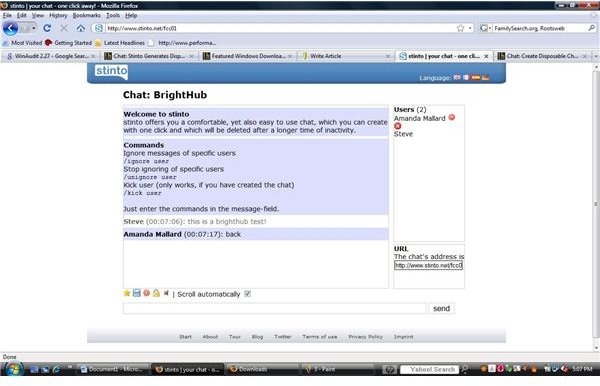
The other users of the chat room simply type in the url, agree to the terms and enter their name. Once inside, users can download the chat history, the owner can lock the session and enable or disable sound. Stinto also offers the ability to report anyone who may be abusive in a chat session. Stinto offers other commands to administer the temporary session. These commands give authoritative use of the session.
Administrative Commands
-
Ignore messages of specific users /ignore user
Advertisement -
Stop ignoring of specific users /unignore user
-
Kick user (for administrator of the chat session / creator) /kick user
Advertisement
Stinto’s simplex method of offering chat has an extra feature to stop scrolling or to scroll the conversation automatically.
Stinto
Web 2.0 and Stinto
Stinto’s technology is simple yet complex. With Web 2.0 changing how we use the internet, Stinto offers a service that can be used by students, businesses, family or anyone. Stinto is still working on the encrypted chat and is currently using self signing certificates. This instant form of collaboration for the aforesaid users is a needed service.
For more information on Stinto’s online disposable chat services, visit their website at www.stinto.com .