It isn’t immediately obvious how to grab screenshots from your favourite movies on a Blu-ray player and it isn’t that easy. Due to DRM, this feature is often restricted, but there are ways around these restrictions.
DRM Blocks Blu-ray Screen Grabs
Blu-ray players are becoming more and more common on home computers. Traditionally having a DVD running on your PC would allow all sorts of video and audio ripping and screen grabbing to be done.
Sadly, this isn’t the case with Blu-ray.
Due to the tight DRM (digital rights management) that is in place on Blu-Ray discs, it is very difficult to take screen captures from high definition discs.
Thanks to a few workarounds however, it is not impossible – this how to guide looks at three methods that rely on either specialist software, the software that comes bundled with your Blu-Ray player or even reconfiguring your Windows settings.
Force Print Screen by Reconfiguring Windows Settings
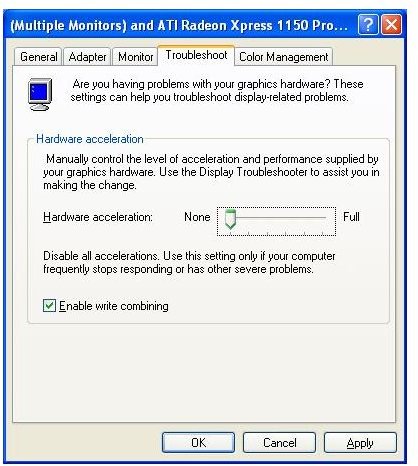
The cheapest solution is to disable hardware acceleration on your Windows PC. To do this, minimise all windows and right-click on an empty area of your desktop, selecting the Properties item in the menu.
On the Settings tab, click the Advanced button and in the new screen go to the Troubleshoot tab. Here you can slide the Hardware Acceleration to None.
You may also need to adjust your monitor’s resolution before continuing, but you should be able to use the Print Screen button on your keyboard to take single screen captures and paste them into Paint, Photoshop or Paint Shop Pro.
Use the Software Bundled with your Blu-ray Player
If you’re lucky enough to have the right software, grabbing a screen capture can be a simple case of tapping a button on your keyboard.
Some Blu-ray players come packaged with software from Arcsoft – their Total Media Theatre application will manage the playback of your Blu-ray disc, allow various audio and visual settings to be enhanced for the best playback, as well as offer a simple menu command or keystroke to enable Blu-ray screen caps to be taken instantaneously.
Convert your Blu-ray Movie and Capture Screens
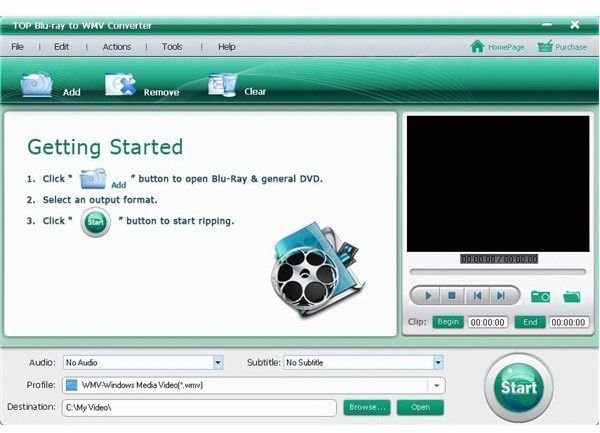
A third way to get screen captures from Blu-ray discs is to convert the Blu-ray data format into something more user friendly, such as WMV.
TOP Blu-ray to WMVConverter 5.7.9 (available for $39.99 with a 3 minute limit trial) is a perfect way to convert the BD format on a Blu-ray disc into a file format that you can get a screen capture image from.
Once the film or section of video has been converted, use the open source VideoLan VLC Media Player (available from www.videolan.org/vlc/ ) to capture the required image using the menu item Video > Snapshot.


