What is a GPS Waypoint? Find Out All You Need to Know for Optimum Navigation with Your Device
The Importance of Waypoints
Are you wondering what a GPS waypoint is because you’re new to the world of portable, handheld GPS devices and their capabilities?
Then let’s get right to a good working definition and explore all the ramifications regarding the significance of these navigational tools. The term has been around since the revolutionary handheld GPS devices first became available to the public and was no longer the exclusive domain of the military. A waypoint is a physical location somewhere on our planet as determined by the satellites up there in the stratosphere designed for the purpose of communicating location data to a GPS receiver. A waypoint is the set of coordinates representing the longitude and latitude of a given position. Older models would represent the coordinates of a waypoint with some code limited to four characters but now they allow for a more apt description such as “primitive camp site” for example.
On many newer GPS devices a waypoint will include the elevation as well. Waypoints are still the handiest feature on a GPS unit because they let you know where you are, where you’ve been, and where you want to go. A good GPS device allows for the operator to input and save many waypoints right on the device when they’re at a location they want to mark. The second article specifically instructs you on that procedure. Alternatively, waypoints may be uploaded onto the device by attaching a cable and interfacing with mapping software that is compatible with your unit. If you have a Garmin GPS and want to learn more about mapping options and upgrades for it, visit the series beginning with Garmin Handheld GPS Maps: Basic Overview to also learn about MapSource and third party Topo maps.
Waypoints are Navigational Tools for Places to Remember and Routes to Take
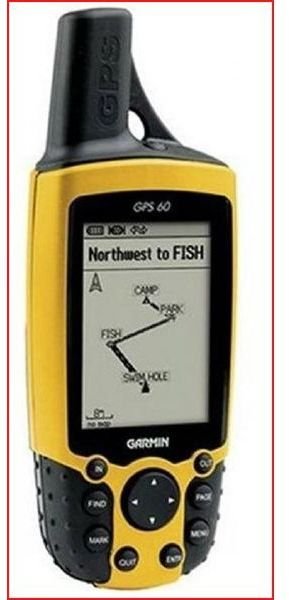
Waypoints are essentially Points of Interest (POIs) too, which are a host of places marked with a POI icon designating the location as interesting for reasons ranging from a really good coffee shop to a spot where something historically significant took place. POIs are more prevalent on your city maps and they’re usually not something you input yourself but come prepackaged and are loaded by interfacing with some type of software.
But we are really focusing more on capturing your position as a waypoint while somewhere navigating in the great outdoors because that is where it is really most useful. The reason being a route can be mapped out using a series of waypoints so you navigate from one to the next and so on like following a trail of virtual breadcrumbs. In that way you know exactly how to get back. Also, depending upon the specific activities that bring you outdoors, you can input a waypoint for that rare bird you spotted, for a highly productive fishing hole, for the spot where you took down that Bull Elk, or for search and extract geocaching missions.
Check our site for the best models for geocaching and for backpacking among many other hobbies. Utilizing Google Maps on your computer in conjunction with your GPS device is also an excellent method of viewing your waypoints on the trips you took or are planning to take. We will cover that in another article. But now that you have a firm understanding of what a waypoint is, the next article in this two part series shows you the all important instructions for how to enter one on the GPS receiver you own and operate with.
This post is part of the series: The Essentials Of Using Waypoints on a Handheld GPS Receiver
First learn a comprehensive definition of what a waypoint is and what it’s used for on a portable GPS unit. Then find out about the instructions on how to input a waypoint on a personal GPS device in this two part tutorial providing essential skills for outdoor navigation with your mapping gadget.