eBooks are a popular alternative to paperbacks and hardcovers. The ability to carry a couple of thousand books on a device speaks to a lot of people. In this article we review the jetBook Lite. One of the few devices with a TFT monochrome LCD screen to read your books on.
Introduction
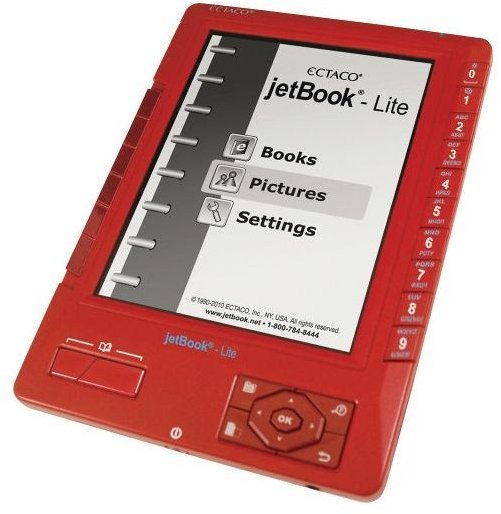
The eBook reader is becoming more popular every year. Even with the launch of tablets, the popularity of eBook readers hasn’t been touched much.
This is probably because of the way eBook readers utilize the screen that you read of off. Traditionally, reading books on laptops and computer is uncomfortable. This is where eBook readers strive. The e-paper displays used by eBook readers are better on the eyes. This is, according to scientists, because of the lack of back lighting .
The jetBook Lite uses a monochrome TFT LCD screen. E-ink displays have the tendency to not be the sharpest of screen. This is why Ectaco choose to use TFT.
In addition to my review, I wanted a second opinion. We have a 13 year old daughter who rips through books like they only have two pages each. She is literally reading books so fast that we can’t keep up with buying her books. So who better to get an opinion from than a teenager who loves to read. You will find her paragraph on what she thought of the jetBook Lite below my review.
The Review Prerequisites
In order to truly test this eBook reader I put it to the test in different scenario’s. Using different file formats, even different lighting setups. I also dove into the software running on the jetBook Lite. But this is perhaps outside the scope of this eBook reader review.
Features (5 out of 5)
I found the feature set of the jetBook Lite to be quite extensive. Here is the list as found on jetBook.net.
- Support of ePub, Mobi, PRC, RTF, .txt, .pdf, .fb2, .jpg, .gif, .png, and .bmp file formats
- Support of eReader (PDB) DRM format through Ereader.com and Fictionwise.com
- True pocket-sized portability for thousands of eBooks
- Support for eBook contents in Albanian, Catalan, Danish, Dutch, English, Faeroese, Finnish, French, Galician, German, Icelandic, Italian, Norwegian, Portuguese, Spanish, Swedish, Croatian, Czech, Estonian, Hungarian, Latvian, Lithuanian, Polish, Romanian, Russian, Slovak, Slovenian and other European languages, additionally, jetBook supports Arabic, Farsi, Vietnamese and Hebrew.
- Bidirectional dictionaries for certain European languages (incl. German and Spanish) are available
- Multilingual interface options that include German and Spanish
- Pre-loaded CIA World Factbook
- Bookmarks and auto page turn functionality
- Adjustable font type and size
- Screen rotation support for both portrait & landscape modes
- SD card slot
- Batteries 4xAA
- Product Dimensions: 8.9 x 6.2 x 1.3 inches; weight 9 oz. w/o batteries.
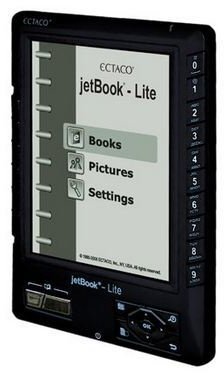
Ectaco jetBook Lite eBook Reader Images
The Screen (4 out of 5)
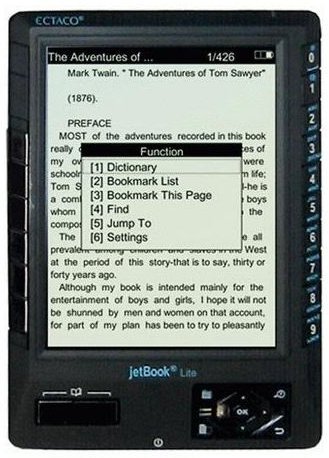
This screen is extremely comfortable to read of off. I have seen and read on many e-ink displays , the fact that this isn’t an e-ink display is maybe the best decision Ectaco could have made. E-ink is in general not too sharp, yes I know there are “better” e-ink screens out there but they cost a lot more than I would be willing to pay for an eBook reader. The jetBook Lite makes use of a reflective TFT, as a result you only need some light to be able to read on the jetBook. This eBook reader handles well in even the lowest of lighting situations. Reading with a 40 Watt light bulb works great. Even reading with only the light of my laptop screen in a darkroom is doable, though probably not recommended.
The only fault I found with this screen is because of its reflectiveness as well. When reading in direct sunlight the jetBook Lite I noticed a slight flicker. When I did a little research I only found one other jetBook Lite user that found this disturbing enough to send the device in to Ectaco. However, this is an unwanted feature that comes from the reflective TFT so even sending the eBook reader in would not help. The new eBook reader would just have the same problem. The only way to circumvent this problem is by changing the way the sun reflects off the screen. So turning the screen or maybe even sitting in the shade instead of the full sunlight could help. I haven’t found this problem to occur when using indoor lighting, as I said it only occurs in extreme bright light conditions.
The Buttons (4 out of 5)
There are three options to turn pages on the jetBook. The left side of the device has a rocker that you can move up or down to turn pages. Also on the left but on the front face of the device there are two chrome buttons for page turning. Finally on the front face at the right you find the arrow keys the left and right arrow keys are used for turning pages in this case.
This group of buttons on the right front face of the jetBook are also used for navigation through menus. The number buttons (0-9) on the right side of the device are used to jump from menu item to menu item, even though you could also use the arrow buttons and the OK button for this. When reading a book these numbered buttons give you options like: Dictionary search by selecting a word, jumping to pages or adjusting font size and zoom, depending on what file type you are using (zoom for instance works in some PDF files and DOC files).
Overall Load Speed and Page Turning Speed (4 out of 5)
When doing a cold start, meaning from completely off to on, it can take a while to start up and load the index view. If you start reading and you switch it off while in a book it will start up a lot quicker. The load speed of a book depends on a couple of factors. Most important is file format and size, I found that some PDF books take a while to load. From what I have read on the Ectaco and Mobile Read forums , this is mostly with the DRM books. With the book loaded up it takes a mere second to turn a page.
When reading on the jetBook Lite I did notice that when adjusting your grip, like you would do with a paperback, you suddenly find yourself having to grab the device uncomfortably because the right side of the device only has page turning options on the bottom right.
Battery Life (4 out of 5)
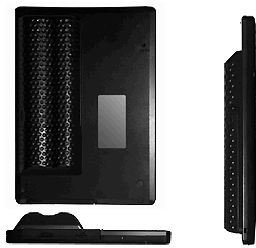
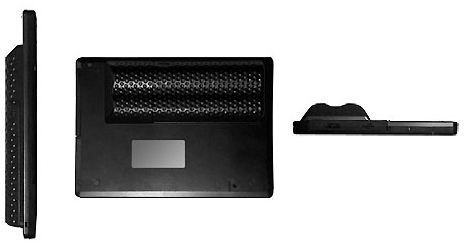
The jetBook Lite’s predecessor, the jetBook, has a battery build-in. Ectaco’s reason for changing this is simple, give the user the power to change batteries when they need to. In addition to that, the total weight of the device went down because of the use of AA batteries. The jetBook Lite takes 4 AA batteries. The battery compartment on the back has a golf ball texture making it easy to use the compartment as a handle as well.
Battery life is excellent, we used the alkaline batteries provided by Ectaco with the device. We were able to read for 15 days, reading for at least 20 min. to 3 hours a day, between me and my daughter. Compared to some of the more popular eBook readers on the market, and keeping in mind this eBook reader has a TFT screen, this is excellent.
When using rechargeable batteries the results may vary. This is because different kinds of rechargeable batteries have different mAh (milliampere-hour = The time a rechargeable battery will last before running out of juice. Usually calculated by this formula: mAh / A = h). Rechargeable batteries of at least 2000mAh should do the trick, using 2500mAh batteries will come close to the result above.
The Price (3 out of 5)
The price of the device is everything. This eBook reader will set you back $160.30 shipped. They are offering free shipping at the moment which would mean that the device would only cost you $149.95. That’s a $10.35 discount. You can find the jetBook Lite for about $124.47 with free shipping on Amazon (see the top result). The recent price drop of the Kindle now makes the jetBook Lite more expensive then the Kindle 2 (in this case I am talking about the Wi-Fi only version of the Kindle 2). This should warrant a price drop from Ectaco, however we have not been able to find out if a price drop is to occur any time soon or not.
Opinion of a Teenager (5 out of 5)
As I said in my introduction, this is the opinion of our 13 year old daughter Brandy. She is currently reading Benjamin Franklin ’s Autobiography for school, and Anne Frank ’s Tales From the Secret Annex. The Anne Frank diary is reading for pure pleasure, school had nothing to do with that one. I have left her paragraph un edited.
“I found the jetBook Lite pretty easy to figure out, I had no reason to read the manual that had come with it. If you think that you’re going to strain your eyes, your absolutely wrong; it doesn’t matter if you have glasses or contacts. Your eyes won’t get as tired as they would if you were in front of a computer screen. All it takes is just a simple reading light so you can read. Another thing was that I didn’t need to adjust the font size at all, but if you need to then you can do so, otherwise I didn’t have any problems.
If you find a little hour glass in the middle of the screen and it’s taking forever to load don’t think it’s broken, it’s just taking a little time to load, because the book has so many pages in it. It’s a really good product and it’s really good for people that don’t like carrying books around wherever they go, I recommended that you buy the jetBook Lite. They’re really good for parents and young adults who love reading. One of the other features I really like is that the jetBook Lite saves the page number you’re on, if you need to stop reading for a moment and the auto-shut off kicks in, or if you switch the jetBook off manually. If you like reading your newspaper, you can download the newspaper on it so you can read your daily paper in the morning. The last thing it’s good for is you’re not wasting so much paper every time the publishers need to print their newspapers or books, it’s saving trees each and every day. They should use these in schools instead of wasting so much paper and ink, if everybody would choose to use an eBook reader it would be better for our environment.”
Conclusion
After Brandy’s opinion here is my conclusion; the jetBook Lite is a great eBook reader for kids and adults alike. This eBook reader needs to go back to Ectaco, after I pry it from Brandy’s hands. But after reviewing this device we will soon have a jetBook Lite of our own. At the $124.47 price point I think it’s a great device to buy, over the Kindle 2 or the Sony Digital Reader Touch Edition.


