Whether you’re looking for a utility that can create global macros on a Windows PC or you’d just like to have macro capabilities in one application, consider checking out Macro Express 3. This application is both powerful and light, and the price tag isn’t that bad either.
Overview and System Requirements
Macro Express 3 is a small, but powerful utility that allows you to create macros for just about any task performed on a Windows PC. It offers users several ways to create these macros, including an easy recording wizard that can construct a basic macro simply by interpreting the keystrokes and mouse movements used when performing the task.
Although there are several Windows applications that come with a built-in macro recorder, there are many more, such as Microsoft PowerPoint 2007 , that lack such a tool. Moreover, the macros created in Macro Express 3 aren’t just restricted for use in one application. They can be set up to work globally in all programs, or you can define a specific collection of applications to associate with each macro.
To run this lightweight Windows application, your system will need to meet the following requirements.
- Windows Vista, XP, 2003, 2000, NT 4, Me, 98, or 95.
- Pentium or greater CPU.
- 32 MB RAM.
- 20 MB hard drive space.
- Internet Explorer 4.0 or higher required for some features.
Download and Installation (5 out of 5)
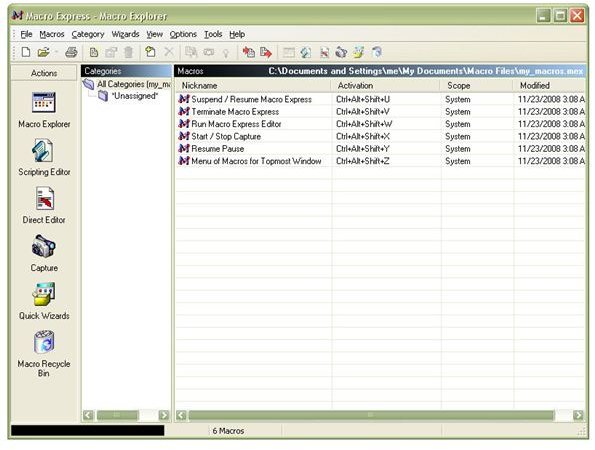
The installation file for Macro Express 3 is just about 8.5 MB in size and downloads in moments if you’re on a broadband connection. Installation of the software is quick and smooth, and there’s no need to reboot the computer afterwards.
At the end of the installation process, the application is immediately ready for use, and you can start creating your first macro right away.
Methods of Macro Creation (5 out of 5)
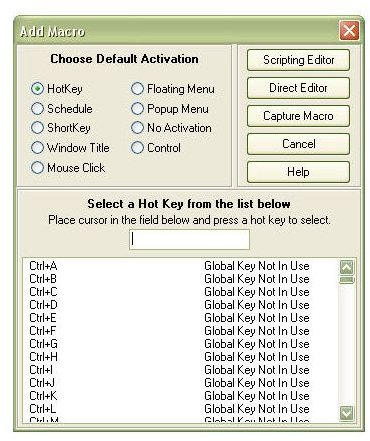
The developers of Macro Express 3 have gone out of their way to make sure that macro creation abilities are available to users of all levels of technical background. The easiest way to build a new macro is with the Macro Quick Wizard that walks you through the steps of creating a macro in “capture” mode. Basically, creating a macro using the capture technique just requires you to enter the commands, using your keyboard or mouse, that you want the macro to perform.
You don’t have to use the wizard to capture a macro – you can also access this option from the Add Macro window or the shortcut area located on the left panel of the application. This will save experienced users who don’t want to be bothered with walking through every step of the wizard, a little extra time. Additionally, you can create a macro by using the scripting editor or direct editor. Both of these editors have a very intuitive interface and allow you to have a wider range of control over your macro creations.
Playing Back Macros (5 out of 5)
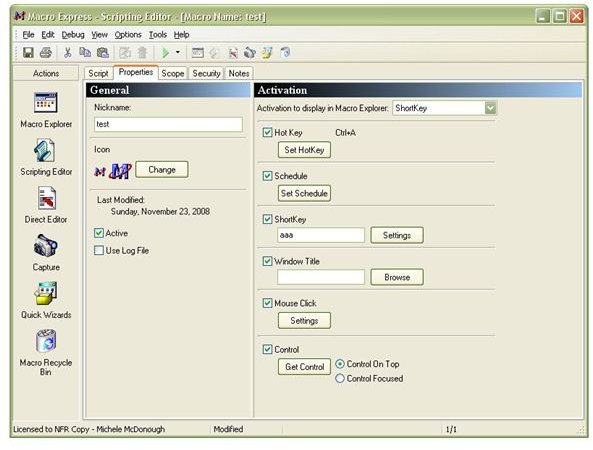
Most macro users are familiar with the process of assigning macros to hotkeys. This ability is present in Macro Express 3, but it’s just one of the many options that you have for macro playback. This variety of choices is one of my favorite features of the software. I’m always a little leery of using hotkey assignments for global macros, because I worry they might interfere with some other application’s custom definitions. So, I really like the idea of having other options available. (Just as a note here – even if you do assign a hotkey to a global macro that is used by other applications, you can always disable that hotkey for those programs when defining the macro scope.)
In addition to hotkey assignment, you can also assign macros to shortcut key sequences (like abc or 1a3), schedule the macro to run at a specific time, have the macro run when the mouse clicks a certain area of the screen, add the macro to a floating menu where it can be selected when needed, and run the macro directly from the Macro Explorer. These are just a few of the major macro playback options available. Several others are included and documented in detail within the application.
Ease of Use (4 out of 5)
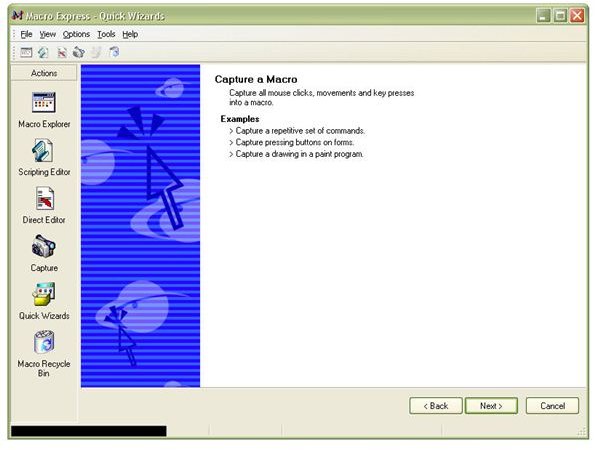
The basic user interface of the application is very intuitive. If you’ve ever worked with the macro recorder in Microsoft Office, you should be able to walk through the Macro Quick Wizard with little to no problems. If this is your first foray into the land of macro creation, it may take a little practice to get you up to speed. However, the wizards in Macro Express 3 are very explanatory, and they provide an excellent starting place for people wanting to jump right in to creating their first macro.
The only reason I am rating this component a 4 out of 5 is because there is a learning curve involved here. Beginners to macro creation should not expect to be able to create complex macros right away with the software. However, spending a little time with the tutorials and practicing with the recording quick wizard should have even the newest user creating basic macros in a short amount of time. The power of the software makes this time spent “learning the ropes” well worth the effort.
User Support (5 out of 5)
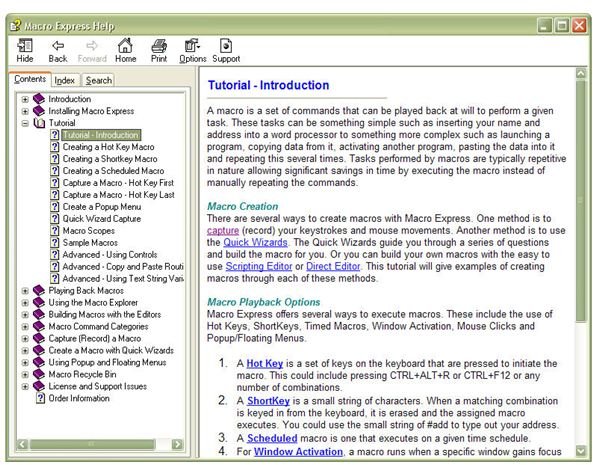
The support options offered by Insight Software Solutions, the developers of Macro Express 3, are simply phenomenal. To begin with, the program itself comes equipped with a comprehensive set of tutorials that can be accessed from the Help screen of the software. On top of that, the Macro Express web site includes several video tutorials covering many of the application’s features.
If that isn’t enough, there’s also an active discussion forum where users can share tips and tricks, a newsletter archive, and a gallery of free sample macros that can be downloaded to use as-is or as starting points for creating your own macros. If you still have questions after all investigating all these resources, you can contact Insight Software Solutions directly.
Price and Overall Rating (5 out of 5)
The price for a single copy of Macro Express 3 is $39.95, but there are substantial discounts available for multi-user packages. Considering the capabilities of this program, there’s no question in my mind that the utility is worth the price. If you have any regular processes that you want to streamline or repetitive tasks that you perform, this is definitely an application you want to check out. Macro Express 3 does have a 30-day trial period so you can download the software and make sure that it meets your needs before you buy.
Even if you never create a single macro on your own, the dozens of shared macros available as free downloads make the application an attractive deal. Still, it’s worth taking the time to go through some of the macro tutorials to learn how to create your own. As I mentioned previously, it may take a little practice to become fully comfortable with the software’s abilities, but don’t let that deter you from trying it out. In fact, stay tuned to Bright Hub’s Window Channel, because we’ll be offering some tutorials of our own in the near future to show how this utility can be used to increase productivity in other Windows’ applications.


