Maintain and control Windows using WinUtilities Professional or its free edition. You can also fix broken desktop shortcuts and defrag the registry to keep the computer in top shape.
Computer Maintenance Using WinUtilities Pro
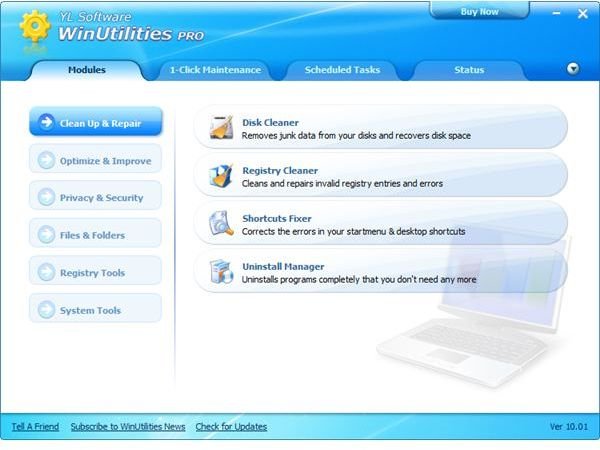
WinUtilities Pro 10 has received positive feedback for its simple interface and easy to use tools in maintaining Windows operating systems. Windows maintenance is required to keep the computer free from unnecessary files or folders, remove old software and to keep private information safe. WinUtilities Pro is a collection of tools to clean, repair and keep the files safe and private.
Installation and System Requirements (3 out of 5)
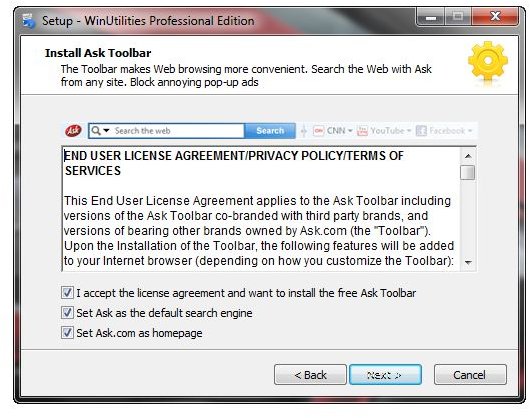
Installing WinUtilities in Windows is a quick process. The program does not require a computer restart before you can start maintaining Windows. The only issue to installing this software is the inclusion of the Ask toolbar in its installer. People should be careful before clicking the “Next” button without unchecking the boxes for installing the unnecessary toolbar and browser changes. Note that the program will use 24 MB of hard disk space after installation.
WinUtilities 10 Professional runs on Windows 7, Vista, XP, Windows 2003 Server, Windows 2000, NT and 98. You can use the program in 32 or 64-bit edition of Windows.
Program Features (5 out of 5)
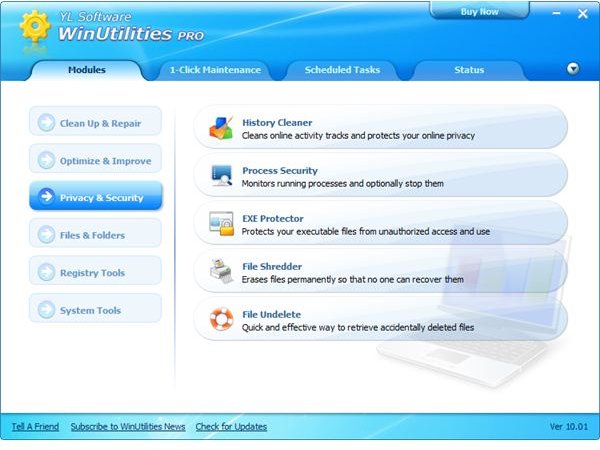
YL Computing WinUtilities 10 Professional edition provides the following features to help maintain the computer:
-
Clean-up and Repair - Cleans and repairs the registry and the hard disk for unnecessary files or entries. It also provides an option for fixing already removed shortcuts in the start menu and desktop. There’s also an uninstall manager to easily remove software that couldn’t be removed using the Add or Remove programs utility in Windows.
Advertisement -
Privacy and Security - WinUtilities Pro allows you to clean the history to protect your privacy while online. The program can also protect executables from unauthorized access and use. There is also an option to securely delete files, monitor processes and undelete files and folders.
-
Optimization - Registry and hard-disk defrag utilities will help improve the performance of the computer. These tools are included in the program, in addition to maintaining start-up items and browser helper objects (BHO). Another available optimization tool is the memory optimizer that can run in the background.
Advertisement
Other tools in WinUtilities 10 Professional:
-
Files and Folders - You can password protect media files and documents, search for duplicate files and split or join large files.
Advertisement -
System Tools - This option should be used by advanced users only. The system tools have the option to manage the system settings by modifying boot and network configuration. There is also an option to schedule an automatic computer shutdown.
-
Registry Tools - In addition to the registy cleaner , you can also take advantage of registry search, backup and restore.
Advertisement
User Interface and Performance (5 out of 5)
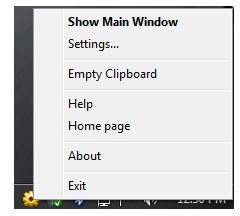
It’s quite easy to use WinUtilities 10 Pro because its user interface is straightforward and will not confuse new computer users. The program will only use 10 MB of memory while it is running in the background or if you opted to minimize the program to the system tray. There’s a handy command in WinUtilities Pro’s tray icon, such as empty the clipboard, open the program or to only open the program setting. You can also configure it to automatically check for updates.
When I tried the program tools to clean the browsing history, protect files and folders or programs and optimize the computer, the performance of the computer has improved. This is because the hard disk and registry has been defragged. What is neat in using this program is the ability to run the one-click maintenance so you don’t need to browse which tools to run.
Price to Value and Conclusion (4 out of 5)
WinUtilities Pro only costs $50 with a 30-day money back guarantee. The trial edition is fully functional for 31 days. If you find this program expensive, you can opt to using the free edition with basic PC maintenance tools.
The professional edition of WinUtilities 10.01 is a nice package to keep your computer clean and running without issue. It’s recommended for its ease of use.
References
- Screenshots taken by the author, courtesy of YL Computing .
- Program version in this review: Trial edition of WinUtilities 10.01 Professional Edition.
- Information based on author’s experience and review.


