Comparing Operating Systems: Choosing the Best OS - Windows, Mac or Linux?

Written by:  • Edited by: Tricia Goss
Updated Dec 31, 2008
• Related Guides: Mac Os X | Windows Vista | Windows XP

Operating systems are unique, diverse and highly configurable. Here we compare the three main operating systems on the market today and ask the crucial question - Windows Vista vs. Linux vs. Apple Mac OS X: An Operating System Comparisons review to find the best OS for you the end user.

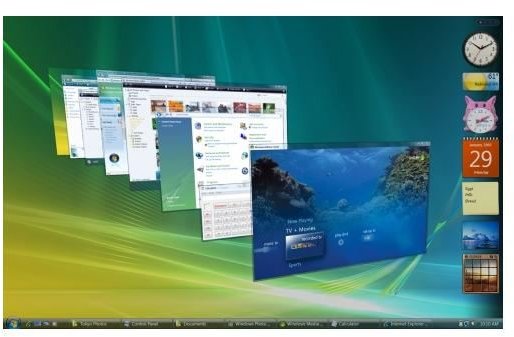
Operating System Comparisons - Windows Vista
click to enlarge

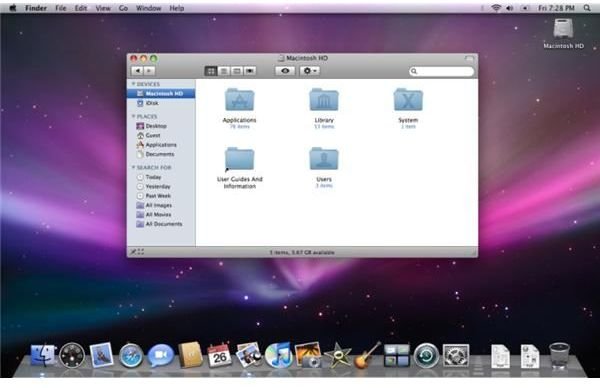
Operating System Comparisons - Apple Mac
click to enlarge

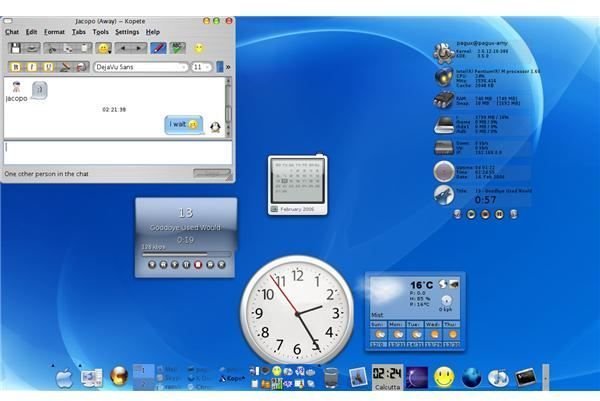
Operating System Comparisons - Linux
click to enlarge

Windows Vista is a slick, 3D graphic extravaganza of an operating system. With exceptional navigational displays, a rich feature set for multimedia and communications and a considerable upgrade from Windows XP in terms of visuals and processor dynamics, there is much to like about the new operating system from Microsoft.

It has been over a year now since Microsoft launched Windows Vista, their much publicized and eagerly anticipated new operating system. Now twelve months on from its launch, how has it bedded in? And does it stand up to the rigors of daily use by masses of end users in the home and business environment? Many say that Windows XP is still superior in speed and performance, others say that is to be expected with Vista's new look and graphically intensive user interface. And what about the impending release of Windows 7, which many leading analysts say will make Windows Vista obsolete?

Now, having given Microsoft a grace period to settle Windows Vista beta testing issues and bug fixes we thought it would be a good time to analyze its strengths and weaknesses. Not, as is common on many forums by comparing it to its predecessor Windows XP. That is old hat! We've seen those discussions and been party to the whys and what-fors over and over again.

What would be good is a direct assessment of Windows Vista in relation to the outside competition. This comes in the form of Linux and the Apple Mac’s OS X. All three operating systems, Vista, Linux and OS X offer differing levels of user interaction, customization and security. All three have considerable weight behind them from many authoritative voices in the IT community. All three have valid arguments for and against their use. So let's take a closer look:


Comments

Showing all 6 comments
 
zahida Aug 22, 2011 5:14 AM
suggestion
you have to make some guide line that how user use linux
Silvia Mar 21, 2011 2:59 PM
download unix
Hello Fahad,

the main two group of operation system that include the UNIX core, are the "mac OS" and the "linux".
Linux is freeware and also open source, so it has no cost and you can use it as you want.
For instance, a widely used free operating system (with many extra free programs included) is the Ubuntu Linux, you can download it today in:
http://www.ubuntu.com/desktop/get-ubuntu/download
(just click in the download button).
The installation of that OS is very intuitive, but if you need some help you can read the "install it! - show me how" found in the same link that I gave to you.
If you have any more doubts or if you finished the installation, you can write here.
Fahad Mar 21, 2011 1:16 AM
How to get unix operating system
Hi,
I want to get a good hand in unix operating system and its very new to me.So please tell me from where to download, Is it a freeware or not or how to get instruction to learn
phillip May 30, 2010 3:40 AM
OS keys
i have two operating systems (vista & windows 7) installation cds both bought with my laptop but i didnt get keys with them. of recent, i needed to reinstall the operating systems on both machines but i couldnt locate the keys. can you help?
Silvia Mar 23, 2010 8:04 PM
linux
hello graham,
if you want to try linux for free you can download an ...iso CD file, then you burn it and you can install it; alternatively you can ask a free mail CD (received in the "post office"), but that is slower.

To install another O.S. (operative system) in your computer, firstly you need to create/or have a separate partition in your disk. Then, you can install there linux: insert a linux CD, restart your computer and follow its instructions.
Linux will be independent from windows vista and it will not affect any programs!
After that, when you turn on the computer, it will appear a menu at the booting asking which O.S. you want to run, you choose and that's all!

You can choose the distribution you will download and install, for example some common distributions are:

Linux ubuntu: (recommended by me)
http://www.ubuntu.com
http://ftp.ucsb.edu/pub/mirrors/linux/ubuntu/karmic/ubuntu-9.10-desktop-i386.iso

or
Linux fedora KDE:
http://fedoraproject.org/get-fedora-kde

or
Linux debian, Linux gentoo, Linux mandriva, Linux openSUSE, etc...

If you don't have yet a CD/DVD burner you can get one for windows here:
http://downloads.sourceforge.net/infrarecorder/ir050.exe?download
(this is infra recorder: a free and open source image burning program, so with that you can burn a CD with the *.iso file)

I hope this helps you [and other people]!
I'm realy glad because I use linux, it's so fast and secure! =D

ah, another advantage is that, with some *.iso CDs like these I mencioned before, you have two options:
» install the linux O.S.
or
» run the linux O.S. from the live CD to experience it
graham Feb 10, 2010 4:47 AM
linux
how to down load linux or find a cd and to install it over windows vista and will it afect any programs
 
blog comments powered by Disqus
Email to a friend