How to Compile and Run Java Programs from the Command Prompt
Using the Command Prompt window
In this article, we show you how to compile and run your Java program. We assume that the JDK has been installed in
C:\Program Files\java\jdk1.6.0_07
and your program is stored in a file AreaOfSquare.java in the folder C:\MyJava.
We will run our programs using the “Command Prompt” window. This is also called the MS-DOS window.
Open the window by clicking on Start > All Programs > Accessories > Command Prompt
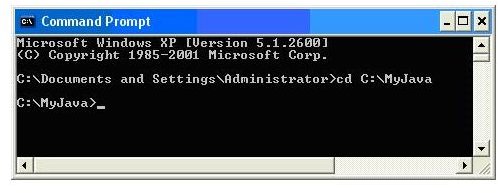
At the command prompt >, type cd C:\MyJava
The window should now look as follows (your first lines may be slightly different):
This changes the directory to the folder containing your program, AreaOfSquare.java.
To compile the program, we would like to type
javac AreaOfSquare.java
where javac.exe is the file containing the compiler.
However, if we did this, we would get a message to the effect that javac is unknown.
The file javac.exe is found in the bin folder of the JDK.
C:\Program Files\java\jdk1.6.0_07\bin is called the “path” to the compiler. We must tell Windows where to find the compiler by setting the Path “environment variable.”
How to set the “Path”
To set Path, go to Start > Control Panel and open the System control panel.
Click on the Advanced tab and then on Environment Variables. In the section System variables, click on Path (you may need to scroll) and then on Edit. In the pop-up window, click in the Variable value field and use the right arrow key to go to the end of the field.
Type a semi-colon ( ; ) if one is not present as the last character on the line. After the semi-colon, type the path C:\Program Files\java\jdk1.6.0_07\bin\ or C:\ jdk1.6\bin\ or to wherever you installed it. Click OK all the way out to the Control Panel.
Now you can type
javac xxxx.java
(where xxxx is the name of your program) from any command prompt and Windows will know where to find the compiler.
Helpful hint: if you’ve set Path correctly and it doesn’t work, close the Command Prompt window and then reopen it. (If it is open when you set Path, it will not recognize the change.)
Compile and execute
Now that you’ve set Path, you can compile the program with
javac AreaOfSquare.java
If there are no errors in the program, the compiler will create a file called AreaOfSquare.class in the folder C:\MyJava. This file contains the Java bytecode (think of it as machine language) equivalent of the source program.
To execute the program, type
java AreaOfSquare
(Note that you do not type .class.) This invokes the Java interpreter, java.exe, also stored in the bin folder of the JDK. The Java interpreter will execute the code in the class file.
Here, the computer will type
Enter length of side:
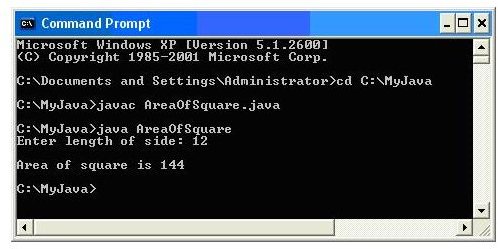
and wait for you to enter a number. Suppose you type 12. The screen will then look like this:
Enter length of side: 12
Area of square is 144
and you are returned to the command prompt. The following shows the Command Prompt window at the end of the above activities:
References
Reference text: Java Programming – A Beginner’s Course
Related programming references
This post is part of the series: Introduction to Java Programming
This is a series which aims to discuss and teach Java programming to the complete beginner. Absolutely no programming background is assumed.
- Introduction to Java Programming - An Overview
- Java - Data, Variable and Algorithm Explained To A Beginner
- Java Example: Algorithm and Program For Area of Square
- Java Programming For Beginners - Test, Debug, Document, Maintain
- JDK Java Compiler: The Java Development Kit
- Java Programming For Beginners - How To Compile And Run Java Programs
- Data Types, Constants And Variables
- Java Programming For Beginners - Characters and printf
- Java Programming For Beginners - Part 9
- Java Programming For Beginners - Part 10
- Java Programming For Beginners - Part 11
- Java Programming For Beginners - Part 12
- Java Programming For Beginners - Part 13
- Java Programming For Beginners - Part 14
- Java Programming For Beginners - Integer Data Types
- Java Programming for Beginners - Part 16
- Java Integer Arithmetic For Beginners
- Java Programming For Beginners - Part 18
- Java Programming For Beginners - Part 19
- Java double to int and Other Conversions