Ever wondered how you can convert your PDF files to Word documents? In this tutorial, I will explain three easy methods to convert PDF to Word in a matter of minutes. Most importantly, for free.
Complete Guide to Convert PDF to Word
Microsoft Word is the most popular document editing software in the world. It comes bundled with the Microsoft Office suite and provides a wide range of features that cater to your each and every word processing need. With the newer versions of Microsoft Word like Word 2007 and Word 2010, the software is becoming increasingly refined and easy to use.
Adobe’s PDF (Portable Document Format) is another very popular format, which is used for publishing documents and exchanging them on the internet. The advantage with PDF is that while the formatting and appearance of Word documents change with every application used to view or edit it, like Microsoft Word and Open Office, PDF retains the exact formatting when viewed with any reader. However, PDF documents are not very easy to edit.
In this tutorial, I will explain how you can convert PDF documents to Word (DOC).
There are many ways and methods to convert PDF to Word or PDF to DOC. In this article, I will explain the three easiest ways.
Use HelloPDF to convert PDF to Word (DOC)
HelloPDF is a small freeware program that you can use to convert your PDF documents to Word documents. It is available for a free download at Hello PDF Free PDF to Word Converter Download .
It is the easiest way to convert PDF to Word and is very fast and easy to use. It supports images as well as text in the PDF and provides accurate formatting.
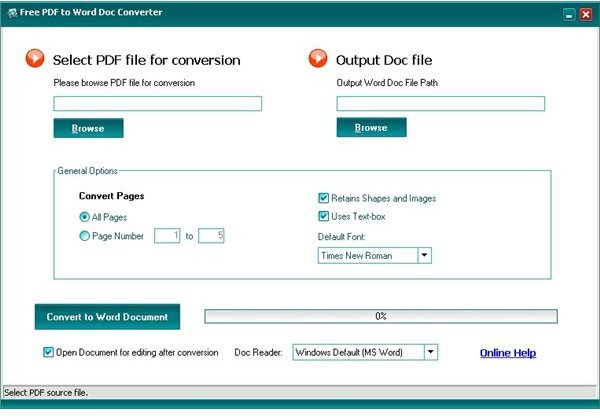
Just download HelloPDF and install it. Open the Free PDF to Word Doc Converter from the Start Menu > All Programs.
Select the PDF file for conversion by browsing to it. Select the pages you want to convert from PDF to doc and tick the Retain Shapes and Images and Use Text Box fields if you want to keep the layout and positioning of the images with the text intact. Select a default font and click on the Convert to Word Document button to start conversion.
After the conversion is complete, open the Word doc to see the converted file.
You will see that all the text in the PDF has been copied to the Word doc in the default font and the images have been inserted properly while preserving the formatting and text fields.
However, in many offices, downloads are restricted. If you cannot download this PDF to Word converter, check the next two methods.
Use the Online PDF to Word DOC conversion service
The PDF to Word online conversion tool is one of the best PDF to Word converter. The best thing about this is that you don’t need to download any software. It provides very accurate results when converting from PDF to Word and preserves the original formatting in both text and images.
Just visit PDF to Word Online Converter to convert PDF to DOC. You will see three selection boxes.
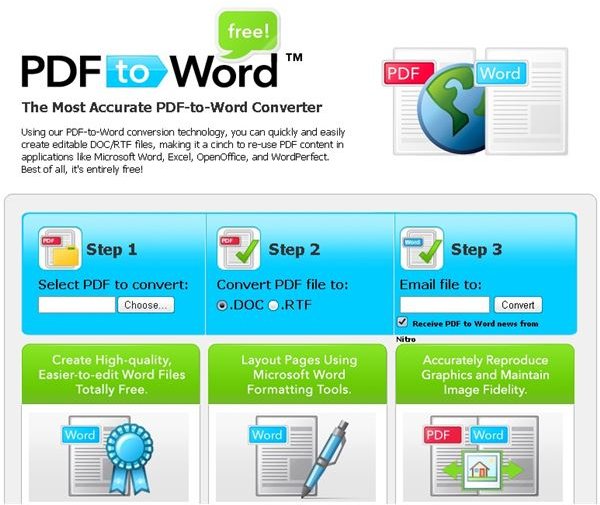
In the first box, select the PDF file that you want to convert. Click on the Choose button and browse to the PDF you want to convert.
In the second box, select whether you want to convert it to a DOC or an RTF document.
In the third box, enter your email ID. The file will be emailed to you after conversion as an attachment. Make sure that you remove the tick on the Receive PDF to Word News from Nitro checkbox if you don’t want to receive their newsletters. Click on the Convert button.
You PDF file will be uploaded to their servers and after a few minutes, depending on the file size, you will be notified that the PDF file has been successfully uploaded and that you will receive it in your email.
Check your email to find the converted file. If you can’t find it in your inbox, check the Spam folder.
Convert PDF to TXT and then convert it to Word
This is a very simple method. It works best with PDF documents that consist of only text data with no images.
To convert PDF to TXT, just open the file in Adobe Acrobat Reader. It is a free download for the basic version. Adobe Acrobat Reader Free Download.
After installing Adobe Acrobat Reader , open it and click on the File Menu on the top left. Click on Open and browse to the PDF file that you wish to convert to word.
After the PDF file has been opened and displayed, click on the File Menu again and select the Save as Text option. Select a location to save the text file and click on the Save button.
Now open the text file and copy the whole text. Open a new Word Document and paste the text.
Your original PDF document has now been converted to a Word DOC document.
Note that this method is the fastest but will work only if your PDF document contains only text data. If there are images in the PDF or if you don’t want to do this manually, follow the other two methods.
Also, check this article to see how you can convert Word documents to PDF


