Syncing files between computers doesn’t need to be frustrating. There are many ways to do so, some physically and some wirelessly.
How to Sync Files between Computers
Are you going out for the day with your laptop or going out of town? Need to know how to sync files between your computers? Technology has grown in such a way that simply walking from one PC to another just to print suddenly seems to be so far from we are today. Syncing files between two or more computers is fairly easy, usually only using a simple download or push of a button.
This article will go over some of the ways you can sync those important files.
Windows Live Sync & Home Group
If you’re a user of Windows, there are a few products that Microsoft offers to their users. With the arrival of the new operating system Windows 7, Microsoft has issued several products that will allow storage and the ability to sync files to multiple computers. One of these products is Windows Live Sync.
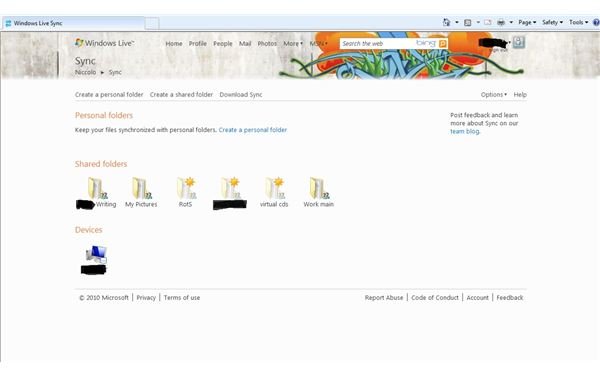
Windows Live Sync is a free product and download from Microsoft for both Windows and Mac operating systems. It requires a Live or Hotmail email (also free to sign up), which can be attained when on the site. You first need to download the application; after it has installed, sign in with your Hotmail or Live email and password. The first time the application will ask what you would like to sync (videos, documents, music) and then will finish installation. Do the same for any computer you want to sync with; when finish, it will direct you to the Live Sync website.
From here, you can view devices, as well as add folders and other documents. When a change is made to a file on one computer, it will show up on the other, as log as the computer is online and signed in.
Home Group
Home Group is a new feature for users of Windows 7 and is especially good for homes with more than one computer and who share many documents. Setting up the Home Group is also easy - usually one of the steps when installing 7 - and allows for sharing of documents, folders, pictures, and others that are set up to be shared. As long as a computer is on the home network and has permission, Home Group is available.
Servers & Phones
Servers are mostly seen within businesses or corporations, but there are some servers that are designated for home use, usually with home businesses in mind. Servers are basically larger sized computers that are just used for storage purposes in regards to files and documents.
Home servers are again good for home businesses and homes with several computers, as documents can be loaded and then pulled from the server; so when changes are made, they appear across the server. Many manufacturers of home and business computers also sell servers, like Dell and HP.
Smartphones
Many cell phone users have access to smartphones, which are like small computers that can call out. Most smartphones have the capability of syncing files between computers, which may be an alternative if you are always on the go.
Old Fashioned
There is of course the old fashioned way of syncing files and that’s the use of flash drives, DVD/CD’s, and floppies.
Compared with the above, this method should only be a quick way of syncing files, such as going from home to school or to work. However, there are also methods that can help with this too and that’s the use of an online storage facility, like Microsoft’s Sky Drive . These online storage sites can range from being free to a monthly or yearly fee, but they allow a set limit of storage to let a user upload files or pictures.
Then when the user needs it - say at a school lab - it’s there for them, without the need to bring along a flash drive. The downside to this of course is that any file that is changed will need to be uploaded again. This can rather difficult if a user forgets to do this, thus leaving them with an older copy rather than a newer one.


