Have you ever opened an email attachment in Outlook, edited the document, hit the Save button and later couldn’t find the document? Well, you might be able to recover that document from Outlook’s OLK temporary folder. Find out how to locate your OLK folder in Windows XP.
Understanding the OLK Folder
Outlook opens all attachments in a secure temporary folder called “OLK”. The exact name of the OLK folder varies by computer - it is typically “OLK” followed by a number. Outlook opens email attachments in the OLK folder in order to isolate the attachment in case the attachment contains a virus. So the OLK folder does serve an important purpose, but if you work on a document and save it without choosing a different location, you could lose all the edits that you made to the document.
IMPORTANT! The first thing you want to make sure to do as soon as you realize that you have accidentally saved your document to the OLK folder is to not close or open any applications, do not re-open the email attachment, and do not shut down or restart your computer. Doing any of these things could result in the loss of your document, since typically Outlook will clear the OLK folder if any of these events occur.
How to Locate the OLK Folder
The OLK folder is located in Temporary Internet Files, but it cannot be accessed via Windows Explorer or even through a search. You have to know the exact path to your OLK folder in order to open it. Here is how you find the location of your OLK folder.
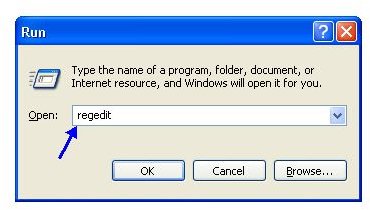
- Go to Start and select Run.
- Type regedit in the Open box.
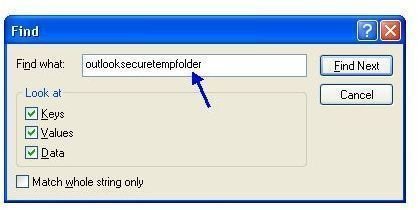
When the Registry Editor opens, press CTRL+F to open the Find dialog so that you can quickly find the OLK folder. Type outlooksecuretempfolder in the Find What box and click on the Find button.
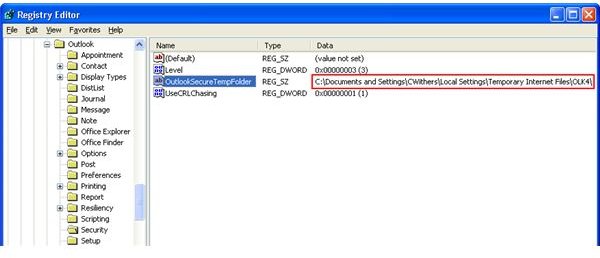
This should bring you back to the Registry Editor with the correct file highlighted.
How to Open the OLK Folder
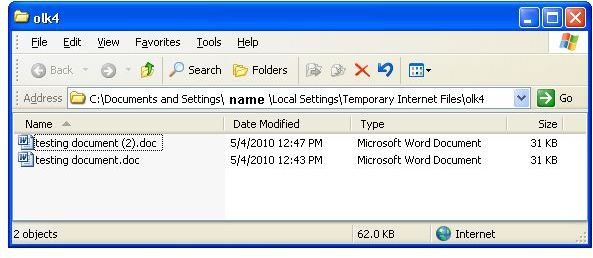
You have now found the path of the OLK folder, but how do you open it? Leave the Registry Editor open, and go back to the Start menu and choose Run. You now need to type in the whole path to the OLK folder that you found in the Registry Editor. Type that path in and click OK.
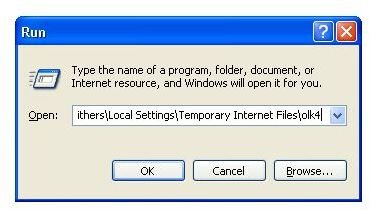
You have now opened Outlook’s OLK temporary folder. If you haven’t closed and re-opened Outlook, your document should be in the OLK folder. What you need to do now is to click on the document and drag it out to your Desktop. You have now recovered your document.
If you do not see your document in the OLK folder, or the document that is there does not contain your edits, than that means your document is gone. Different computers will behave differently when it comes to the OLK folder, but typically, when you re-open Outlook, the OLK folder is cleared out and the documents are not recoverable.
Outlook Express or Windows Mail
Outlook Express or Windows Mail (Vista) are a little different. They do both store documents in a hidden folder under Temporary Internet Files, but the path is slightly different. Try this path for recovering documents saved in the Outlook Express or Windows Mail temporary folder. You will need to put in the correct user name in the path.
C:\Documents and Settings\[User Name]\Local Settings\Temporary Internet Files\Content.IE5\
In Vista, just enter the above path into the Search field when you click the Microsoft Vista logo in the bottom left corner of the Desktop window.
Prevent Documents from Saving Into the OLK Folder
The best practice for dealing with Outlook’s OLK temporary folder is to prevent documents from saving in that location in the first place. Now there is nothing you can do so stop Outlook from opening email attachments in the OLK folder if you open the attachment directly from the email. So what you need to get into the habit of doing is right-clicking on the email attachment, choosing Save As, and saving it to your desktop or some other location. Then open the document from that location to make your edits. If you get into the habit of saving your email attachments right from the beginning, you will never have to worry about this problem again.


