How to Delete Libraries in Windows 7 - Removing Folders and Entire Libraries
Library Management
It may take a little bit of time to get used to the new library system in Windows 7, but it’s actually quite a nice tool that you can use to manage files on your PC – especially if you keep documents, pictures, and videos in several different locations. But, to use this feature in a truly effective manner, you’ll probably have to delete libraries from time to time. At the very least, you may need to remove certain folders from a library to clean up the structure and make it easier to find what you’re looking for.
In this guide, we’ll first look at how to remove individual folders from a library while leaving the rest of that library intact. Then, we’ll describe how to delete an entire library in Windows 7.
Removing a Folder from a Library
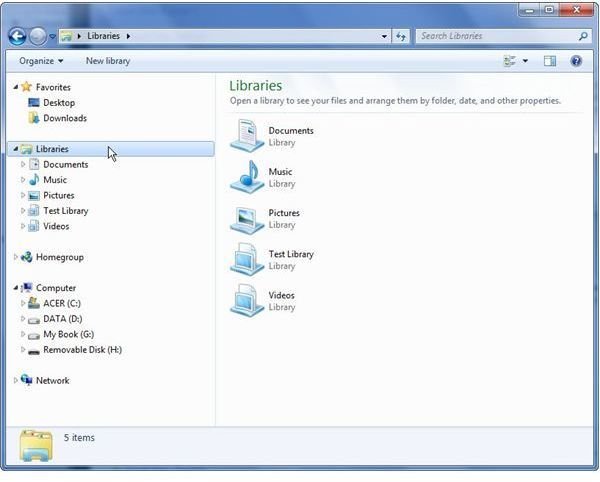
Step 1: Begin by clicking on the Start button and selecting Computer. (Alternatively, you can use any other means to open Windows Explorer.) Then, click on Libraries in the left side panel as shown in the screenshot below. Click any image for a larger view.
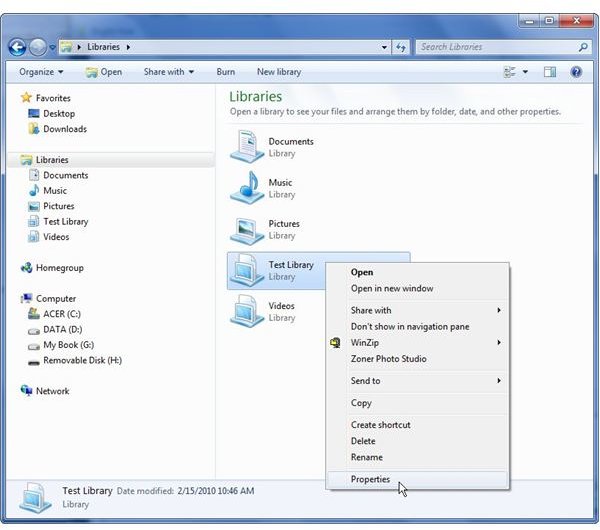
Step 2: Right-click on the library that contains the folder you want to remove and select the Properties option.
Step 3: Select the folder that you want to remove from that library and then click the Remove button.
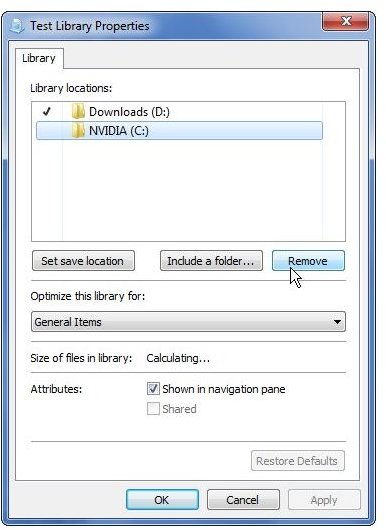
Step 4: Click Apply and then OK to return to Windows Explorer.
Note that this action will not delete the folder on your hard drive. It will only remove its contents from the library view.
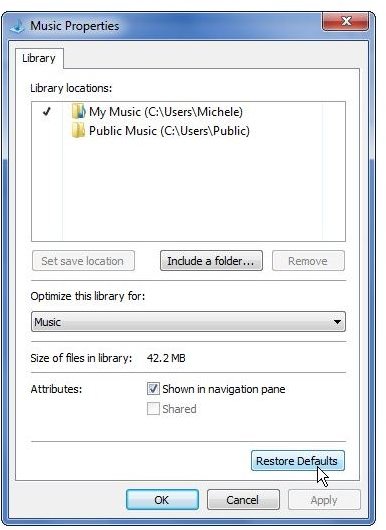
If the folder you deleted was one of the default folders included in the standard Documents, Music, Pictures, or Videos library, one quick way to get that folder back is to click on the Restore Defaults button in the Properties window. You might want to be a little cautious here, however. Not only will the Restore Defaults option add default folders back to a particular library, but it will also remove any non-default folders that you’ve manually added.
Deleting Libraries
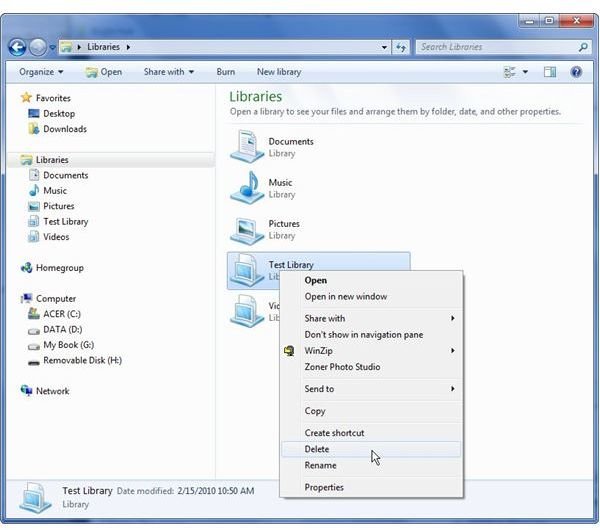
If you want to delete an entire library in Windows 7, just right-click on that library and choose the Delete option. Again, this action will not delete any of the actual content from the files and folders contained in that library. It will just remove the “shortcut” to that material that was created in the Libraries navigational structure.
What if you delete a Windows 7 default library and you want it back?
If you accidentally delete one of the default libraries in Windows 7 and you want to undo that action, you can do so by right-clicking on Libraries in the left side panel of Windows Explorer and selecting Restore default libraries.
Additional Resources
How to Change Sleep State Settings in Windows 7 – Is your PC going to sleep at all the wrong times? With just a few clicks, you can change how long Windows 7 waits before shifting into sleep state. You can also enable or disable the setting that requires you to enter a password when coming out of sleep state.
Turn Off Aero Snap in Windows 7 – If the snap feature in Windows 7 is causing you frustration by maximizing or changing the sizes of open windows “accidentally,” you can disable this tool and save yourself some headaches. This guide will show you how.
Top 5 Free Windows 7 Email Software Applications – Since Windows 7 no longer comes with a pre-installed email program, you may want to explore a few different alternatives. Windows Live Mail may be the application that Microsoft is recommending, but it’s not the only option.