Windows XP Desktop themes determine the appearance of different elements of the OS including the login screen and application windows. A web search on Top Free Windows XP Desktop Themes will give you countless results. The article looks at the best free desktop themes for Windows XP.
Windows XP Desktop Themes – Introduction to Windows Themes and their Need
People tend to personalize almost everything they possess to suit their needs and/or personality. For example, bikers remove the original parts of the bike and replace them with wider tires and special horns etc. other than dazzling paint. Similarly, as soon as people buy an iPod or a cell phone, they check it out and customize it so that they do not have to search for a specific option in the menu. This helps people feel comfortable and sometimes special while dealing with those objects.
The same is with Windows XP themes. A Windows XP theme contains the color and appearance of different elements of the graphical user interface. These elements include: the desktop color, windows background color, icon size, text size on title bars, and much more. The basic aim of themes is to offer users with a personalized experience: less strain on eyes, or dashy colors – depending upon user preferences.
How to Select Best Windows XP Desktop Themes
Windows XP Default Themes and Customizing Them
**
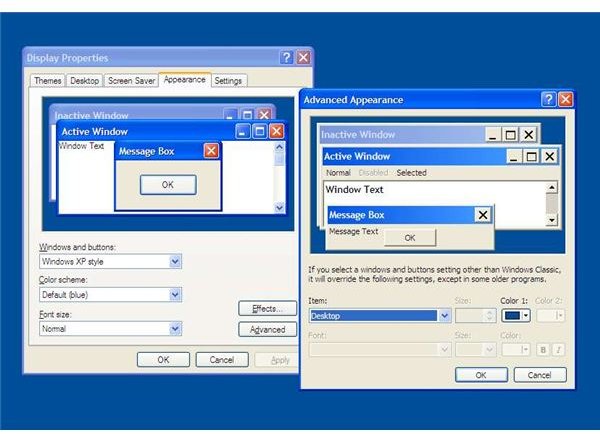
Windows XP Pro offers you three default themes: Blue (Default), Olive Green, and Silver. The Windows XP Blue theme is especially good for people who spend long hours on computers. You can further customize them using the Display Properties box, clicking Advanced button under the Appearance tab (Fig 1).
Caring for your Computer While Downloading Free Windows XP Desktop Themes
A little search on the Internet can get you several more themes that suit your needs or preferences. There are many other sites that offer best Windows XP desktop themes. Most of them offer free Windows XP themes downloads. However, you should always take precautions while going for free Windows XP themes downloads. Many such “free Windows themes downloads” may also install malware in your computer.
I recommend sites that you might have tried previously and felt reliable. Some such sites are CNET, PCMAG, BrotherSoft, and of course, Windows Download Centre.
System Requirements
In an attempt to create extraordinary free Windows XP themes, programmers often tend to use codes that need higher resources. If you download a 3D theme for Windows, you better check the compatibility of the theme with Windows XP, and the amount of RAM it consumes. Installing a resource-consuming theme slows down your system and also consumes power rapidly while you are on batteries.
Desktop Themes for Windows XP for Free

.
Final Fantasy XI seems best for teens and kids – very colorful and bright. Available from both Windows Download Center and CNET, the theme is low on resources.
.
.
.
Here are some more top Windows XP desktop themes from CNET (in accordance with user rating on CNET).
Cowboy Bebop Desktop Theme Set features a futuristic society. You get all science fiction related elements with this theme including the screensaver. The desktop may be slightly bright owing to the wallpaper but I found application windows to be cool enough for working. Upon installation, you get three free Windows XP desktop themes.
Microsoft Zune Theme: Check out the editor’s description before downloading it; they have given this official free Windows XP desktop theme, 4.5 stars out of five. Contrary to the Cowboy Bebop theme, this Windows XP theme offers eye soothing colors (Don’t download if you don’t like the color black). It seems to use Windows Silver Theme as its base.
3DNA Desktop 1.1: The theme makes your desktop come alive with all kinds of 3D effects. You can create different “worlds” to get started. Each world contains links to your folders etc. Once you have your worlds configured, you can download and add more elements to them. Rated four stars by the CNET editors, this theme works best on gaming computers.
SkinStudio : A utility that allows you to create your own skins using startup templates or even with a blank template. As you move ahead, you can create skins for virtually every component for Windows XP Desktop. The Stardock site contains screenshots showing how to use the package . If you are not able to determine the best Windows XP Desktop theme, you can use the SkinStudio to create your own free Windows Desktop themes.


