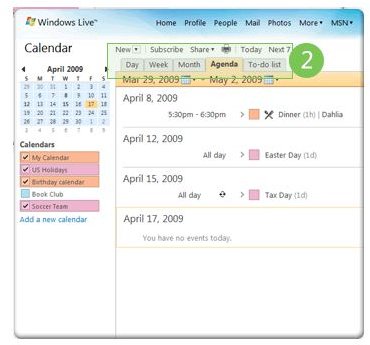
There are many things you can do with the Windows Live Calendar including adding appointments, reminders, and sharing events with others. This guide shows how to sync Windows Live Calendar with Outlook and discusses solutions to common problems while synchronizing Windows Live.
Using Microsoft Outlook Connector to Sync Windows Live Calendar with Outlook
Similar to Microsoft Outlook Calendar, you can plan your day, week, or entire month on Windows Live Calendar too. The only thing is that is that it is much easier to understand and manage the agendas on the Windows Live calendar owing to its look. Unlike Outlook calendar, Windows Live Calendar is easier to view and understand with bigger boxes that do not strain your eyes. Plus, you can share it with whomever you want using a minimum clicks.
Ever since the Windows Live Calendar was released, people at Microsoft have been working to present its users with software that helps them sync Windows Live calendar with Outlook. The output is the Microsoft Outlook Connector, now in its 12.1 version. The process is easy. First. you have to download Outlook Connector from Microsoft’s Office website. After you install it, you just run it to sync Windows Live Calendar with Outlook. Not only Calendar, but the Outlook Connector 12.1 also synchronizes the mail messages and contacts.
Though the process is easy, you may not be able to access your MSN calendar once the Outlook Connector 12.1 is hooked to MS Outlook. What happens is – once you run the Outlook Connector 12.1 on your computer, your MSN calendar is transferred to Windows Live Calendar. Once this is done, you cannot access your MSN calendar from within Outlook.
Note: The Outlook Connector 12.1 works well only with Outlook 2003 and later versions. I could not find any reliable software for synchronizing MSN or Windows Live calendar with Outlook versions below 2003. You may use Outlook Connector Beta if you can get it. However, results are not guaranteed.
Common Problems Using Outlook Connector to Sync Windows Live Calendar with Outlook
**
1. MSN Sync Problem
As mentioned in the above section, if you run Outlook Connector 12.1 directly, you won’t see a proper migration of your MSN calendar to Windows Live Calendar. To get around it, Microsoft recommends you update your MSN calendar before using the Outlook Connector 12.1.
Tip: Though slightly tedious, if you need to sync MSN calendar again, uninstall Outlook Connector 12.1 and make changes to the MSN calendar. Once done, re-install and run the Outlook Connector to sync MSN calendar with Outlook 2003 and above.
2. Can’t Connect to Windows Live Calendar through Outlook (all versions above 2003)
If you face problems synchronizing your Windows Live Calendar even after installing Outlook Connector 12.1, you need to update your accounts. To achieve this, visit the Windows Live update website and click on “Update Account”. Once you are done with updating the accounts, restart Outlook to sync Windows Live Calendar with Outlook.
3. Can’t Sync Windows Live Calendar in Outlook 2003
Though Outlook 2007 automatically synchronizes the calendar as you install the Outlook Connector 12.1, the process is not automated in Outlook 2003. To sync Windows Live calendar with Outlook, you have to click on Send/Receive option. The synchronization occurs when you manually click on Send/Receive after installing Outlook Connector.
4. Message Saying Outlook Cannot Start
This happens when the Outlook Connector is not installed properly. The correct method is to close Outlook before installing Windows Live on your computer. Once done, you need to reboot the computer. After rebooting, you will be able to start Outlook normally.
5. Message saying Premium Account Required
Among the main problems people face while running Outlook Connector 12.1 is that they see a message that they need a premium account for the program to work properly. This is just a leftover from the beta version and may be removed with next version. As of now, Outlook Connector 12.1 is absolutely free, though there are some extra goodies for people using premium Hotmail/MSN account.
NOTE: While you sync Windows Live Calendar with Outlook, the Outlook Connector makes some changes made to your distribution lists. You will not be able to see the contact names in distribution lists (only). Instead, when you sync Windows Live with Outlook, the names are replaced with email IDs. However, the individual contact records are not altered.


