One of the many benefits of Microsoft Access is that you can create a database that is easy to augment and expand. However, the more data you enter into a table, the wider and longer your datasheet grows as well. Learn several ways to resize rows and columns to make your Access data more manageable.
Overview
There are several ways in which you can resize rows and columns in Access. For instance, you can resize a single column to any size you choose, resize rows or columns to fit their content and more. Read on to learn some of the various ways to resize rows and columns in your Access datasheet.
Resize a Column to a Specific Width
To resize a single column in an Access table to a specific width, move the mouse pointer to the right border of that column. You will notice that the pointer changes to a double-sided arrow. When it does, click on the border of the column and drag it to your desired size.
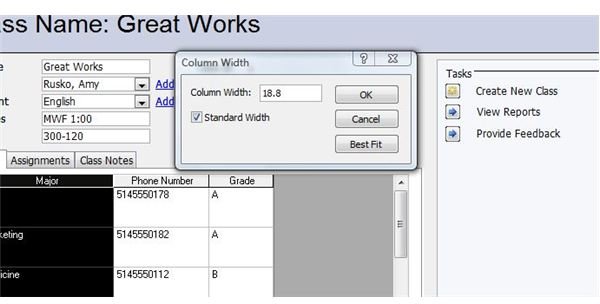
You can also click to select the column you would like to change, right-click and select Column Width. A Column Width dialog will open. Type in the width to which you want to resize the column, or select the Standard Width check box. Click OK to apply the changes.
Resize Rows to a Specific Height
While the process of resizing row height in Access is quite similar to that of resizing column width, the outcome is somewhat different. You cannot resize a single row in Access as you can a single column. When you resize the row height of any row, all rows in the table are affected.
To resize the rows in your Access table, place the mouse pointer on the record selector at the left of the datasheet between any two rows. When the pointer changes to a double-sided arrow, click and drag the row selected to the size you desire. When you let go of the mouse button, all of the rows will be resized.
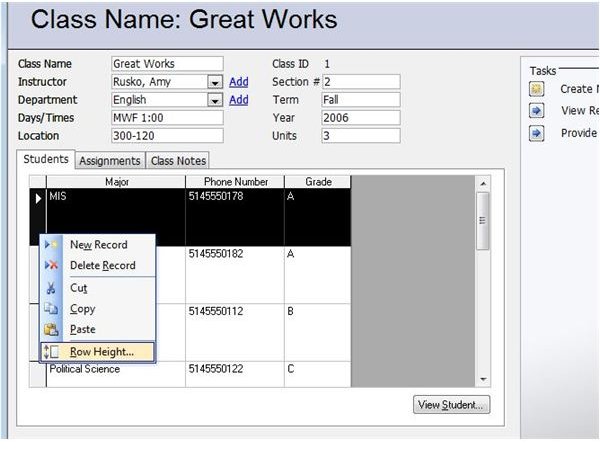
Another way to resize the rows it to select any row, right-click and choose Row Height. In the Row Height dialog box, enter the size to which you want to change the rows, or select the Standard Height check box. Click OK to apply the changes.
Resize a Column to Fit the Data
If you want to resize a single column so that it is just wide enough to contain the current data, move the mouse pointer to the right border of that column. When the pointer changes to double-sided arrows, double-click. The selected column will instantly resize to the proper width.
You can also click to select the column you would like to change, right-click and select Column Width. Click the Best Fit button and Access will resize the column to fit the contents it contains.
Resize Several Contiguous Columns
Just as changing the size of a single row in Access resizes all of the rows in the table, you can resize several adjacent columns at the same time. Select all of the columns you want to change by pressing and holding the mouse button while you drag the mouse across the column headers. Place the mouse pointer over the right edge of the rightmost selected column. When the pointer becomes a double-headed arrow, click the border and drag it outward or inward to the desired width. When you let go of the mouse button, all of the selected rows will be resized.
More on Access
For more Access tips, tricks and tutorials, check out the Bright Hub collection of Microsoft Access User Guides and Help . New articles are added all the time, so be sure to come back often!


