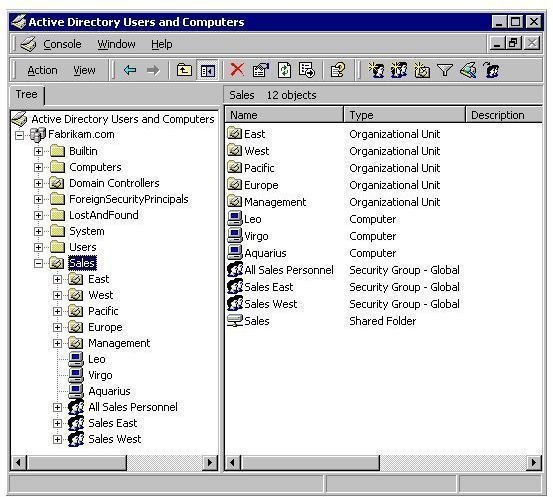
It used to be easy to manage computers, even a small group of computers, but Network Administrators are now asked to manage not just hundreds of computers, but computers located in different geographical areas. The way to do this effectively is with Active Directory and creating Group Policies.
What is Group Policy?
The last thing that a network administrator wants is to setup users and computers blindly in the network infrastructure. Group Policy is an infrastructure that allows you to implement specific configurations for users and computers throughout the network. Group Policy settings are contained in Group Policy objects (GPOs), which are linked to Active Directory directory service containers. These include sites, domains, or organizational units (OUs). The hierarchical nature of Active Directory allows the settings within GPO’s to be managed. This means that Group Policy is one of the reasons to deploy Active Directory; it allows you to manage user and computer objects.
- A Site object in Active Directory represents a physical geographic location that hosts networks.
- A domain is a logical group of computers that share a central directory database. Their physical location is irrelevant as long as they can communicate.
- Organizational units are Active Directory containers into which you can place users, groups, computers, and other organizational units. It is the smallest scope or unit to which you can assign Group Policy.
What is Active Directory?
An Active Directory is a directory structure used on Microsoft Windows based computers and servers to store information and data about networks and domains.
Active Directory performs many functions. It provides information on objects. It organizes these objects for easy retrieval. It allows access for administrators and end users depending on the operation and it allows the administrator to set security up for the directory.
An object can be a piece of hardware such as a printer, or an end user or even security settings set by the administrator. Furthermore, objects can hold other objects within their file structure. All objects will have an ID, which is usually an object name, i.e. a folder name, and a set of attributes that characterize the object. Typically this is called the schema.
Why is Group Policy needed?
As computers have become more sophisticated, managing them and the users that use them has also become more challenging. Consider the types of users that used computers twenty years ago: there was only one type - PC users. Today administrators must deliver and maintain customized desktop configurations for many types of workers like mobile users, application workers, database users or developers or even for those with specialized operations like data entry.
Consider Security. This used to be confined only to login and password operations, but it must now be more critically managed. Security problems used to be limited to viruses, and introducing virus protection software usually took care of the problem. Not anymore. Problems like identity theft, hacking, online file theft plus the myriad of spam and new virus offering make security a top priority. So security settings, including updates, permissions, and firewalls, are some features must be delivered efficiently to all the computers and devices in the organization.
Change and configuration management is now the order of the day. New users must hit the ground running; they must be productive quickly without costly training. And if there is a computer breakdown or disaster, service must be restored quickly without or limited data loss or time lost. Furthermore, if there is a breakdown, the recovery should be at minimal cost. These considerations force administrators to set policies to implement change quickly and which therefore will affect large numbers of users and computers.
These are reasons why Group policy is needed. One policy for the group.
What Does Group Policy Do?
Group Policy is the infrastructure that allows you to implement change at the object level in Active Directory. Once you define an object’s configuration, you implicitly rely on the operating system to enforce those configurations.
This infrastructure provides a high degree of flexibility, allowing you to customize configurations, such as delivering a specific piece of software to specialized users based on their membership in an OU.
The Group Policy Management Console (GPMC) allows you to implement and manage Group Policy. The end result is that Group Policy Objects (GPO) can be linked to sites, domains, and Organization Units, allowing the settings to be applied to users and computers.
IntelliMirror Management Technologies
In order to implement these policies the IntelliMirror Management system offers administrators a group of management technologies. They are designed to allow administrators to create a similar and consistent network setting. Users are provided with several key features that allow them to work across the network regardless of where they operate from. These include giving access to user applications, application settings, roaming user profiles, and user data, from any managed computer—even when they are disconnected from the network.
IntelliMirror is implemented through a set of Microsoft Windows features:
-
Group Policy
Advertisement -
Active Directory
-
Software Installation
Advertisement -
Windows Installer
-
Folder Redirection
Advertisement -
Offline Folders
-
Roaming User Profiles.
Advertisement
Components of Group Policy
Components of Group Policy
- The site. Group Policy is normally not applied to sites. It is usually applied to domains and organizational units. If it is attached to a site, then all computers in that site have the same group policy.
- The domain, a group of connected Windows computers that share user account information and a security policy.
- An organizational unit — a subgroup of computers, or even a single computer, within a domain.
- An organizational unit nested within a larger organizational unit.
- The local stand-alone computer.
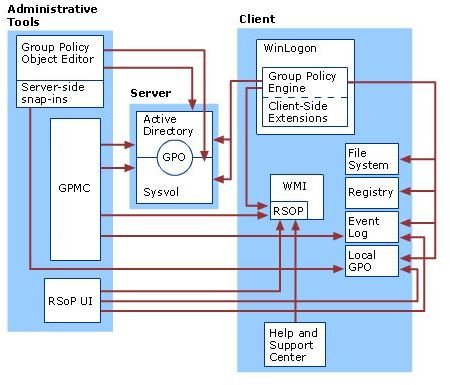
Group Policy Server Implementation
When determining the manner in which Group Policy settings should be structured or arranged into GPOs, one should focus on the users and computers that need the settings. Active Directory and Group Policies are implemented on Server 2003 or Server 2008 domain controllers, not on client machines, like XP, Vista, or Windows 7.
Here are the different types.
- Single setting GPO type: With this GPO type, a GPO contains only one type of Group Policy settings, like security or software settings, but not both. Here settings are task oriented and distributed among numerous persons.
- Multiple setting GPO type: With this GPO type, a GPO contains more than one type of Group Policy setting. It can contain both security and software settings. Here the organization’s administrative tasks are centralized. The Administrator has to perform all the different types of Group Policy administrative tasks.
- Dedicated setting GPO type: With this GPO type, one GPO contains user settings, and another contains computer configuration settings.


