Internet Explorer 8 ships with several annoying alerts set to on by default. Learn how to turn the top 3 most annoying IE8 alerts off and create a more enjoyable Internet experience.
IE8 Alerts
As with several previous versions of Microsoft’s popular Internet Explorer web browser, Internet Explorer 8 (IE8) shipped with several annoying alerts set to on by default. These alerts disrupt Internet surfing and can create a very unpleasant online experience whenever one of these alerts pops up.
Certainly, Microsoft has an incentive to create a stable, secure Internet browser to compete with Firefox and several other prominent browsers eager to steal away some of the Internet browser market from Microsoft. However, sometimes too much of a good thing is bad. By default, IE8 has three annoying alerts set to go off by default while you browse the Internet. Learn what these alerts mean and how to turn them off.
How to Disable the Default Web Browser Check Alert in Internet Explorer 8
As mentioned above, Microsoft wishes to compete with alternative Internet browsers available to its market. Firefox, in particular, is inching its way up closer and closer to Microsoft’s rung on the Internet browser ladder of popularity.
Whenever you click on a link, Microsoft wants IE8 to open rather than some other browser. To ensure this, Microsoft wants to alert you whenever your default Internet browser is set to some browser other than IE8. IE8 does this by checking whether it is the default browser every time you open it.
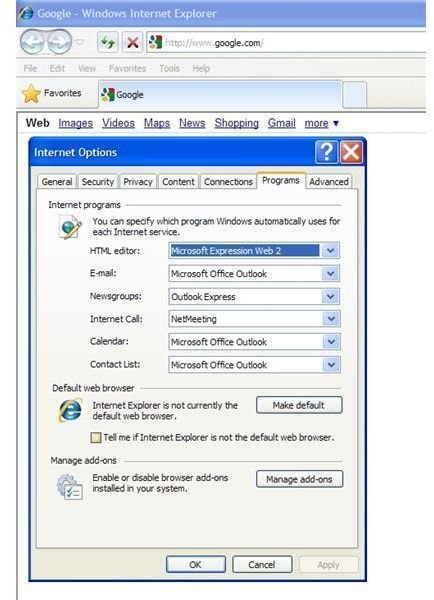
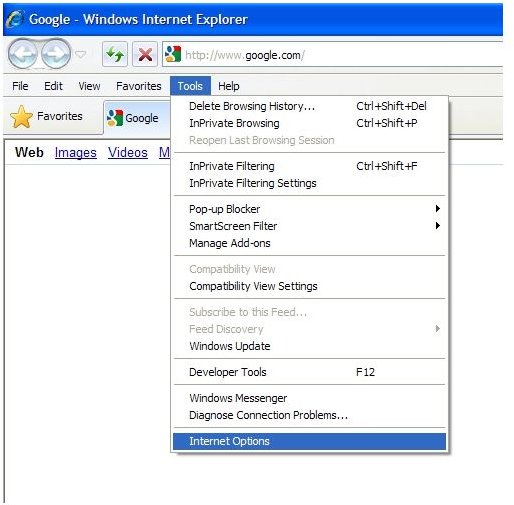
To disable the default web browser check in IE8, click on TOOLS on the menu bar and then click on INTERNET OPTIONS (see Figure 1). When the INTERNET OPTIONS window appears, click on the PROGRAMS tab and uncheck the box that says TELL ME IF INTERNET EXPLORER IS NOT THE DEFAULT WEB BROWSER (see Figure 2). Now you can use another browser as your default Web Browser and still use IE8 when you want without constantly being reminded that IE8 is not your default browser.
How to Disable Script Debugging Alerts in Internet Explorer 8
Whenever IE8 encounters an error on a web page, it may or may not ask you whether you want to debug the error. Unless you are the creator of the page, there really is no point in trying to debug someone else’s programming.
The script-debugging alert can be different from user to user depending on whether you have certain programs installed on your computer. This alert can become very annoying unless you are actively debugging your own code or the code of someone you work for.
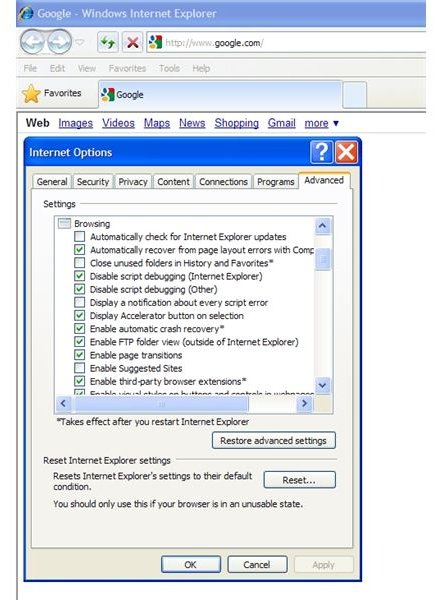
To disable the script debugging alerts in Internet Explorer 8, click on TOOLS on the menu bar and then click on INTERNET OPTIONS (see figure 1). Then, click on the ADVANCED tab in the INTERNET OPTIONS window that opened. In the SETTINGS section of the windows and in the BROWSING options (see figure 3), be sure the following options are checked:
Disable Script Debugging (Internet Explorer)
Disable Script Debugging (Other)
Now IE8 will no longer annoy you with questions and alerts about whether you want to debug errors.
How to Disable Pop-up Blocker Alerts in Internet Explorer 8
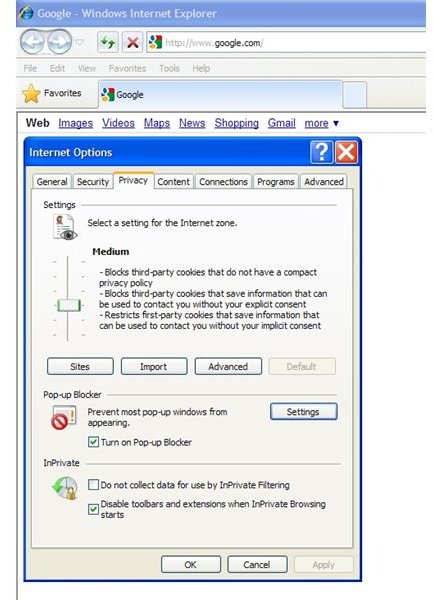
Although the pop-up blocker in IE 8 is quite adept at stopping annoying pop-up advertisements and surveys, the alert can be just as annoying that IE8 blocks for you. After all, by enabling the pop-up blocker in IE8, you are trying to create a smoother Internet experience. How smooth can it be when IE8 blocks the pop-up but you are still annoyed by an alert that a pop-up has been blocked?
To disable pop-up blocker alerts in IE8, click on TOOLS on the menu bar and then click on INTERNET OPTIONS (see Figure 1). Then, click on the PRIVACY tab (see Figure 4) and then the SETTINGS button under the POP-UP BLOCKER section (see Figure 5). In the POP-UP BLOCKER SETTINGS windows, uncheck the following options under the NOTIFICATIONS AND BLOCKING LEVEL section:
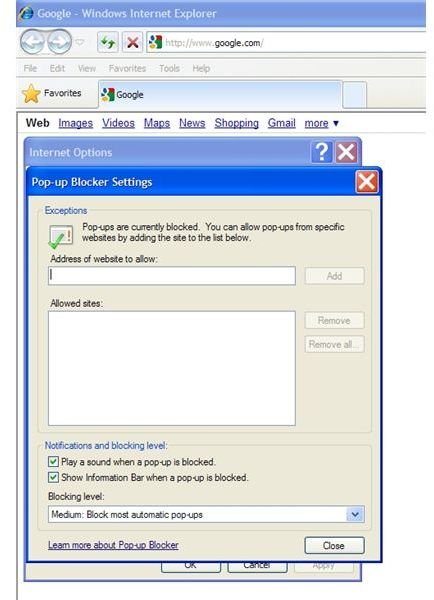
Play a Sound When a Pop-Up is Blocked
Show Information Bar When a Pop-up is Blocked
Now you will no longer be annoyed by alerts whenever IE8 blocks a pop-up.
Conclusion
Although Internet Explorer 8 has made some huge improvements over previous versions of the software, it still carries some annoying alerts that must be disabled. Although these alerts are turned on by default, they are easy to disable as long as you know where they are.


