How to Calculate with a Microsoft Access Parameter Query
Calculating (or Narrowing) Data With a Parameter Query
In Parts 1 through 3 of this article series, we demonstrated how parameter queries can be added to forms and reports to display only the data we are interested in viewing. This article takes the process one step further by adding a calculation to parameter query, specifically by:
- finding and displaying records within a specific timeframe
- finding and displaying records that fall within a specified period of time in past
- finding and displaying records that have a specified numerical value
Demo screenshots in this article are from a sample database “Sapphire Sales.” All queries are based on a table in that database named “Sales Table.”
First Things First: How to Create a Parameter Query
To create your query:
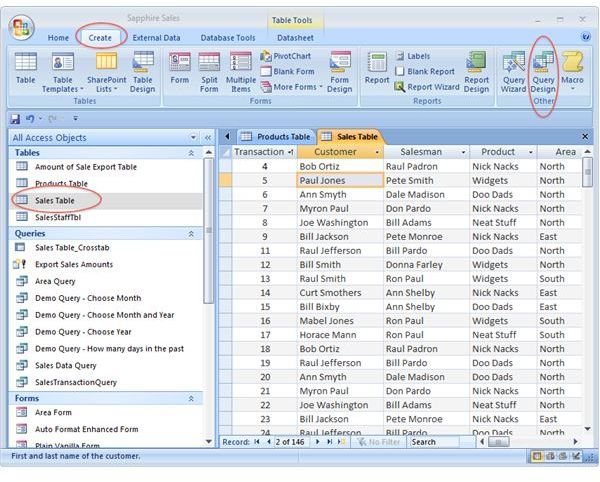
♦ Open the table that you want to run the query on and select the “Create” tab. Click on “Query Design” in the “Other” Group. The table we are using in this demo is “Sales Table.”
♦ Click on the “Create” tab, and “Query Design” in the “Other” group. The query design window will open.
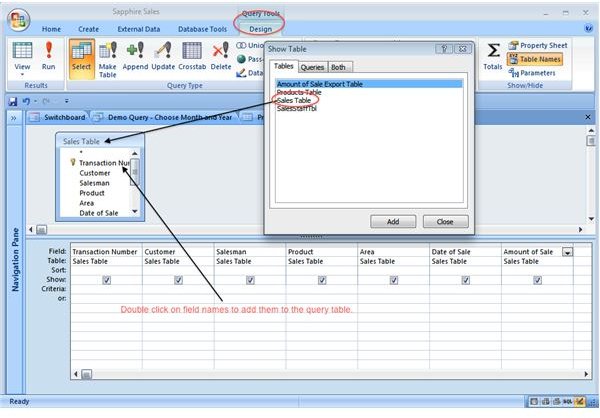
♦ Double click on the “Sales Table” to add the table to your query window.
♦ Double click on the fields that you want the query to display.
The screenshots below illustrate the foregoing steps.
Finding and displaying records within a specific time frame
Now that we have our query view, we can add functions that narrow down our data. First, we want our query to display only those records of a specific month and year. Here’s how:
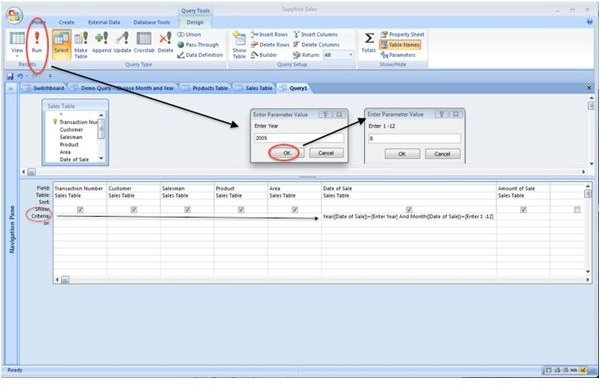
♦ In the Query design window, enter the following function in the Criteria row of the Date of Sale field column:
Year([Date of Sale])=[Enter Year] And Month([Date of Sale])=[Enter 1 -12]
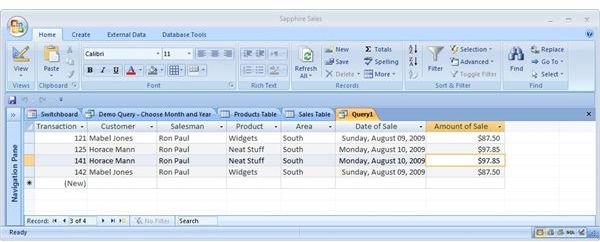
♦ Run the Query by clicking on the red exclamation point in the Results group (first on the left at the top of the query design window).
The screenshots below illustrate the query and its results:
Finding and displaying records that fall within a specified period of time in past
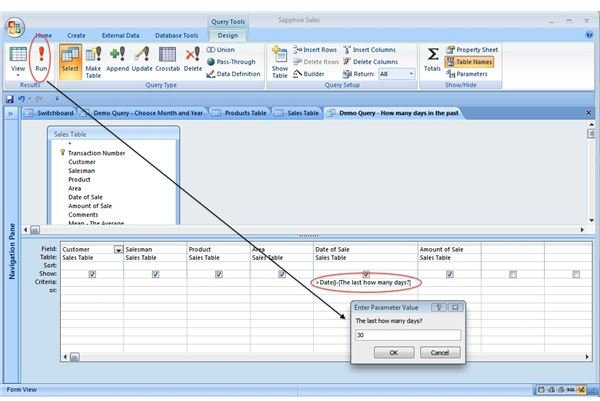
Next, we want our query to show us only those records that were created within a specified number of days in the past. Here’s how:
♦ In the query design window, enter this function in the Criteria row of the Date of Sale column:
>Date()-[The last how many days?]
The screenshot below illustrates the executed query in Design view:
Finding and displaying records that have a range of numerical values
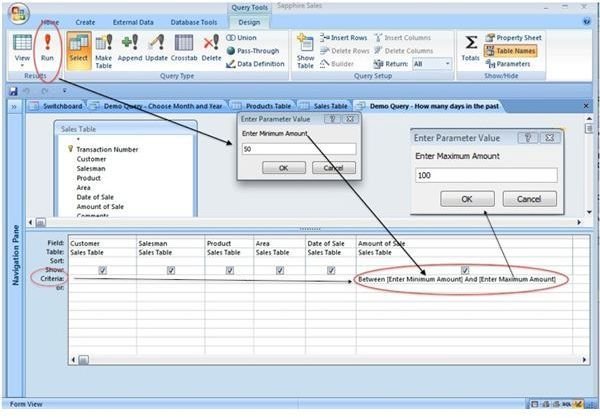
Finally, we want our query to display records that have a specified range of dollar values. Here’s how:
♦ In the query design window, enter this function in the Criteria row of the Amount of Sale column:
Between [Enter Minimum Amount] And [Enter Maximum Amount]
The screenshot below illustrates the query in Design view:
The Final Touches
Once you have your calculated parameter queries designed and working, you can generate new forms and reports based on those queries. You may also want to specify the order (ascending or descending) in which the data is displayed. Use the Sort row in the query Design view to specify sort order for your data.
More Information on Parameter Queries
Access Tips - Using Parameter Queries
This post is part of the series: MS Access: Using Parameter Queries
The parameter query is an efficient way to access your database without the need for multiple select queries. This series offers advice and pointers for creating, using and attaching parameter queries to Microsoft Access database objects.