Websites that update automatically can be annoying if they do so unnecessarily. Here is how to disable that behavior in Internet Explorer.
Editor’s Note: This article was originally written in 2009. We’ve had reports that this method does not work for IE9. However, if you have an earlier version of Internet Explorer this method may still work for you.
Auto refresh is a useful feature of Internet Explorer. It allows websites to automatically reload with the latest content. It is especially useful for websites with quickly changing content such as Facebook. The refreshing makes it possible for content to appear consistently, without interruption.
However, sites using this feature sometimes end up annoying the user rather than providing them with a better user experience. Constant refreshing can slow down older computers, or can cause information that you need to disappear. If you want to disable automatic refreshing, here’s how.
Browsers like Firefox are known for their large library of extensions. These are extremely useful for solving many small issues, including this one.
However, Internet Explorer is not known to be an add-on friendly browser. While add-ons do exist, Internet Explorer does not have a central library of add-ons similar to the one provided by Mozilla for Firefox.
Although a Google search may result in many tools that you can install to disable auto refresh in Internet Explorer, it is important to note that you don’t need any special add-on. This can be accomplished just changing a simple Internet Explorer setting. Since there is no extension that provides this functionality you’ll have to go into the settings and make the changes manually. While some users might find this confusing at first, it’s actually not hard at all. Just follow the steps below carefully.
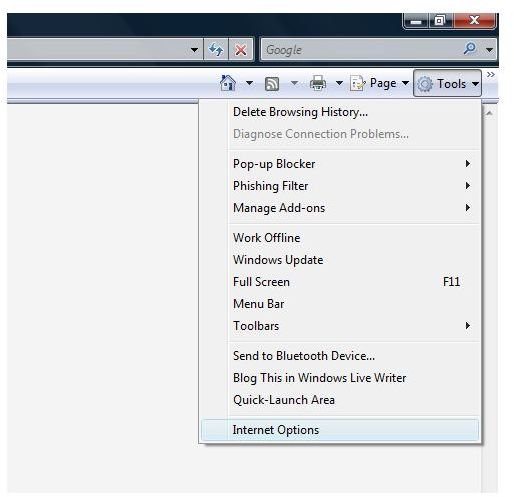
Step 1: Start Internet Explorer if it is not running already. Click on Tools and then Internet Options.
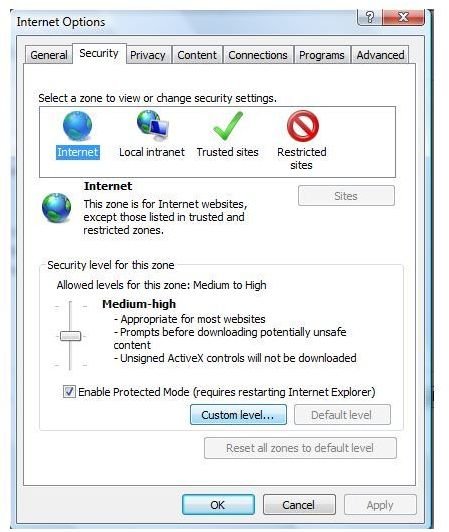
Step 2: In the Internet Options dialog box, click on the Security tab and then select Internet Zone. Click on the button below labeled Custom Level.
Step 3: Scroll down the list that pops up until you find the entry called Allow Meta Refresh. You can see two option buttons below the entry: Disable and Enable. By default, it should be enabled. Disable it and click OK.
Step 4: Click Apply and OK on the Internet Options dialog box. That is it! Your page will no longer refresh automatically anymore, so you will not have to worry about content being updated or changed without your permission.
Although this solves the annoying problem of a web page refreshing every few seconds, let me make it clear that meta refresh is important. Many websites use it to direct the visitors to the correct web page, though the use of meta refresh is discouraged by the W3C.
Note: The use of Meta refresh by websites is decreasing day by day and is being replaced by JavaScript functions or HTTP redirection headers. This method may not work for sites using JavaScript.
References
Author Experience
All images are provided by author.
This article has been placed in our archives.


