MS Access has built-in mathematical functions to crunch numbers. For statistical data, however, the only handy function is the mean (average). Calculating median and mode, however, requires Visual Basic coding. This article shows some easier ways for calculating statistical functions in Access.
Background
Microsoft Access is a data storage application that offers basic mathematical functions. Access queries (and user-originated text boxes in forms and reports) will do a good job in ordinary “numbers crunching.” Statistical analysis in Access, however, is somewhat rudimentary. The only built-in statistical functions in Access are mean (i.e., average) and standard deviation (a measure of how the numbers in a list are spread out).
Access will not automatically calculate the median (the value halfway through a list of numbers where there are an equal array of numbers below and above). Nor will Access automatically calculate the mode (the most frequently occurring value in a set of data). To obtain calculations in Microsoft Access for median and mode, you need a knowledge of Visual Basic and advanced SQL programming. An easier way is let Microsoft Excel do the heavy lifting for statistical calculations.
This article will demonstrate how to use the built-in Microsoft Access function for mean (avg). Then we will see how we can import an MS Access table into Excel and use Excel formulas for the median and mode.
Calculating the Mean
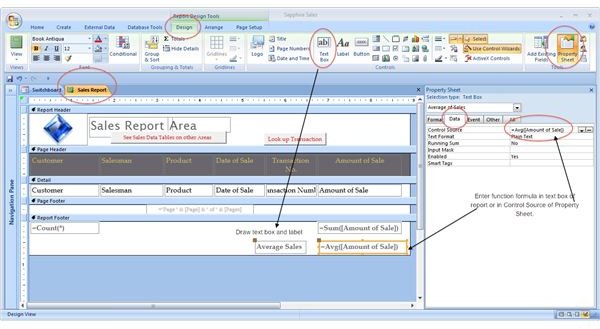
The avg (mean) function in MS Access will calculate the average of an array of numbers. The screenshots below illustrate how to create a text box on a report that calculates the average amount of sales in a report. (The design and report views are shown.)
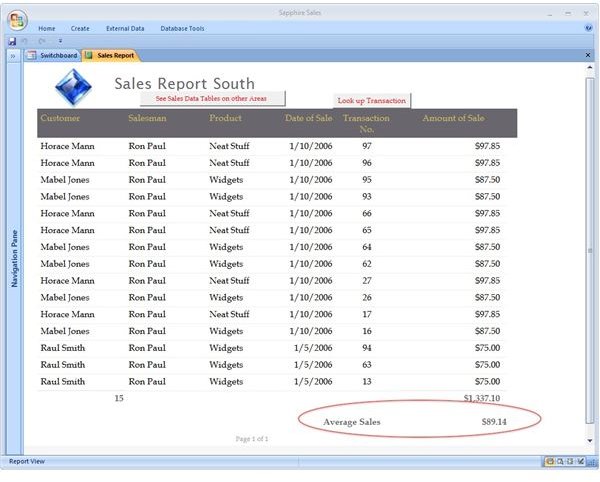
Note: The syntax for the avg formula in Access is =avg([FieldName]).
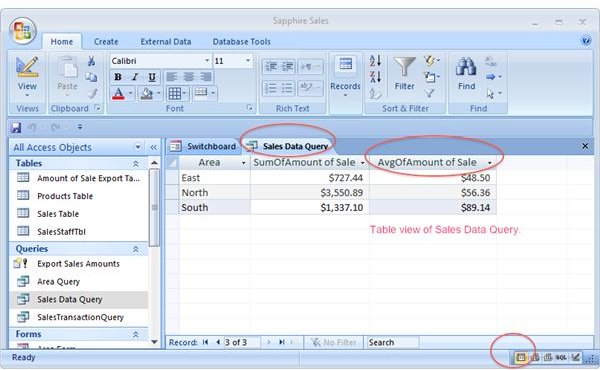
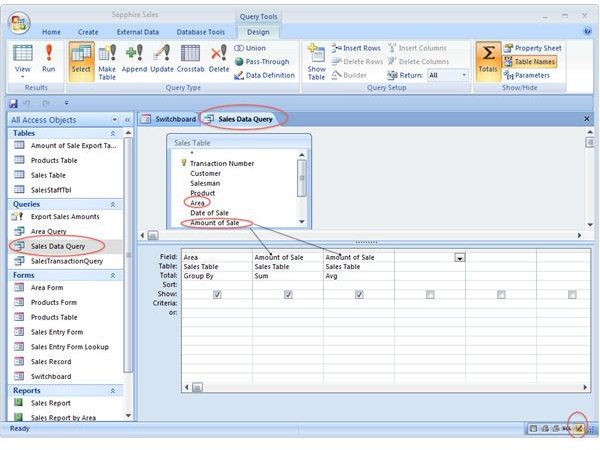
The avg function can also be called up in summary queries and tables. The screenshots below illustrate how to design a query that calculates both a sum and an average of sales by areas. (The query design and table views are shown.)
Calculating the Median and the Mode
♦ Using Visual Basic Programming
There are a number of helpful resources on the web with Visual Basic and advanced SQL code for calculating median and mode. Each resource, however, presupposes a thorough knowledge of VBA and SQL coding. Here are a few resources:
Microsoft Access Office VB VBA Help and Examples - Calculating the Median of a Record Set
Microsoft Help and Support - ACC: How to Use Code to Derive a Statistical Median
dbFormums: Calculating the Mode Value in a Query
♦ Using Microsoft Excel
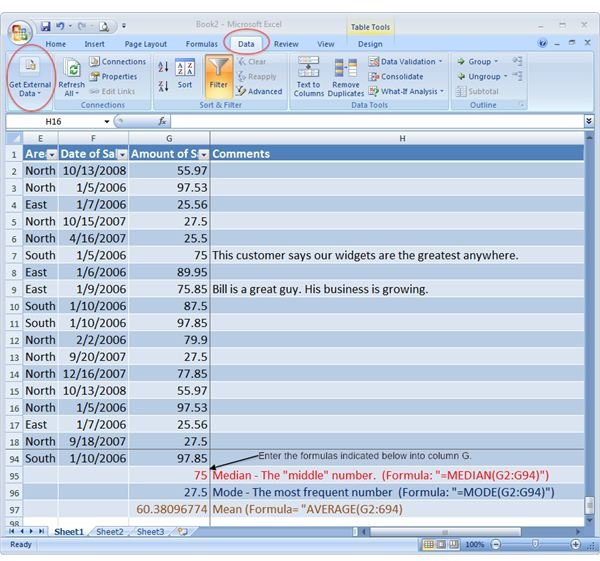
For the “Visual Basic and SQL impaired” (which includes the most of us), Microsoft Excel is better suited for statistical analysis and requires no special programming skills. Follow these steps to import your numbers from Access and quickly calculate your median and mode (and, if desired the mean or average, too):
1. Open a blank MS Excel 2007 spreadsheet.
2. Click on the Data tab/Get External Data (on the far left next to the Connections group).
3. Select From Access and navigate to the Access database and table (or query) you with to import.
4. The table or query will load into the spreadsheet.
5. Enter the following formulas based on the cells where your numerical data is located:
For Median: =MEDIAN(CELL:CELL*)
For Mode: = MODE (CELL:CELL)
For Mean: = AVERAGE (CELL:CELL)
*Cell Row and column address; e.g. G2:G94
The screenshot below illustrates an imported table from Access with the formulas:
Related Bright Hub Articles
Understanding the Different Types of Microsoft Excel Functions
Crosstab Queries in Access 2007 (Note: A crosstab query using the Count function will generate the desired results to view the statistical mode.)
For more information on calculating mean, median, and mode see:
Microsoft Office Online - Calculate the median of a group of numbers
Microsoft Office Online - Avg Function


