With the debut of Apple’s iPhone, other cell phone manufacturers have put some effort into touch screen cell phones for their product lines as well. One is the HTC Touch phone on the Sprint network. New versions are just around the corner, so how does this phone do in the Windows Mobile world?
HTC Touch Phone
I’m a tech guy from back in the day, but I’m also a former financial planner. That means I like gee-whiz-bang features and technology, but it also means that I throw my head back and laugh in movie bad-guy style when someone thinks I’m going to pay $99 a month for my phone service, no matter how much it does. (OK, not true. If $99 a month also does the dishes, gives me a back rub, or mows the lawn, we’ll talk.) So, when I came across something Sprint offered to customers who were friends of Sprint employees and was able to hook up some decent minutes with a data plan, I finally decided to look beyond phones whose feature set was: can make and receive calls while fitting in my pocket. I ended up with the Sprint HTC Touch. After a few months, I can offer up this review.
Physical
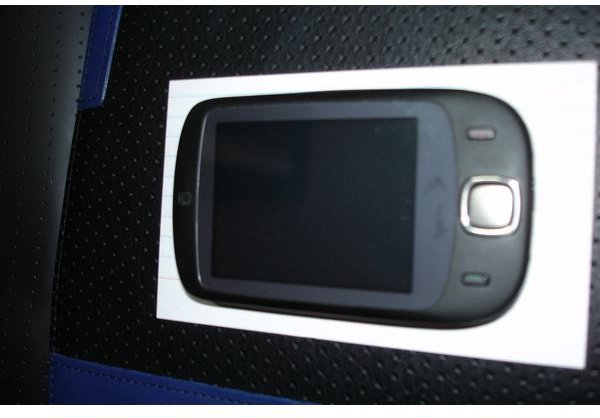
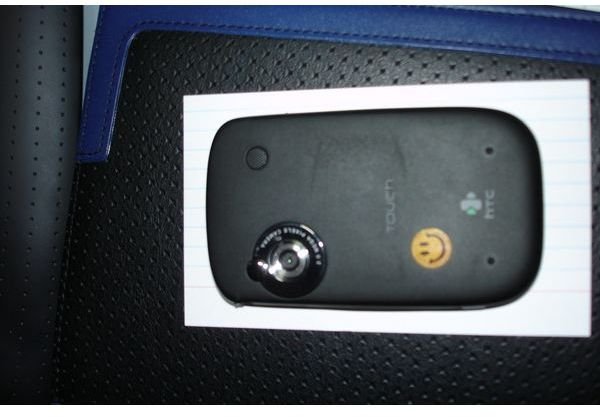
Before ordering expensive things, particularly things that come with a two year contract, I like to do some research. For mobile phones, that means spending some time on Howard’s Forums. If you spend too much time in such places, eventually you will passionately care about the difference between 2.73" and 2.81". Having received my actual HTC Touch, I can safely say that it is small enough. That is a 3 x 5 business card my phone is sitting on. So, yes it fits in your pocket. The case is a bit bulkier and this is a bit of an issue because the touch screen is a bit sensitive to scratches. So, either the phone needs to be the sole occupant of a pocket, or it needs a case. Carrying with your keys = scratched screen. It comes with a plastic overlay to protect the screen, but I messed it up and haven’t gotten a new one yet, so this problem may fix itself. The Talk and End buttons are tiny little green and red (orange according to my two year old) buttons on either side of the square directional button in the bottom center. The square button is the star of the tactile feel of the phone. Up, down, left, right feel easy to use and the feedback is perfect. The center Enter/Select/Go button is similarly good. The back is smooth and unremarkable except that the camera is there, with no way to cover the lens. As a bit of a photography guy that seems wrong. Camera lenses are easy to scratch and that means every picture is lower quality than it should be. I kept the little sticker that comes over it on as long as I could. We’ll consider this the main physical flaw of the device.
HTC Phone Pictures
Phone - It is a Phone Right?
As our cell phones rush along the path to “mobile communication devices” they are losing some of their phone goodness. As you can see from the pictures above, there is no number pad for dialing. Instead, the touch screen becomes the key pad when you select Phone Mode. Dialing is no problem, and it even beeps like a regular phone. Even better, the Contacts screen can be used to dial anyone you call on a regular basis, and if you don’t want to press buttons at all, you can set up a voice dial, although that always makes me feel weird in public places. My last phone was a Motorola Razr clamshell type phone and my home phone is a full size cordless, so the first few uses of my HTC Touch as a phone were a little odd. Since the phone is one solid piece, it doesn’t wrap around your head from ear to mouth. Once you realize that everything else works out somehow if you just hold the tiny ear speaker up to your ear and forget about how it is oriented to your mouth, it works just fine. I’ve had no complaints from the people I talk to. Of course, it works with Bluetooth headsets too. The biggest glitch is pressing a key when dealing with a computer phone call. After being told to press One, you look at the phone to see there is no 1 displayed. You have to press “Keypad” first. This seems a bit odd considering the most common thing (maybe the only thing) you’ll be doing while on a phone call is pressing One or Two. After all, the screen is not visible from your cheek. Which brings us to the only yucky part of the phone. The oils from your cheek get on the screen when you make calls. No big deal except when you forget and then go to look at some pictures and there are these oils on the screen…ewwww.
Windows Mobile
OK, the phone comes with a lot of Sprint stuff and the whole point is to be able to use the Internet, but let’s stay on the channel topic and focus on the Windows Mobile part of the function. Windows Mobile functions just enough like Windows XP to make it seem like a friend of a friend. The Start button is not there, but there is a word near the Windows logo in the upper left corner which is the Start button. Instead of saying start it says what program you are running. Once you clear that hurdle, you are back in familiar territory. A lot of the old friends are here. Windows Media Player plays your movies and music files. There is even an Office Mobile which gives you cell phone versions of the familiar MS Office products. I can see correcting typos in a Word document or giving something the once over, but you aren’t going to want to do any serious work here. It isn’t the software’s fault so much as the limitations of a tiny keyboard and no mouse. The ActiveSync function leaves a lot to be desired. Like many others, I ran a Palm Pilot before I got this phone and the sync works much better there. For starters, you can turn it off on your PC. Not so for ActiveSync, which insists on running until shutdown on your computer, just in case. Even worse, by default the only option to sync your contacts is with Microsoft Outlook. Hello? Small business owner who works from a home office. I haven’t used Outlook in years. What about all those other programs that have contacts? The File Manager application works fine as long as you don’t want to do something a little off key. You’ll be downloading a third-party to do the fancy stuff. Internet Explorer works fine except for the touch scrolling. It seems that I can move a tiny bit at a time (might as well use the direction button then), but if I try and scroll a page worth, it keeps scrolling after I’ve taken my finger off the screen and keeps going until it hits the side or bottom. Fail. Actually, the most important feature is the least documented. In the upper right corner a drop down arrow pulls up all the currently running programs. It is necessary to hit this every so often and do a close all to keep the system from clogging up with the search you made an hour ago. It would be nice if the user could configure a shutdown after a certain period of no activity for certain programs.
You’ll Reboot and You’ll Like It
Windows Mobile, for all of its features and high technology, is a throwback to Windows 95 in one key way. You have to reboot it to keep it running well. This is not XP lite. When programs lock up, they take the entire Windows system (and the phone functions) with them. In order to have any chance of running without trouble you’ll need at least a daily reboot. Frankly, any time I’ve used more than the simple functions on the phone, I jab the reset button for good measure. On the HTC touch, the reset button is on the bottom and requires a tiny tool to push it. The provided stylus works great, and good thing too. Otherwise I would have nothing for it to do.
Overall
Honestly, I love it. I’m willing to overlook some of the flaws because they aren’t really flaws unless you are comparing them to a real computer. My laptop is nice and fits great in a bag, but it doesn’t fit in my pocket, and it isn’t going with me to Cuba Cuba for dinner on a Friday night. Besides, there is nothing quite like having the Internet with you at all times. Is it going to rain this afternoon? Let me check. Do the Broncos play tonight? Let me check. Who was president after Lincoln? Let me check. How do I get to Mizuna? Let me check. You get the idea. Most importantly of all, it allows instant resolution to this question: Do you want to bet? Which means you can get that beer your buddy owes you immediately, instead of waiting until he has forgot he owes you one.


