Change the Computer Language to English in Windows XP
Written by:  • Edited by: Lamar Stonecypher
Updated Jun 1, 2010
• Related Guides: Control Panel | Internet Explorer | Windows XP

With the introduction of MUI, Windows XP can contain a minimum of 33 International languages in addition to the complex Asian scripts. This article explains how to change computer language to English when the default language is something else.

Changing Computer Language to English in Windows XP

If you bought your computer with Windows XP in some other language set as default, you need not worry. You can always change it using the Control Panel. English, along with several widely used languages, is present in almost all Windows XP installations. You only need to set it up so that your copy of Windows XP works with English.

The following steps explain how to change computer language to English in Windows XP.

1. Open Control Panel and double click on the Regional and Language Options icon.

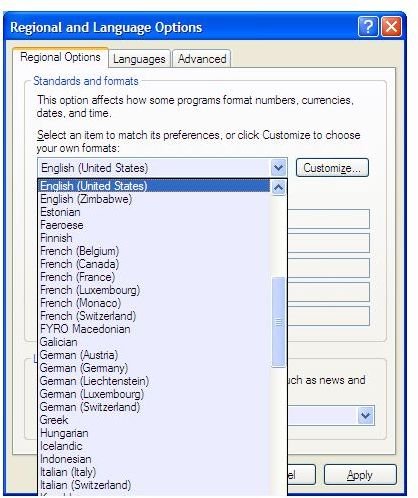
2. In the first tab, Regional Options, select English (US), English (UK), or any other English (there are many versions of English pre-loaded) as per your wish. The option is available in the first drop down list under Standards and Formats (see Fig 1). You may also click the Customize button next to the drop down to customize the format of date, time, currency etc.

3. Click on the next tab, Languages and then click the button labeled Details. In the Text Services and Input Languages dialog box, you can see all the installed languages. Select English in the list of available languages under Default Language Settings (Fig 2).

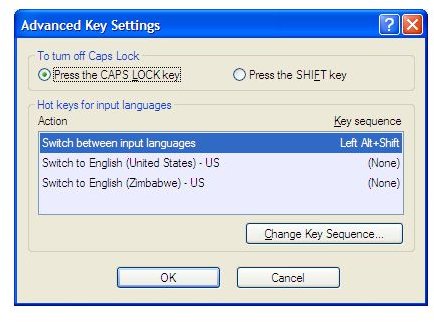
4. To create a keyboard shortcut for switching among installed languages, use the Key Settings under Preferences (Fig 3). Please note that you can also use the Language bar to switch among languages. Click OK to close the dialog box.

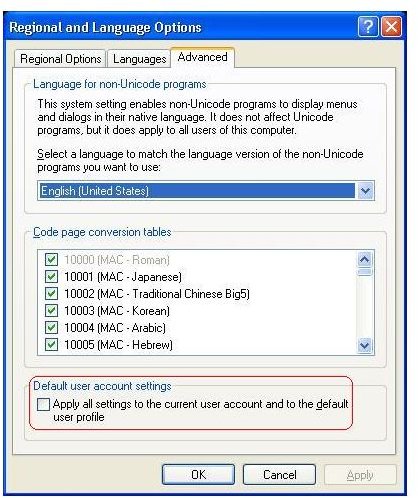
5. To set English as the default language for the particular user account, click on the Advanced tab of Regional and Language Options dialog box. Make sure English is being displayed in the drop down box and check the last option in the dialog box (See Fig 4).

6. Click OK to close the dialog box and logoff for the settings to take effect.

Though this is the most common method used to change the computer language to English in Windows XP, it only changes the GUI and sometimes creates problems with few applications such as Internet Explorer and Outlook Express. If you are facing such problems, you can download MUI patches from MS download center.

NOTE: The above method is often considered as a temporary solution when you have to use different languages. To change the computer language to English in Windows XP so that it has a system wide affect, it is recommended that you perform a fresh install of Windows XP and select English when prompted for language during installation. Later, you may install other languages as required.

Image References
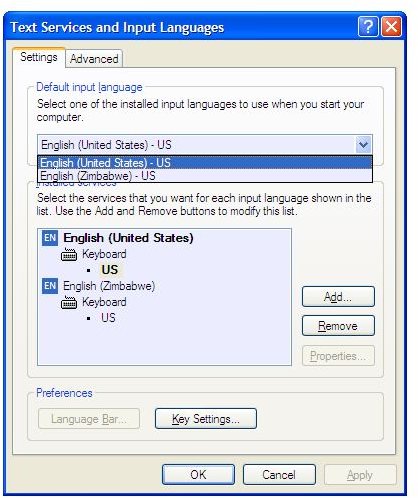
Fig1 Selecting US English in Control PanelFig 2 - Setting up English InputFig 3. Creating a shortcut key for English InputFig 4. Making English Default on the Machine

Comments

Showing all 30 comments
 
Mosman Feb 3, 2012 2:37 PM
RE: Change the Computer Language to English in Windows XP
The operating system on this machine was installed in the Netherlands... I followed the instructions but cannot get English as my language. Is there anything else I can try before reloading the OS?
Arun Kumar, MVP Nov 29, 2011 4:42 PM
RE: Change the Computer Language to English in Windows XP
Here, I created a video to demonstrate changing the language in Hotmail. It first changes language from English to Hindi and then from Hindi to English. Please let me know if you face difficulty understanding it. I could not get a good speaker for that.<br>Here is the link:<br>http://www.windowsandyou.net/2...<br>Regards,<br>Arun
Hebertshirley Nov 27, 2011 8:43 PM
RE: Change the Computer Language to English in Windows XP
It is only the hotmail email tha tis in a different language since someone was using it to send spam
Hebertshirley Nov 27, 2011 8:41 PM
RE: Change the Computer Language to English in Windows XP
Someone got into my hotmail email and changed the language   Need to change it back to English
Arun Kumar, MVP May 24, 2011 4:33 AM
Hi GURCHARANJIT
If it was in English before you installed that program, you can go for a system restore. It should fix the problem.
Regards,
Arun
GURCHARANJIT SINGH LAMBA May 23, 2011 11:50 AM
MENU LANGUAGE IS INDONESIAN AND NOT ENGLISH
I installed lipsetup.msi by mistake the menue language is indonesian not english. can you kindly help.
KARTIK Apr 13, 2011 8:44 PM
Hi
thnx
Arun Kumar, MVP Apr 12, 2011 11:18 AM
Hi Kartik
You can reinstall Windows using the installation CD. Before reinstalling back up your data from system drive (desktop, favorites, documents etc) as they will be removed when you reinstall. If you are not sure, you can take help from a local technician.
Regards,
Arun
Kartik Apr 12, 2011 11:10 AM
Hi
so can you tell me how to reinstall my laptop i have laptop compq.
Arun Kumar, MVP Apr 12, 2011 4:44 AM
Hi Kartik
Since the other portions are in English after you log on, I presum the English language pack is in effect. The only method I see here is to reinstall Windows and select English when it asks for the Language and Regional settings.
Regards,
Arun
KARTIk Apr 11, 2011 8:35 PM
YEs
YES the Windows Login screen also appear in a different language.
Arun Kumar, MVP Apr 9, 2011 6:25 AM
Hi kartik8e@gmail.com
Does the Windows Login screen also appear in a different language or is it only the hardware boot part?
Please let me know.
Regards,
Arun
kartik8e@gmail.com Apr 8, 2011 10:16 PM
plzzzzzzz
k so my problem is when i start my laptop every thing is in different language but when i logging ever thing starts in english so plzzzzzz help me !!! :D
uncung Mar 9, 2011 3:46 AM
my germany LAtex
actually my big problem is every installing software sometimes some of them automatically go to germany version.
for instance i need LaTex software. i remove it many times due to it always appear s in germany. i have 2 cpu one of them in english version.
so i have no problem in installing latex.
but the cpu in my room, very pathetic.
i need it in english installing of latex
lalala Jan 30, 2011 3:19 PM
RE: Change the Computer Language to English in Windows XP
alright thank you so much!
Arun Kumar, MVP Jan 29, 2011 11:35 PM
Hi Lalala
You are right. It is asking for Windows Installation CD for installing something.
Please note that it wont reinstall the entire operating system. It is just looking for some files.
If you dont have the CD, see if there is an option to manually search. It should be labeled Browse. If that option is present and if you can find out what file is Windows asking, you may be able to download the file from internet and use Browse option to point Windows to the folder where you downloaded the file(s).

Regards,
Arun
Signed: Sunday, January 30, 2011, 10:13:49 AM IST
lalala Jan 29, 2011 3:31 PM
RE: Change the Computer Language to English in Windows XP
well my computers in korean right now and i can understand a little bit of it, so i just changed anything from 'korean' to 'english' in that Regional and Language Options thing but theres still this one part that i couldnt change because it said i needed to insert some kind of CD first (which i assumed was the CD needed to reinstall)
Arun Kumar, MVP Jan 29, 2011 2:09 AM
Hi Lalala
Reinstalling is the last resort. You should be able to change the language using Regional and Language Options in Control Panel. Please let me know if you face any problems.
Regards,
Arun
Signed: Saturday, January 29, 2011, 12:48:21 PM IST
lalala Jan 28, 2011 6:10 PM
RE: Change the Computer Language to English in Windows XP
so if you want to change the language of the whole system to English, you HAVE to install the whole thing over again? cuz we can't find our CD for it... is there any other way to do it? like downloadin something off the internet or something?
munna Jan 19, 2011 9:31 AM
RE: Change the Computer Language to English in Windows XP
thanku very much........
Arun Kumar, MVP Nov 11, 2010 2:14 AM
@ neftali vargas
Hi,
What I understand from the comment is that you cannot understand the current GUI so you are not able to change it to English. If this is the case, the only method I can see is to reinstall the OS and select English while installation.

Please let me know if I got your question wrong.

Regards,
Arun,
Signed: Thursday, November 11, 2010, 12:51:15 PM IST
neftali vargas Nov 10, 2010 10:33 PM
changingblanguage from asian to english
I can't understand the asian language to set up translater from asian to english
Arun Kumar, MVP Oct 3, 2010 3:51 AM
Hi Mansour Ahmad
This article explains how to change the computer language to English. Did you follow the given instructions? Please let me know if the above did not help.

Regards,
Arun
Signed: Sunday, October 03, 2010, 1:27:15 PM IST
Mansour Ahmad Oct 3, 2010 3:44 AM
how to change my net language
My net language is (Norwegian) not English I tried to change it trough the instruction from net but I couldn’t so please guide me to do so.

Thanks in Advance,
Mansour Ahmad
Arun Kumar, MVP Oct 2, 2010 3:45 AM
HI Umerfarooq
Just follow the above instructions if you want it back to English. In case you are looking to change the language to something else, you have to install the language pack on your computer if it is not already there. You can install Language packs using the same dialog.

In case you are using Windows 7, the procedure is slightly different, explained at:
http://www.brighthub.com/computing/windows-platform/articles/89455.aspx
The above article also explains installing language packs.

Regards,
Arun,
Signed: Saturday, October 02, 2010, 1:20:44 PM IST
umerfarooq Oct 1, 2010 7:16 AM
pc language
how can i change my pc language its language is italian plz help me sir
Arun Kumar, MVP Jul 25, 2010 3:26 AM
Hi SAMEEL
I wonder if the language is available in Windows. If it is available, you should be able to change it using Languages icon in the Control Panel. Steps would be the same as above. Just select the language instead of "English". Please let me know if you face any problem.

Regards,
Arun,
Signed: Sunday, July 25, 2010, 12:58:57 PM IST
SAMEEL Jul 25, 2010 12:59 AM
HOW CAN WE CHANGE
HOW CAN WE CHANGE OUR COMPUTER LANGUAGE TO PASHTO
Arun Kumar, MVP May 14, 2010 3:23 PM
Hi Atie
Glad that I was able to help. Take care and do feel free to contact me for any problems.

--
Best Regards,
Arun Kumar M.
http://dreams-central.com
Twitter: @DreamsCentral
Signed: Saturday, May 15, 2010, 12:53:56 AM IST
atie May 14, 2010 2:37 PM
thank you
your writing help me.
 
blog comments powered by Disqus
Email to a friend