Though there has been a stiff competition between Internet Explorer and many other browsers like Opera, Chrome, and Firefox, IE has always been a hot favorite. But, IE users often get bugged when it keeps closing unexpectedly for no obvious reason, so let’s discover more about this problem.
The Good Old Misery
Internet Explorer is probably the most sought after web browser to date. But, there are many people who get severely annoyed with the fact that Internet Explorer keeps closing for no reason. Almost all of us would have come across messages like -
“Internet Explorer has performed an illegal operation. Do you want to debug it?” or “Sorry Internet Explorer has encountered a problem. Do you want to tell Microsoft about this?”
And, the worst part of the story is that until IE7, there was no provision to retain the last web page that you were viewing (unlike the restore session option in Firefox and Opera). When IE is about to crash and displays such messages, irrespective of whatever response you give, it will crash. Therefore, if you’re using IE 5,6 or any of the lower versions, then it will make you feel sick about whatever happened to the session in progress, and there’ll be no way out for you to recover its details.
The following are the simple solutions that you may resort to- before actually requesting full-end tech support from anyone.
Common Remedies
Before we move on to the advanced stuff, lets start off with the basics. Always remove any unneeded plug-ins that have been installed to Internet Explorer. Some folks install a specific plug-in to view a specific site and simply forget to remove it. This may not be a source of problems all the time, but in some cases, it might after all be responsible for Internet Explorer closing for no reason.
Therefore, it is advisable to remove unnecessary plug-ins and toolbars that you don’t intend to useoften. Moreover, you must keep deleting the cookies whenever possible. This will help you in ensuring that any malware or piece of unwanted stuff that was sent to your computer gets deleted, before it causes any further harm.
Furthermore, you must also delete the temporary Internet files quite often. Doing so will remove the unwanted junk that sits in your computer, degrading its performance.
Advanced Resolutions
If nothing else works, then it is time to try out the advanced options. Try changing the IE settings.
Because of the security enhancements, Internet Explorer 7+ versions are usually a bit unstable. The best way to sort this out may be to reset the Internet Explorer Settings.
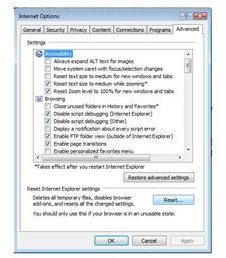
You can do this by clicking on Tools → Internet Options → Advanced → Reset
But, if it happens that you cannot even start the Internet Explorer browser, you can actually access the internet options from the Control Panel.
Soon after you click it, you’ll get a confirmation dialog box. Always remember that only the browser specific settings like the tool bars, add ons, temporary internet files, cookies, and Internet history are affected. No other settings like favorites, feeds and other settings in the internet connections will ever be disturbed with this action.
Tweaking the Internet Settings
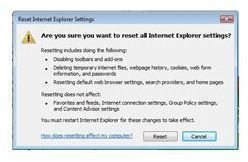
There are mainly four different functions that are carried out if the Internet settings are reset.
1. Browser settings are reset: installed extensions, tool bars, add-ons, and plug-ins are reset here to the default settings.
2. The kind of extensibility entry points that the user installs will not run automatically. The startup extensions will also be disabled.
3. The browsing history, forms, tables, passwords, cookies, and temporary internet files will be cleared off.
4. The default settings that were initially set by the user will automatically be restored.
So, if the Internet Explorer keeps closing for no reason even after trying the basic steps, you may try resetting the internet settings. It is quite possible that one of the above-mentioned steps will fix the issue, otherwise contacting Microsoft support or taking a look at their communities and forums , is always advisable.
Warning: Once you restore the defaults, you’ll lose your current settings and there’s no way to recover them back.


